Driving the vehicle
Electric shift control system
Basic information
This vehicle is electronically controlled to produce maximum available power and smooth operation.
The recommended operating procedures for this vehicle are shown on the following pages.
Starting vehicle
1. After placing the vehicle in the READY to drive position, fully depress the foot brake pedal before moving the shift lever to the D (Drive) position.
The shift lever of this vehicle is designed so that the foot brake pedal must be depressed before shifting from the P (Park) position to any driving position while the power switch is in the READY to drive position.
The shift position cannot be moved out of the P (Park) position and into any of the other positions if the power switch is placed in the OFF position.
2. Keep the foot brake pedal depressed, and move the shift lever to the D (Drive) position.
3. Release the parking brake and foot brake pedal, and then gradually start the vehicle in motion.
WARNING
- Do not depress the accelerator pedal while shifting from P (Park) or N (Neutral) to R (Reverse) or D (Drive) position. Always depress the brake pedal until shifting is completed. Failure to do so could cause you to lose control, which could result in an accident.
- Never shift to either the P (Park) or R (Reverse) position while the vehicle is moving forward and P (Park), D (Drive) position while the vehicle reversing. This could cause an accident or damage the transmission.
- Do not shift to the B position abruptly on slippery roads. This may cause a loss of control.
CAUTION
- To avoid possible damage to your vehicle, when stopping the vehicle on an uphill slope, do not hold the vehicle by depressing the accelerator pedal. The foot brake should be used for this purpose.
- Do not hang items on the shift lever. This may cause an accident due to a sudden start.
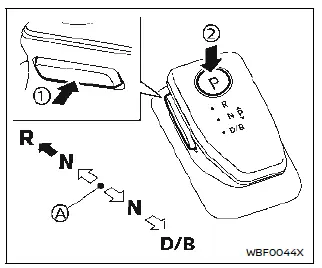
- Home position (central position)
Shifting
To move the shift lever,
 : Push the button 1 to shift.
 : Shift without pushing the button 1.
Push the park button 2 to shift to the "P" (Park) position.
NOTE
- Confirm that the vehicle is in the desired shift position by checking the shift indicator located on the shift lever or on the vehicle information display.
- To place the vehicle into the D (Drive) position from the B position, move the shift lever into the D (Drive) position.
When moving the shift lever into the D (Drive) position again from the D (Drive) position, the position will be changed to B position.
- An operating noise may be heard when operating the shift lever. This is not a malfunction.
After placing the power switch in the READY to drive position, fully depress the brake pedal, and move the shift lever to any of the preferred shift positions.
NOTE
- The vehicle automatically applies the P (Park) position when the power switch is in the OFF position.
- When the READY to drive indicator light does not illuminate, the shift position cannot be changed to the D (Drive), B or R (Reverse) position even if the power switch is placed in the ON position.
- If the following conditions have been met, the shift position may be changed to the P (Park) position automatically.
- When the driver's seat belt is not fastened.
- When the driver's door is opened.
WARNING
- The shift lever is always in the center position when released.
When the power switch is placed in the READY to drive position, the driver needs to confirm that the vehicle is in the P (Park) position.
The indicator next to the "P" by the shift lever is illuminated and the "P" is displayed on the vehicle information display. If the vehicle is in the D (Drive) or R (Reverse) position when the power switch is placed in the READY to drive position, this may cause a sudden start which could result in an accident.
- On a hilly road, do not allow the vehicle to roll backwards while in the D (Drive) position or B position, or allow the vehicle to roll forward while in the R (Reverse) position.
This may cause an accident.
- Do not operate the shift lever while the accelerator pedal is depressed, except when switching to the B position. This may cause a sudden start which could result in an accident.
CAUTION
- Do not slide the shift lever while pushing the park button. This may also damage the electric motor.
- When switching to the preferred position by operating the shift lever, check that the shift lever returns to the central position by releasing your hand from the lever. Holding the shift lever in a mid-way position may also damage the shift control system.
- The following operations are not allowed because excessive force would be applied to the traction motor and this may result in damage to the vehicle:
- Moving the shift lever to the R (Reverse) position when driving forward
- Moving the shift lever to the D (Drive) or B position when reversing
If these operations are attempted, a chime sounds and the vehicle shifts to the N (Neutral) position.
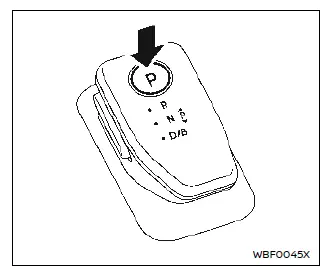
P (Park):
Use this position when the vehicle is parked or when placing the vehicle in the READY to drive position. Make sure that the vehicle is completely stopped. In order to switch to the P (Park) position, push the park button as shown in the illustration once the vehicle has come to a complete stop. If the park button is pushed while the vehicle is in motion, a chime sounds and the current shift position is maintained. After switching to the P (Park) position, apply the parking brake. When parking on a hill, apply the parking brake first while keeping the foot brake pedal depressed then push the park button and place the vehicle in the P (Park) position.
NOTE
- While the vehicle is stationary, if the shift position is placed in any position other than the P (Park) position when the power switch is set to OFF, it will automatically switch to the P (Park) position.
- If the park button is pushed while sliding the shift lever, the shift position will not switch to the P (Park) position. When pushing the park button, be sure to first allow the shift lever to return to its center position.
R (Reverse):
Use this position to back up. Make sure that the vehicle is completely stopped before selecting the R (Reverse) position.
If the vehicle is placed in the D (Drive) position while reversing, the chime will sound and the vehicle will switch into the N (Neutral) position.
N (Neutral):
Neither forward nor reverse gear is engaged. The vehicle can be placed in READY to drive position in this position.
Do not shift to the N (Neutral) position while driving. The regenerative brake system does not operate in the N (Neutral) position. However, the vehicle brakes will still stop the vehicle.
D (Drive):
Use this position for all normal forward driving. If the vehicle is placed in the D (Drive) position while reversing, the chime will sound and the vehicle will switch into the N (Neutral) position.
B:
Use the B position for downhill driving.
When the B position is used, more regenerative brake is applied when the accelerator pedal is released in comparison to the D (Drive) position. Less deceleration is provided by the regenerative brake system when the Li-ion battery is fully charged or the battery temperature is low.
Neutral hold mode function
This function enables you to turn off the EV system with the vehicle in the N (Neutral) position. While this function is activated, the vehicle can be moved by pushing with hand (when car washing) even if the power switch is in the OFF position. When using this function, release the electronic parking brake.
WARNING
- Use this function on a level surface only. Failure to do so may cause the vehicle to move accidentally and could result in a collision or serious personal injury.
- Do not use this function for a purpose other than car washing.
- When the power switch is placed in the ON position after activating this function, depress the brake pedal to stop the vehicle because the shift lever is in the N (Neutral) position.
- If this function is not activated regardless of proper operation, transmission may malfunction. It is recommended that you visit a NISSAN certified ARIYA dealer for this service.
To activate the Neutral hold mode, perform the following operations.
1. Push the power switch to start the EV system.
2. Release the electronic parking brake.
3. Depress and hold the brake pedal.
4. Push the park button on the shift lever.
5. Slide the shift lever to the N (Neutral) position, and hold it for 0.5 second until "N" appears in the vehicle information display.
6. Slide the shift lever to the N (Neutral) position again, and hold it for 0.5 second, until a message "Neutral Hold Mode has been activated." appears in the vehicle information display. 7. Place the power switch in the OFF position. The EV system will turn off with holding the N (Neutral) position.
To exit the Neutral hold mode, place the vehicle in other than N (Neutral) position.
NOTE
- It is necessary to perform the steps 4 through 6 within approximately 5 seconds to prevent incorrect operation.
- When the power switch is placed in the OFF position while the shift lever is in the N (Neutral) position, a message will appear in the vehicle information display.
- If the Neutral hold mode is unavailable, a message will appear in the vehicle information display. To activate the Neutral hold mode, wait for a while without shifting operation and then perform the operations again.