Memory seat
Basic information
The memory seat system has the following features:
- Memory storage function
- Entry/exit function
Memory storage function
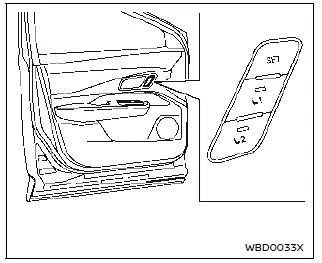
Memory seat switch (driver's side shown; passenger side similar)
Basic information
Two positions for the driver's seat, front passenger's seat (if so equipped), steering wheel and outside mirrors can be stored in the memory switch. Follow these procedures to use the memory system.
1. Adjust the driver's seat, front passenger's seat (if so equipped), steering wheel and outside mirrors to the desired positions by manually operating each adjusting switch. 2. Push the SET switch and, within 5 seconds, push the memory switch (1 or 2).
3. The indicator light for the pushed memory switch will come on and stay on for approximately 5 seconds.
4. The chime will sound if the memory has been stored.
NOTE
If a new memory position is stored in the same memory switch, the previous memory position will be overwritten by the new stored position.
Confirming memory storage
Push the SET switch. If a memory position has been stored in the switch (1 or 2) then the indicator light for the respective switch will stay ON for approximately 5 seconds.
Recalling switch memory positions
To recall the manually stored positions, push the memory switch (1 or 2). The driver's seat, front passenger's seat (if so equipped), steering wheel and the outside mirrors will move to the positions stored in the memory switch.
Linking log-in function to a stored memory position
The log-in function can be linked to a stored memory position with the following procedure.
1. Place the power switch in the ON position while carrying the Intelligent Key that was registered to the vehicle with a log-in function.
NOTE
Make sure the single Intelligent Key is inside the vehicle. If multiple keys are inside the vehicle, the vehicle may detect a wrong Intelligent Key.
2. Adjust the position of the driver's seat, steering wheel and outside mirrors.
3. Place the power switch in the OFF position.
The next time you log in (selecting the user on the display) after placing the power switch in the ON position while carrying the Intelligent Key, the system will automatically adjust to the memorized driving position. (See the separate NissanConnect Owner's Manual.)
Entry/Exit function
This system is designed so that the driver's seat and steering wheel will automatically move when the shift position is in the P (Park) position. This allows the driver to get into and out of the driver's seat more easily.
The driver's seat will slide backward and the steering wheel will move up:
- When the driver's door is opened with the power switch placed in the OFF position.
- When the power switch is changed from ON to OFF with the driver's door open.
The driver's seat and steering wheel will return to the previous position:
- When the power switch is placed in the ON position while the shift position is in the P (Park) position.
The entry/exit function can be canceled through "Vehicle Settings" in the vehicle information display by performing the following:
- Switch the "Exit Seat Slide" or "Exit Steering Up" from ON to OFF. For additional information, refer to "Vehicle Settings".
System operation
The memory seat system will not work or will stop operating under the following conditions:
- When the vehicle speed is 7 km/h.
- When any of the memory switches are pushed while the memory seat system is operating.
- When the switch for the driver's seat, front passenger's seat (if so equipped) steering wheel or power sliding function of the console box is pushed while the memory seat system is operating.
- When the seat, steering wheel and outside mirrors have already been moved to the memorized position.
- When no seat position is stored in the memory switch.
- When the shift lever is moved from P (Park) to any other position.