Drive Mode Selector
Basic information
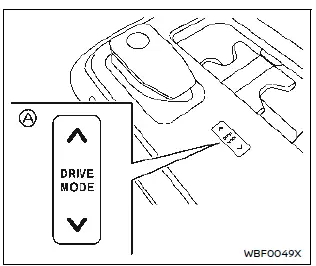
Drive Mode Selector
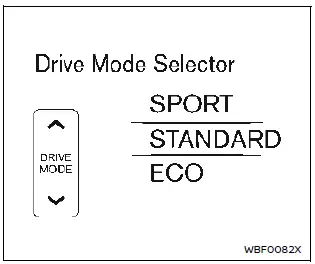
Vehicle information display (2WD models)

Vehicle information display (AWD models)
Multiple driving modes can be selected by using the Drive Mode Selector as below.
2WD models: SPORT, STANDARD and ECO AWD models: SPORT, STANDARD, ECO and SNOW To change the mode, push the upper side or lower side of the Drive Mode Selector A.
NOTE
When the Drive Mode Selector selects a mode, the mode may not switch immediately.
This is not a malfunction.
The current mode is displayed in the vehicle information display. The mode list will appear in the vehicle information display and you can select the mode.
NOTE
The mode list will be turned off in approximately 5 seconds after the mode is selected.
You can also clear the message by pushing the scroll dial on the steering wheel.
If the driving mode cannot be switched using the Drive Mode Selector when the power switch is in the ON position, have the system checked. It is recommended you visit a NISSAN certified ARIYA dealer for this service.
NOTE
The STANDARD mode will be selected first each time the power switch is placed in the ON position.
WARNING
- Do not stare at the Drive Mode Selector or the display while driving so that full attention may be given to vehicle operation.
- Avoid abrupt acceleration, steering or sudden braking especially on slippery roads. Otherwise tire slip, skid or tail-swing occurs; this may cause an accident.
STANDARD mode
This is the standard mode that is most suitable for normal driving.
ECO mode
Basic information
Improves energy efficiency and cruising range. Coasting is available in this mode.
NOTE
Selecting the ECO mode will not necessarily improve energy economy as many driving factors influence its effectiveness.
Operation
Select the ECO mode using the Drive Mode Selector. The ECO indicator illuminates.
Tire Pres ECO advice
The "Tire Pres ECO advice" is a function to show an ECO advice message in the vehicle information display when low tire pressure is detected. To activate or deactivate this function, see "ECO Mode Setting".
When the setting is ON, the ECO Drive Report display shows "Check Tire Pressures for Best Energy Economy". You can switch the display to the Tire Pressures display by pushing the  button on the steering wheel.
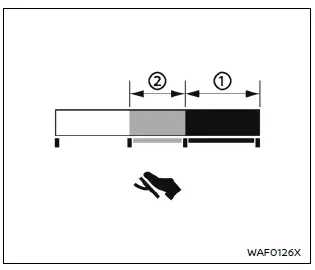
ECO Pedal Guide function
The ECO Pedal Guide display can be selected in the vehicle information display in the ECO mode. Use the ECO Pedal Guide function for improving energy economy.
When the ECO Pedal Guide bar is in the green range , it indicates that the vehicle is being driven within range of the super economy drive.
When the ECO Pedal Guide bar is in the light green range , it indicates that the vehicle is being driven within range of the economy drive.
If the ECO Pedal Guide bar is out of the green range ( and ), it indicates that the accelerator pedal is depressed over the range of economy drive.
The ECO Pedal Guide bar is not displayed when:
- The vehicle speed is less than approximately 4 km/h.
- The shift lever is in the P (Park), N (Neutral) or R (Reverse) position.
SPORT mode
- Provides higher motor torque response for agile driveability and stronger regeneration brake for sporty drive by accelerator pedal only.
- The setting of the steering system is adjusted to moderately increase steering wheel effort for a sporty feel.
NOTE
In the SPORT mode, energy economy may be reduced.
SNOW mode (AWD models)
This mode makes it easier to start and drive on snowy roads and frozen roads.