Traffic Sign Recognition (TSR)
Basic information
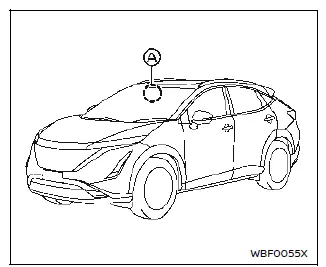
The Traffic Sign Recognition (TSR) system provides the driver with information about the most recently detected speed limit. The system captures the road sign information with the multi-sensing front camera unit A located on the windshield in front of the inside mirror and displays the detected signs in the vehicle information display. The speed limit displayed is based on a combination of navigation system data and live camera recognition.
TSR information is shown in the vehicle information display and in the Head Up Display (HUD) (if so equipped).
WARNING
The TSR system is only intended to be a support device to help provide the driver with information. It is not a replacement for the driver's attention to traffic conditions or responsibility to drive safely. It cannot prevent accidents due to carelessness. It is the driver's responsibility to stay alert and drive safely at all times.
System operation
The TSR system displays the following types of road sign:
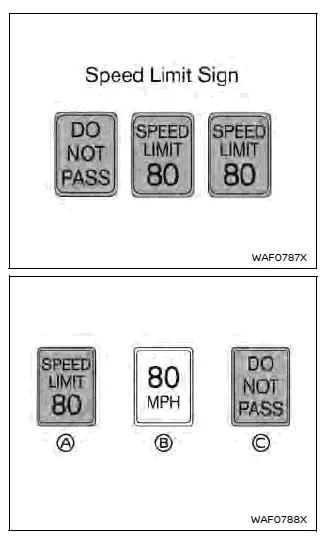
- Latest detected speed limit
- Reduce speed limit caution
- No passing zone
CAUTION
- The TSR system is intended as an aid to careful driving. It is the driver's responsibility to stay alert, drive safely, and observe all road regulations that currently apply, including looking out for road signs.
- The TSR system may not function properly under all conditions.
Below are some examples:
- When the road sign is not clearly visible, for example, due to damage or weather conditions.
- When rain, snow or dirt adheres to the windshield in front of the multi-sensing front camera unit.
- When the headlights are not bright, for example, due to dirt on the lens or if the aiming is not adjusted properly.
- When strong light enters the camera unit. (For example, the light directly shines on the front of the vehicle at sunrise or sunset.)
- When a sudden change in brightness occurs. (For example, when the vehicle enters or exits a tunnel or under a bridge.)
- In areas not covered by the navigation system.
- If there are deviations in relation to the navigation, for example due to changes in the road routing.
- When overtaking buses or trucks with speed stickers.
- When the data from the navigation system is not up-to-date or is unavailable.
- The TSR system may display a traffic sign, though there is no traffic sign in front of the vehicle.
It may display a different speed limit from that for a passenger vehicle. (The maximum speed limit sign may show a higher or lower number than the actual maximum speed, for example, when detecting a speed limit sign for truck, advisory sign, different speed limit sign between daytime and nighttime, or speed limit sign written in different unit near the border, etc.)
How to enable/disable the TSR system
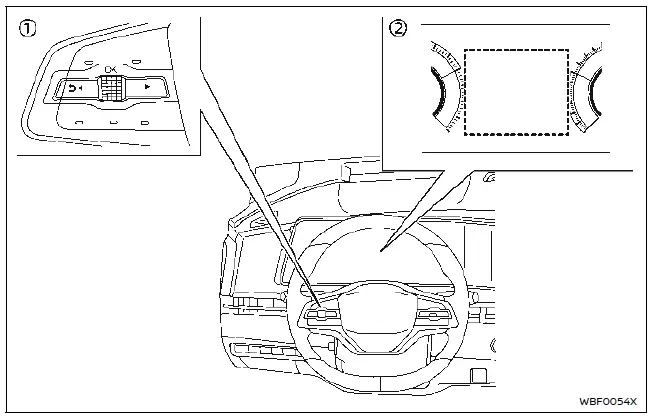
- Steering-wheel-mounted controls (left side)
- Vehicle information display
Perform the following steps to enable or disable the TSR system:
1. Push the  button until "Settings" appears in the vehicle information display and then push the scroll dial. Use the scroll dial to select "Driver Assistance". Then push the scroll dial.
2. Select "Speed Limit Sign" and push the scroll dial to turn the system on or off.
System temporarily unavailable
If the vehicle is parked in direct sunlight under high temperature conditions (over approximately 104ºF (40ºC) and then started, the TSR system may be deactivated automatically.
Action to take:
When the interior temperature is reduced, the TSR system will resume operating automatically.
System malfunction
If the TSR system malfunctions it will be turned off automatically and the TSR "Malfunction See Owner's Manual" warning message will appear in the vehicle information display.
Action to take
If the warning message appears, pull off the road at a safe location and stop the vehicle. Turn the EV system off and restart the EV system. If the warning message continues to appear, have the system checked. It is recommended that you visit a NISSAN certified ARIYA dealer.
System maintenance
The TSR system uses the same multisensing front camera unit that is used by the Lane Departure Warning (LDW) system, located in front of the inside mirror.