Meters and gauges
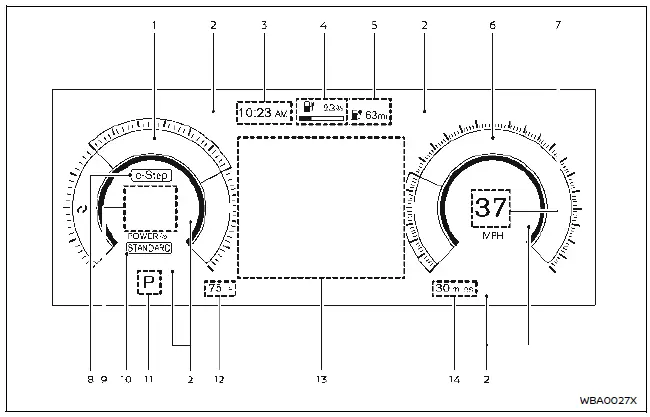
- Power meter
- Warning and indicator lights
- Clock
- Li-ion battery available charge gauge
- Estimated driving range
- Speedometer
- Vehicle speed
- e-Step indicator
- Personal display
- Drive Mode Selector indicator
- Shift position indicator
- Outside air temperature
- Vehicle information display
- Odometer
Basic information
The view of the meter screen can be changed.
- For cleaning, use a soft cloth, dampened with water. Never use a rough cloth, alcohol, benzine, thinner or any kind of solvent or paper towel with a chemical cleaning agent. They will scratch or cause discoloration to the lens.
- Do not spray any liquid such as water on the meter lens. Spraying liquid may cause the system to malfunction.
Changing the meter screen view
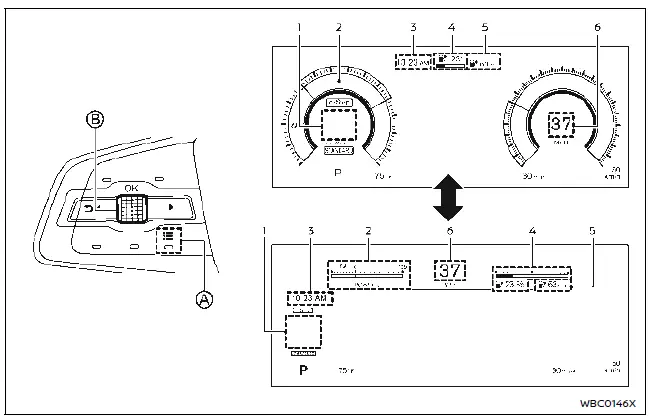
- Personal display
- Power meter
- Clock
- Li-ion battery available charge gauge
- Estimated driving range
- Vehicle speed
The meter screen view can be changed to expand the vehicle information display area.
To change the meter screen view:
1. Push the control switch A on the left side of the steering wheel.
"Shortcut Menu" appears on the vehicle information display area.
2. Select "Change Meter View" by rotating the scroll dial B and push it to change the view.
Speedometer and odometer
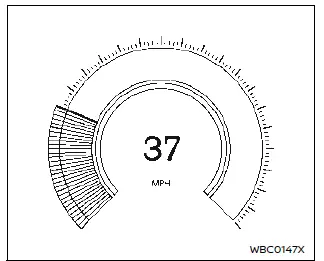
Speedometer
The speedometer indicates vehicle speed (MPH or km/h).

Odometer
The odometer 1 is displayed in the vehicle information display:
- when the power switch is in the ON or READY to drive position
- for a period of time after the power switch was placed in the OFF position
The odometer displays the total distance the vehicle has been driven.
Power meter
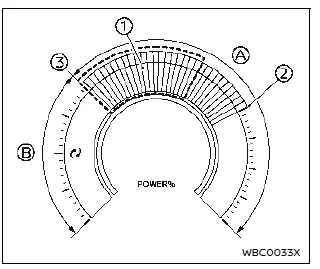
The power meter displays the traction motor power level when the accelerator pedal is depressed, as well as the level of power regeneration provided to the Li-ion battery by the regenerative brake.
This meter displays the actual traction motor power consumption A and the regenerative brake power provided to the Li-ion battery B. The white illuminated part 1 in the display moves right or left depending on demand.
The power meter is in a neutral state .
The white illuminated part moves to the right when power is provided to the traction motor (Li-ion battery discharges).
The white illuminated part moves to the left when power is generated and provided to the Li-ion battery by the regenerative brake system (Li-ion battery charging).
The power meter also indicates if the power provided to the motor is limited.
When power is limited, a guidance line of the limitation 2 is displayed.
Regenerative braking is automatically reduced when the Li-ion battery is fully charged to prevent the Li-ion battery from becoming overcharged. Regenerative braking is also automatically reduced when the Li-ion battery temperature is high/low to prevent Li-ion battery damage.
If the Li-ion battery charge is low, power provided to the traction motor is reduced.
Motor output is also limited if the Li-ion battery temperature is high/low.
Li-ion battery available charge gauge
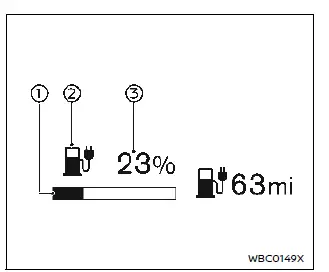
- The gauge indicates the approximate remaining Li-ion battery charge available to drive the vehicle.
- Low battery charge warning light illuminates in yellow when the available Li-ion battery charge is getting low.
- This figure shows the current state of charge (%) of the Li-ion battery.
Charge the Li-ion battery before the percentage figure becomes "0".
When the low battery charge warning light  illuminates in yellow, charge as soon as it is convenient, preferably before the percentage figure becomes "0". When the percentage figure becomes "0" and the low battery charge warning light (yellow) illuminates, there is a very small reserve of Li-ion battery charge remaining.
NOTE
- The length of the bar of the gauge is determined by the available charge and the amount of charge the Li-ion battery is capable of storing at the current temperature.
- Temperature affects the amount of charge the Li-ion battery is capable of storing. The Li-ion battery is capable of storing less power when the Li-ion battery temperature is cold. The Li-ion battery is capable of storing more power when the Li-ion battery is warm. The length of the bar of the gauge can change based on the amount of power the Li-ion battery is capable of storing. For example, when the Li-ion battery becomes colder, a longer bar is shown because the available charge is a greater percentage of the Li-ion battery's capability of storing power.
When the Li-ion battery becomes warmer, a shorter bar is shown because the remaining energy is a lower percentage of the Li-ion battery's capability of storing power.
Estimated driving range
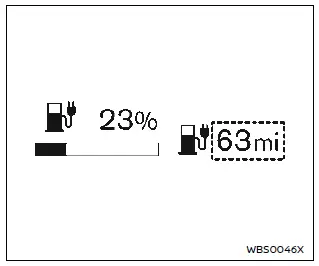
The driving range (miles or km) provides an estimated distance that the vehicle can be driven before recharging is necessary.
The driving range is constantly being calculated, based on the amount of available Li-ion battery charge and the actual power consumption average.
The displayed driving range is the distance calculated based on the current driving style.
NOTE
- If you continue to drive the vehicle after the low battery charge warning light (yellow) illuminates and the Li-ion battery is close to being completely discharged, "---" will be displayed. Charge the Li-ion battery as soon as possible. When the Li-ion battery is charged, the original display will be restored.
- After the Li-ion battery is charged, the displayed driving range is calculated based on the actual average energy consumption of previous journeys. The displayed driving range will vary every time the Li-ion battery is fully charged.
- The driving range will increase or decrease based on driving.
- It may take 2 or 3 battery cycles to show accurate mileage.
Instrument brightness control


The instrument brightness control switch can be operated when the power switch is in the ON position. When the switch is operated, the vehicle information display switches to the brightness adjustment mode.
Push the switch A to brighten the instrument panel lights. The bar moves to the right side.
Push the switch B to dim the lights. The bar moves to the left side.
The vehicle information display returns to the normal display when the instrument brightness control switch is not operated for more than 5 seconds.
Shift position indicator
The shift position indicator indicates the shift position when the power switch is in the ON or READY to drive position.
e-Step indicator
The e-Step indicator in the vehicle information display shows the status of the e- Step system. When the e-Step system is turned on, the indicator changes to blue and displays "e-Step". When the e-Step system is turned off, the indicator changes to gray and displays "e-Step OFF".