Interior lights

In this manual: Interior lights
Foreword — 1Seats, seat belts and Supplemental RestraintSystem (SRS) — 1Passenger compartment — 1Instrument panel — 1Warning and indicator lights — 1The EV (Electric Vehicle) system — 1Li-ion battery — 1High voltage precautions — 1EV (Electric Vehicle) characteristics — 1Life with an EV (Electric Vehicle) (scene guide) — 1Efficient use of your vehicle — 1EV (Electric Vehicle) unique information — 1Types of charge and how to charge the Li-ion battery — 1Charging methods — 1Charging related indicator lights — 1Seats — 1Head restraints/headrests — 1Seat belts — 1Child safety — 1Child restraints — 1Supplemental Restraint System (SRS) — 1Cockpit — 1Meters and gauges — 1Warning lights, indicator lights and audible reminders — 1Vehicle information display — 1Head Up Display (HUD) — 1Security systems — 1Wiper and washer switch — 1Rear window and outside mirror defroster switch — 1Headlight and turn signal switch — 1Horn — 1Heated seats — 1Climate controlled seats — 1Rear Door Alert — 1Power outlets — 1Emergency Call (SOS) button — 1Storage — 1Roof rack — 1Windows — 1Moonroof — 1Interior lights — 1HomeLink Universal Transceiver — 1Keys — 1Doors — 1Intelligent Key system — 1Hood — 1Liftgate — 1Charge port lid — 1Tilt/telescopic steering — 1Sun visors — 1Mirrors — 1Memory seat — 1NissanConnect Owner's Manual — 1RearView Monitor — 1Intelligent Around View Monitor — 1Moving Object Detection (MOD) — 1Ventilators — 1Heater and air conditioner — 1Radio antenna — 1Push-button power switch — 1Before starting the EV system — 1Driving the vehicle — 1e-Step system — 1Parking brake — 1Automatic brake hold — 1Drive Mode Selector — 1Driver Assistance systems — 1Traffic Sign Recognition (TSR) — 1Lane Departure Warning (LDW) — 1Intelligent Lane Intervention (I-LI) — 1Blind Spot Warning (BSW) — 1Intelligent Blind Spot Intervention (I-BSI) — 1Rear Cross Traffic Alert (RCTA) — 1ProPILOT Assist Systems — 1Automatic Emergency Braking (AEB) with Pedestrian Detection system — 1Intelligent Forward Collision Warning (I-FCW) — 1Intelligent Driver Alertness (I-DA) — 1Rear Automatic Braking (RAB) — 1Increasing power economy — 1All-Wheel Drive (AWD) system — 1Electric power steering — 1Brake system — 1Brake assist — 1Vehicle Dynamic Control (VDC) system — 1Chassis control — 1Hill Start Assist system — 1Sonar system — 1ProPILOT Park — 1Cold weather driving — 1Hazard warning flasher switch — 1Flat tire — 1Jump starting — 1If the Li-ion battery becomes completely discharged — 1Towing your vehicle — 1Cleaning exterior — 1Cleaning interior — 1Corrosion protection — 1Cooling system — 1Reduction gear oil — 1Windshield wiper blades — 1Window washer fluid — 112-volt battery — 1Intelligent Key battery replacement — 1Lights — 1Wheels and tires — 1Maintenance requirement — 1General maintenance — 1Explanation of scheduled maintenance items — 1Maintenance schedules — 1Recommended fluids/lubricants and capacities — 1Vehicle identification — 1Vehicle loading information — 1Towing a trailer (2WD models) — 1Flat towing — 1Reporting safety defects — 1Event Data Recorders (EDR) — 1
3steps
~18min
2/5difficulty
Done 0 of 3

Basic information

CAUTION

  • Do not leave the light switch on when the EV system is not running for extended periods of time to prevent the 12-volt battery from being discharged.
  • Turn off the lights when you leave the vehicle.

Interior light switch

Nissan Ariya. Interior lights
  1. The interior lights can be turned ON regardless of door position. The lights will go off after a period of time unless the power switch is placed in the ON position when any door is opened.
  2. The interior lights can be set to operate when the doors are opened.

    To turn off the interior lights when a door is open, touch the switch, the interior lights will not illuminate, regardless of door position. The lights will go off when the power switch is placed in the ON position, or the driver's door is closed and locked.

  3. The brightness of the map lights can be adjusted in 4 levels by touching this switch.

Map lights
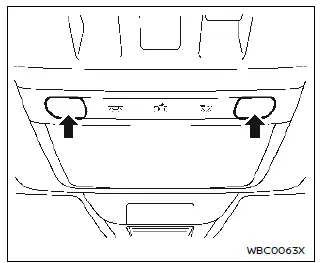
Nissan Ariya. Interior lights

Touch the light to turn the map lights on.

To turn the light off, touch the light again The lights will also turn off after a period of time when the lights remain illuminated to prevent the 12-volt battery from becoming discharged.

Rear personal lights
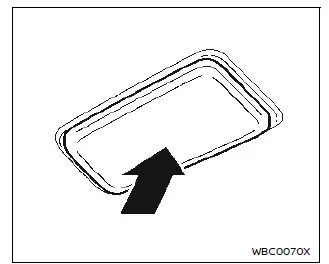
Nissan Ariya. Interior lights

To turn the rear personal light on, touch the light. Touch the light again to dim the light. To turn off the light, touch the light once again.

The lights will also turn off after a period of time when the lights remain illuminated to prevent the 12-volt battery from becoming discharged.

Vanity mirror light

Nissan Ariya. Interior lights

The light over the vanity mirror will turn on when the cover on the vanity mirror is opened.

When the cover is closed, the light will turn off.

The lights will also turn off after a period of time when the lights remain illuminated to prevent the 12-volt battery from becoming discharged.

Cargo light

The cargo light illuminates when the liftgate is opened.

The light will turn off after a period of time when the light remains illuminated to prevent the battery from becoming discharged.