Driver Assistance systems
- Basic information
- How to enable/disable the systems
Basic information Nissan Ariya 2026
Each Driver Assistance system is designed to help the driver in different ways as they drive. The following Driver Assistance systems (if so equipped) are available on this vehicle:
Forward Driving Aids
- Automatic Emergency Braking (AEB) with Pedestrian Detection
 Assists the driver with a warning and/or braking operation when there is a risk of a forward collision with the vehicle ahead in the traveling lane.
- Intelligent Forward Collision Warning (IFCW)
 Helps alert the driver when there is a sudden braking of a second vehicle traveling in front of the vehicle ahead in the same lane.
Side Driving Aids (Lane and Blind Spot)
- Lane Departure Warning (LDW)
 Warns the driver that the vehicle is about to cross a lane marker with an indicator and a steering wheel vibration.
- Intelligent Lane Intervention (I-LI)
 Warns the driver that the vehicle is about to cross a lane marker with an indicator and a steering wheel vibration.
Assists the driver to return the vehicle to the center of the traveling lane.
- Blind Spot Warning (BSW)
 Warns the driver of a vehicle in an adjacent lane when changing lanes with an indicator.
- Intelligent Blind Spot Intervention (I-BSI)
 Warns the driver of a vehicle in an adjacent lane when changing lanes.
Assists the driver to return the vehicle to the center of the traveling lane.
Rear Driving Aids
- Rear Cross Traffic Alert (RCTA)
 Assists the driver when backing out from a parking space by detecting other vehicles approaching from the right or left of the vehicle.
Rear Driving Aids
- Rear Automatic Braking (RAB)
 Assists the driver when the vehicle is backing up and approaching stationary objects directly behind the vehicle by providing a warning and automatic braking if needed.
Parking Aids
- RearView Monitor
Shows a rear view of the vehicle when the shift lever is placed in the R (Reverse) position. - Intelligent Around View Monitor
Assists the driver in parking situations by showing various views of the position of the vehicle in a split screen format. - Moving Object Detection (MOD)
Informs the driver of moving objects near the vehicle in parking situations. - Sonar system
Informs the driver with a visual and audible alert of stationary obstacles near the bumpers or the vehicle sides (flanks) (if so equipped).
ProPILOT Assist
- ProPILOT Assist
 Consists of Intelligent Cruise Control (ICC) and Steering Assist.
- Intelligent Cruise Control (ICC)
 Helps the driver maintain a selected distance from the vehicle ahead and can reduce the speed to match a slower vehicle ahead.
Decelerates the vehicle to a standstill when a vehicle ahead slows to a stop.
- Speed Limit Assist
 Detects a change of the speed limit, indicates the detected speed limit and can apply it to the vehicle set speed automatically or manually.
(A feature of ProPILOT Assist with Navilink)
- Speed Adjust by Route
 Adjusts the vehicle speed depending on curves, junctions and exits, using road information provided by the navigation system. (A feature of ProPILOT Assist with Navi-link)
ProPILOT Assist
- Steering Assist
 Assists the driver to help keep the vehicle within the center of the traveling lane.
Traffic and other conditions and laws permit, and it is safe to do so, driver's hands can be taken off the steering wheel. Always pay attention to the road and the operation of the vehicle. (A feature of ProPILOT Assist 2.0)
- Lane Change Assist
 Help the driver make a lane change when the turn signal is activated (A feature of ProPILOT Assist 2.0)
- Passing Assist
 Help the driver make a lane change when a slower vehicle is detected ahead (A feature of ProPILOT Assist 2.0)
- Route Assist
 Help the driver make a lane change when approaching the point where a lane change is necessary, according to the route set in the navigation system. (A feature of ProPILOT Assist 2.0)
Other Driving Aids
- High beam assist
 Switches the headlights to the low beam automatically when an oncoming vehicle or leading vehicle appears in front of your vehicle.
- Traffic Sign Recognition (TSR)
 Provides the driver with information about the most recently detected speed limit.
- Driver Monitor
Monitors the driver's attention to the road ahead with a driver facing camera.
- Intelligent Driver Alertness (I-DA)
 Helps alert the driver when a lack of attention or driving fatigue is detected.
- Hill Start Assist
Helps prevent the vehicle from rolling backwards in the time it takes the driver to release the brake pedal and apply the accelerator when the vehicle is stopped on a hill.
How to enable/disable the systems Nissan Ariya first Gen
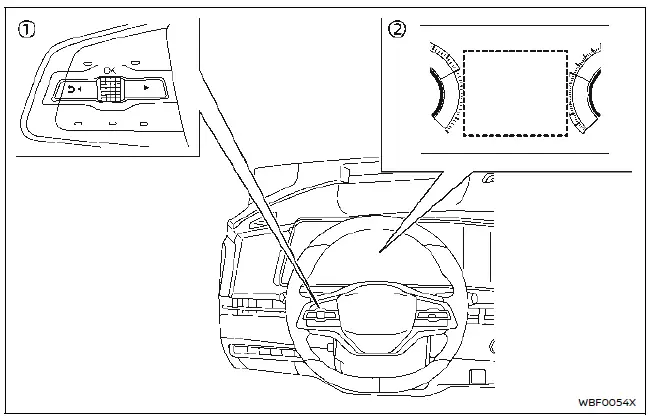
- Steering-wheel-mounted controls (left side)
- Vehicle information display
Basic information
The following systems (if so equipped) can be enabled or disabled using the settings menu in the vehicle information display. Select each setting item using the scroll dial on the steering-wheel-mounted controls.
- Automatic Emergency Braking (AEB) with Pedestrian Detection
- Intelligent Forward Collision Warning (I-FCW)
- Lane Departure Warning (LDW)
- Intelligent Lane Intervention (I-LI)*
- Blind Spot Warning (BSW)
- Intelligent Blind Spot Intervention (IBSI)*
- Steering Assist
- Rear Cross Traffic Alert (RCTA)
- Rear Automatic Braking (RAB)
- Moving Object Detection (MOD)
- Sonar system
- Speed Limit Assist (ProPILOT Assist with Navi-link)
- Speed Adjust by Route (ProPILOT Assist with Navi-link)
- Traffic Sign Recognition (TSR)
- Intelligent Driver Alertness (I-DA)
- Lane Change Assist (ProPILOT Assist 2.0)
- Passing Assist (ProPILOT Assist 2.0)
- Route Assist (ProPILOT Assist 2.0)
*: To operate the I-LI and I-BSI systems, you need to push the ProPILOT Assist switch after enabling each system in the settings menu.
Driver Assistance display
The Driver Assistance display appears in the vehicle information display when selected using the scroll dial, or for a short period of time when the ProPILOT Assist switch is pushed.
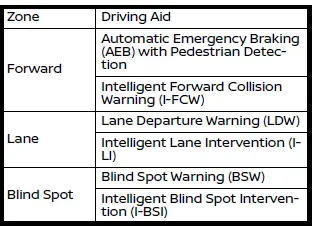
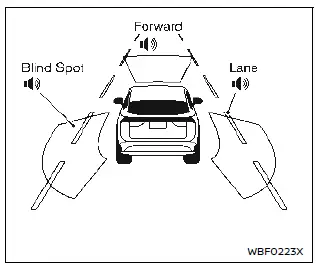
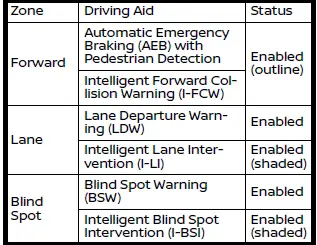
The status of the following systems can be shown in each zone of the display.
- When any of the "Warning" systems are enabled, the "
 " mark is shown in each zone.
- When any of the "Intervention" systems are enabled, the "
 " mark is shown in each zone.
- When no system is enabled, "OFF" is shown in each zone.
The display changes as the following examples:
All: outline
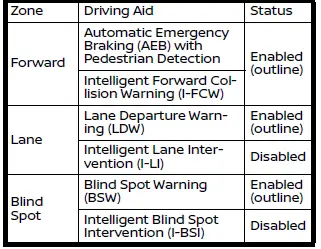
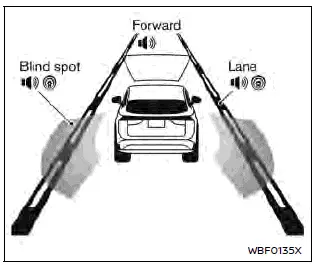
Forward: outline, Other: shaded
Driver assistance troubleshooting guide
Basic information
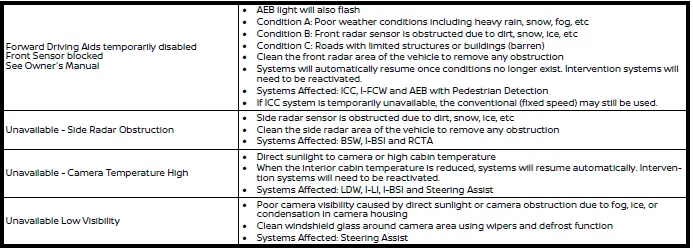
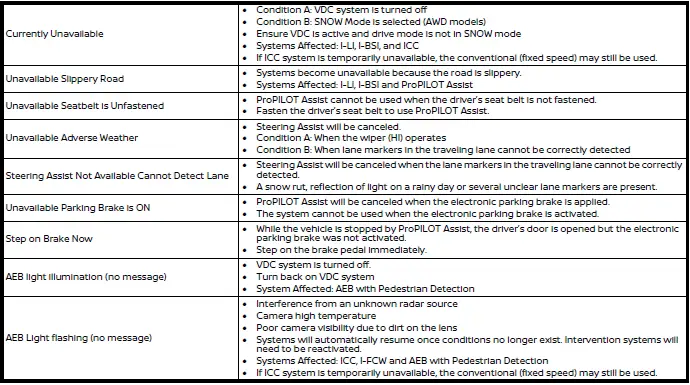
Some of the Driver Assistance systems use the common parts (camera, radar, sonar, etc.) to function. When a pop-up warning message appears in the vehicle information display or the warning light flashes/illuminated, check the system conditions.
For system temporarily unavailable
It is important to ensure the radar sensors, cameras and sonar sensors are clean before each drive. Unclear or damaged cameras and sensors, as well as environmental conditions can affect system performance.

For system malfunction
If any of the following malfunction warnings appear (orange), stop the vehicle in a safe location. Turn the EV system off, restart the EV system. If the warning message/light continue to illuminate, it may be a malfunction. It is recommended that you visit a NISSAN certified ARIYA dealer for service.

Camera, radar and sonar locations
The camera, radar and sonar that are used by each Driver Assistance systems are located on the front and rear of the vehicle. For the maintenance of each component, see "System maintenance" section in this Owner's Manual for each application system.
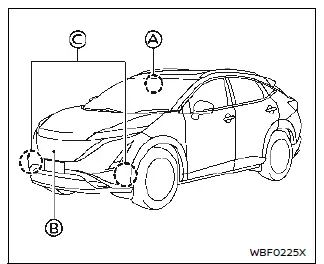
Vehicle front
- Front camera unit
- Automatic Emergency Braking (AEB) with Pedestrian Detection
- Lane Departure Warning (LDW)
- Intelligent Lane Intervention (I-LI)
- Intelligent Blind Spot Intervention (IBSI)
- Steering Assist (as part of ProPILOT Assist Systems)
- High beam assist
- Traffic Sign Recognition (TSR)
- Front radar sensor
- Automatic Emergency Braking (AEB) with Pedestrian Detection
- Intelligent Forward Collision Warning (I-FCW)
- Intelligent Cruise Control (ICC) (as part of ProPILOT Assist Systems)
- Side radar sensor
- ProPILOT Assist 2.0
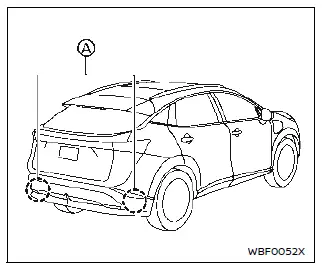
Vehicle rear
- Side radar sensor
- Blind Spot Warning (BSW)
- Intelligent Blind Spot Intervention (IBSI)
- Rear Cross Traffic Alert (RCTA)
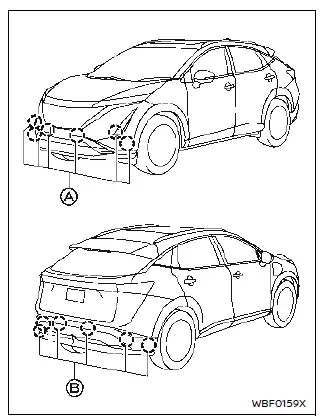
Sonar
- Front and side (if so equipped) sonar sensors
- Sonar system
- Rear and side (if so equipped) sonar sensors
- Rear Automatic Braking (RAB)
- Sonar system