Sonar system
- Basic information
- System operation
- Sonar system limitations
Basic information Nissan Ariya: FE0

The sonar system sounds a tone to inform the driver of obstacles near the bumper.
When the sonar system is turned on, the sonar view will automatically appear in the vehicle information display and in the center display.
WARNING
- The sonar system is a convenience but it is not a substitute for proper parking.
- The driver is always responsible for safety during parking and other maneuvers. Always look around and check that it is safe to do so before parking.
- If there is any doubt the surroundings in the path of the parking area and/or the parking area itself are not free from obstacles, immediately stop the vehicle and check the surroundings.
- The sonar system is intended as an aid to parking, to be used in conjunction with the inside and outside mirrors.
- Read and understand the limitations of the sonar system as contained in this section. The colors of the sonar indicator indicates different distances to the object.
- Inclement weather or ultrasonic sources such as an automatic car wash, a truck's compressed-air brakes or a pneumatic drill may affect the function of the system; this may include reduced performance or a false activation.
- The sonar system is designed as an aid to the driver in detecting large stationary objects to help avoid damaging the vehicle.
- The sonar system is not designed to prevent contact with small or moving objects. Always move slowly. The system will not detect small objects below the bumper, and may not detect objects close to the bumper or on the ground.
- The sonar system may not detect the following objects: fluffy objects such as snow, cloth, cotton, glass-wool, etc.; thin objects such as rope, wire and chain, etc.; or wedge-shaped objects.
- The front and rear sonar sensors detect the distance between the vehicle and the obstacle by detecting the sound wave reflected from the surface of an obstacle. When there is a sound such as horn, or an ultrasonic source (such as sonar of other vehicles) around the vehicle, the sensor (sonar) may not detect objects properly.
- The sonar system may detect some types of curbstones.
If your vehicle sustains damage to the bumper fascia, leaving it misaligned or bent, the sensing zone may be altered causing inaccurate measurement of obstacles or false alarms.
CAUTION
- Excessive noise (such as audio system volume or an open vehicle window) will interfere with the tone and it may not be heard.
- Keep the sonar sensors (located on the bumper fascia) free from snow, ice and large accumulations of dirt. Do not clean the sonar sensors with sharp objects.
If the sensors are covered, the accuracy of the sonar function will be diminished.
System operation Nissan Ariya 1st generation
The system informs with a visual and audible signal of front obstacles when the shift lever is in the "D" (Drive) position and both front and rear obstacles when the shift lever is in the "R" (Reverse) position.
The system is deactivated at speeds above 10 km/h. It is reactivated at lower speeds.
The intermittent tone will stop after 3 seconds when an obstacle is detected by only the corner sensor and the distance does not change. The tone will stop when the obstacle get away from the vehicle.
When the object is detected, the indicator (green) appears and blinks and the tone sounds intermittently. When the vehicle moves closer to the object, the color of the indicator turns yellow and the rate of the blinking increases. When the vehicle is very close to the object, the indicator stops blinking and turns red, and the tone sounds continuously.
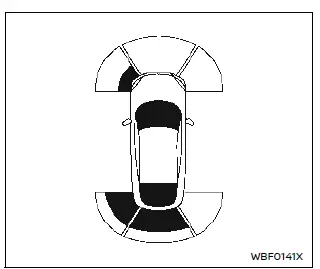
When the vehicle moves closer to an obstacle, the sonar indicator (detected area) appears in the vehicle information display.
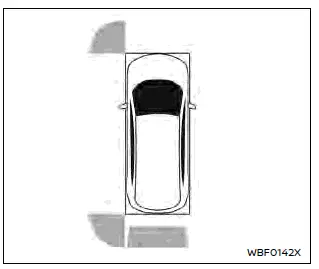
The sonar indicator also appears on the camera view of the center display.
How to enable/disable the sonar system
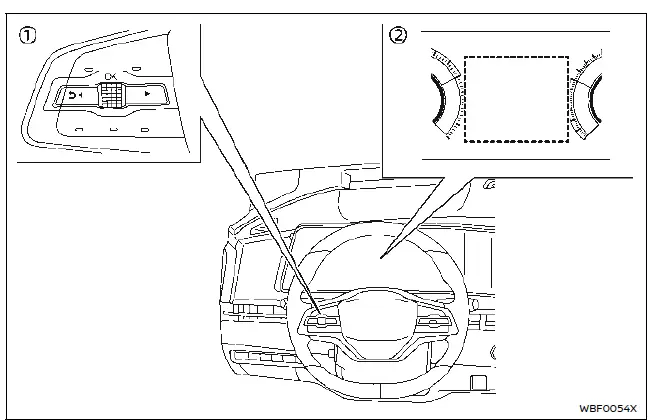
- Steering-wheel-mounted control (left side)
- Vehicle information display
The system is automatically activated when the power switch is in the ON position and the shift lever is in the D (Drive) or R (Reverse) position.
NOTE
When the shift lever is in the R (Reverse) position and the [Parking Assist] screen is displayed in the vehicle information display the sonar system can be disabled temporarily by pushing the scroll dial on the steering wheel.
Perform the following steps to set up the sonar system function.
1. Push the  button until "Settings" appears in the vehicle information display and then push the scroll dial. Use the scroll dial to select "Driver Assistance." Then push the scroll dial.
2. Select "Parking Assist" and push the scroll dial.
3. Use the scroll dial to navigate in the menu and select or change an item:
- Front Sonar
- Turns ON/OFF the front sonar sensors
- Rear Sonar
- Turns ON/OFF the rear sonar sensors
NOTE
Disabling Rear Sonar will not automatically disable Rear Automatic Braking (RAB). To activate/deactive RAB, see "How to enable/disable Rear Automatic Braking".
- Sonar Distance
- Changes the sonar sensor's detection distance to "Long," "Medium" or "Short"
- Auto Show Sonar
- Shows the sonar display in the vehicle information display when the sonar activates
- Sonar Volume
- Changes the volume of the tone sound to "High," "Medium" or "Low"
Sonar system limitations Nissan Ariya: FE0
WARNING
Listed below are the system limitations for the sonar system. Failure to operate the vehicle in accordance with these system limitations could result in serious injury or death.
- Read and understand the limitations of the sonar system as contained in this section.
Inclement weather may affect the function of the sonar system; this may include reduced performance or a false activation.
- The sonar system is deactivated at speeds above 10 km/h.
It is reactivated at lower speeds.
- Inclement weather or ultrasonic sources such as an automatic car wash, a truck's compressed-air brakes or a pneumatic drill may affect the function of the sonar system; this may include reduced performance or a false activation.
- The sonar system is not designed to prevent contact with small or moving objects. Always move slowly. The system will not detect small objects below the bumper or on the ground.
- The sonar system may not detect the following objects: fluffy objects such as snow, cloth, cotton, glass-wool, etc.; thin objects such as rope, wire and chain, etc.; or wedge-shaped objects; complex-shaped objects or multiple objects in close.
- The sonar system may not detect objects at speed above 5 km/h and may not detect certain angular or moving objects.
- The sonar system may not detect the following objects:
- Pedestrians who approach the vehicle from the side
- Objects placed next to the vehicle
- The sonar system may not operate in the following conditions:
- When rain, snow, ice, dirt, etc. adheres to the sonar sensors.
- When a loud sound is heard in the area around the vehicle.
- When the surface of the obstacle is diagonal to the front or rear of the vehicle.
- When a sonar system or the area around the sensor is extremely hot or cold.
- The sonar system may unintentionally operate in the following conditions:
- When there is overgrown grass in the area around the vehicle.
- When there is a structure (for example, a wall, a toll gate equipment, a narrow tunnel or a parking lot gate) near the side of the vehicle.
- When there are bumps, protrusions or manhole covers on the road surface.
- When the vehicle drives through a draped flag or a curtain.
- When there is an accumulation of snow or ice behind the vehicle.
- When driving on a steep hill.
System temporarily unavailable
When sonar blockage is detected, the system will be deactivated automatically.
The system is not available until the conditions no longer exist.
The sonar sensors may be blocked by temporary ambient conditions such as splashing water, mist or fog. The blocked condition may also be caused by objects such as ice, frost or dirt obstructing the sonar sensors.
Action to take:
When the above conditions no longer exist, the system will resume automatically.
System maintenance

The sonar sensors A and B (8 or 12) are located on the front and rear bumpers.
- Always keep the area near the sonar sensors clean.
- If the sonar sensors are dirty, wipe them off with a soft cloth while being careful to not damage them.
- The sonar sensors may be blocked by temporary ambient conditions such as splashing water, mist or fog. The blocked condition may also be caused by objects such as ice, frost or dirt obstructing the sonar sensors. Check for and remove objects obstructing the area around the sonar sensors.
- Do not subject the area around the sonar sensors to strong impact. Also, do not remove or disassemble the sonar sensors. If the sonar sensors and peripheral areas are deformed in an accident, etc., have the sonar sensors checked. It is recommended that you visit a NISSAN certified ARIYA dealer for this service.
- Do not attach stickers (including transparent material), install accessories or apply additional paint on the sonar sensors and their surrounding areas. This may cause a malfunction or improper operation.
- When washing the vehicle using a high-pressure washer, do not apply direct washer pressure on the sonar sensors. This may cause a malfunction of the sonar sensors.