Windows
Power windows
Basic information
WARNING
- Make sure that all passengers have their hands, etc. inside the vehicle while it is in motion and before closing the windows. Use the window lock switch to prevent unexpected use of the power windows.
- To help avoid risk of injury or death through unintended operation of the vehicle and or its systems, including entrapment in windows or inadvertent door lock activation, do not leave children, people who require the assistance of others or pets unattended in your vehicle.
Additionally, the temperature inside a closed vehicle on a warm day can quickly become high enough to cause a significant risk of injury or death to people and pets.
The power windows operate when the power switch is in the ON position, or for a period of time after the power switch is placed in the OFF position. If the driver's or front passenger's door is opened during this period of time, power to the windows is canceled.
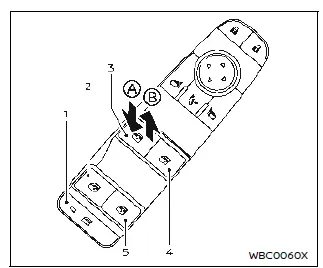
- Window lock button
- Rear left passenger side window
- Driver side window
- Front passenger side window
- Rear right passenger side window
Main power window switch (driver's side)
To open or close the window, push down A or pull up B the switch and hold it. The main switch (driver side switches) will open or close all the windows.
Locking rear passenger's windows
When the window lock button is pushed (the indicator illuminates), the rear passenger's windows cannot be operated with the rear passenger's power window switch. The rear passenger's windows can only be operated with the main switch (driver side switches). To cancel the passenger's windows lock, push the window lock button again.
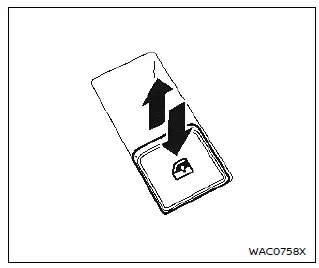
Passenger side power window switch
The passenger's switch can control its corresponding window. When the window lock button on the driver's switch is pushed, the rear passenger's switch cannot be operated.

Automatic operation
The automatic function enables a window to fully open or close without holding the switch down or up.
To fully open the window, push the power window switch down to the second detent and release the switch. To fully close the window, pull the power window switch up to the second detent and release the switch. The switch does not have to be held during window operation.
To stop the window open/close operation during the automatic function, push down or pull up the switch in opposite directions.
Auto-reverse function
WARNING
There are some small distances immediately before the closed position which cannot be detected. Make sure that all passengers have their hands, etc., inside the vehicle before closing the window.
The auto-reverse function enables a window to automatically reverse when something is caught in the window as it is closing by the automatic function. When the control unit detects an obstacle, the window will be lowered immediately.
Depending on the environment or driving conditions, the auto-reverse function may activate if an impact or load similar to something being caught in the window occurs.
Window timer:
The window timer allows the window switch to be operated for a short time even if the power switch is placed in the OFF position. The window timer will be cancelled when the driver's or front passenger's side door is opened or the preset time has expired.
Operating windows with Intelligent Key
The windows can be opened by pushing the "UNLOCK" button on the Intelligent Key. This function will not operate while the window timer is activated or when the windows need to be initialized. For details about the Intelligent Key button usage, see "How to use remote keyless entry function".
To open the windows, push the "UNLOCK"  button on the Intelligent Key for about 3 seconds after the door is unlocked.
To stop opening, release the "UNLOCK"  button.
If the window open operation is stopped on the way while pushing the "UNLOCK"  button, release and push the button again until the windows open completely.
When power window switch does not operate
If the power window automatic function does not operate properly, perform the following procedure to initialize the power window functions.
1. Close the door.
2. Place the power switch in the ON position.
3. Pull the power window switch and hold it to fully close the window.*1
4. Release the power window switch.
5. Pull the power window switch and hold it for approximately 5 seconds or more.*2
6. Push the power window switch down and hold it to fully open the window.
7. Release the power window switch.
8. Push the power window switch down and hold it for approximately 5 seconds or more.*2
9. Pull the power window switch and hold it to fully close the window.*1
10. Operate the window by the automatic function (window open and close) to confirm that the initialization is complete.
*1: If the window stops before reaching the fully closed position, release the switch, then pull and hold it again to fully close the window.
*2: After pulling or pushing the power window switch and holding it for approximately 5 seconds or more, the window will move again.
If the window cannot automatically be closed since the auto-reverse function activated due to a malfunction, perform the following procedure to cancel the auto-reverse function.
1. Pull the power window switch up until the auto-reverse function is activated, then the window will reverse automatically.
2. Repeat the procedure twice.
3. Pull the power window switch and hold it to close the window to confirm that the cancellation is completed.
WARNING
When the auto-reverse function is canceled, the window will not automatically reverse even if the control unit detects an obstacle. Make sure that all passengers have their hands, etc. inside the vehicle before closing the windows.
If the power window functions do not operate properly after performing the procedure above, have your vehicle checked. It is recommended that you visit a NISSAN certified ARIYA dealer.