Push-button power switch
Basic information
WARNING
Do not operate the push-button power switch while driving the vehicle except in an emergency. (The EV system will stop when the power switch is pushed 3 consecutive times or the power switch is pushed and held for more than 2 seconds.) If the EV system stops while the vehicle is being driven, this could lead to a crash and serious injury.
Before operating the push-button power switch, be sure to push the park button to shift to the P (Park) position.
Intelligent Key system
The Intelligent Key system can be used to operate the power switch without taking the key out from your pocket or bag. The operating environment and/or conditions may affect the Intelligent Key system operation.
Some indicators and warnings for operation are displayed on the vehicle information display.
CAUTION
- Be sure to carry the Intelligent Key with you when operating the vehicle.
- Never leave the Intelligent Key inside the vehicle when you leave the vehicle.
- If the 12-volt battery is discharged, the power switch cannot be switched from the OFF position, the steering wheel cannot be moved. Charge the 12- volt battery as soon as possible.
Operating range for EV system start function
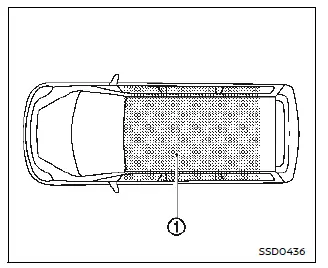
The Intelligent Key can only be used for starting the EV system when the Intelligent Key is within the specified operating range 1.
When the Intelligent Key battery is almost discharged or strong radio waves/noises are present near the operating location, the Intelligent Key system's operating range becomes narrower and may not function properly.
If the Intelligent Key is within the operating range, it is possible for anyone, even someone who does not carry the Intelligent Key, to push the power switch to start the EV system.
- The cargo room area is not included in the operating range but the Intelligent Key may function.
- If the Intelligent Key is placed on the instrument panel, inside the glove box, multi center storage or door pocket, the Intelligent Key may not function.
- If the Intelligent Key is placed near the door or window outside the vehicle, the Intelligent Key may function.
If the battery of the Intelligent Key is discharged, see "Intelligent Key battery discharge".
Power switch operation
CAUTION
- Do not leave the vehicle for extended periods of time when the power switch is in the ON position and the EV system is not running. This can discharge the battery.
- Use electrical accessories with the EV system running to avoid discharging the vehicle battery. If you must use accessories while the EV system is not running, do not use them for extended periods of time and do not use multiple electrical accessories at the same time.
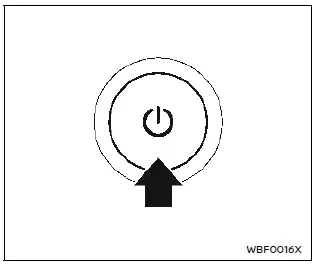
When the power switch is pushed without depressing the brake pedal, the power switch position will change as follows.
- once to change to ON.
- two times to change to OFF.
When the power switch cannot be switched to the OFF position, proceed as follows.
1. Push the park button on the shift lever to place the vehicle in the P (Park) position.
2. Push the power switch. The power switch position will change to the ON position.
3. Push the power switch again to the OFF position.
Power switch positions
ON
All the electrical power activate at this position.
The ON position has a battery saver feature that will place the power switch in the OFF position after a period of time under the following conditions:
- The power switch is in the ON position and the READY to drive indicator light is not illuminated.
- Vehicle is parked.
READY (Normal operating position)
This position turns on the EV system, electrical accessories and the vehicle can be driven.
OFF
The EV system is turned off in this position.
Auto ACC
Even when the power switch is in the OFF position, the Auto ACC function automatically switches to the state where electrical components such as the navigation system and door mirrors can be used (ACC state) under specific conditions. You can use the navigation system, door mirrors, etc. even after the EV system is stopped or before the power switch is turned ON.
The Auto ACC function is activated in the following cases.
- When the door is unlocked using the Intelligent Key function.
- When the power switch is placed in the OFF position.
The Auto ACC function will be stopped in the following cases.
- After a period of time have passed without operating the navigation system or audio system.
- After approximately 1 minute has passed since the EV system was stopped and the vehicle has been locked with the Intelligent Key function.
- After a period of time have passed since the driver's door is opened and then closed without locking the doors.
The Auto ACC function can be extended up to 30 minutes by operating the navigation system. If it is extended, other electrical components such as door mirrors can also be used. The ACC state cannot be extended by operating an electrical components other than the navigation system or audio system.
CAUTION
To prevent the 12V battery from discharging, use the electrical components (navigation system, power socket, etc.) with the EV system started.
Emergency EV system shut off
To shut off the EV system in an emergency situation while driving or when the Intelligent Key battery is discharged, perform the following procedure:
- Rapidly push the push-button power switch 3 consecutive times in less than 1.5 seconds, or
- Push and hold the push-button power switch for more than 2 seconds.
After EV system shut-off, open the door to return to the normal condition.
Intelligent Key battery discharge

If the battery of the Intelligent Key is discharged, or environmental conditions interfere with the Intelligent Key operation, start the EV (Electric Vehicle) system in the READY to drive mode according to the following procedure:
1. Push the park button to shift to the P (Park) position.
2. Firmly apply the foot brake.
3. Push the power switch.
4. Touch the power switch with the Intelligent Key as illustrated. (A chime will sound.)
5. Push the power switch while depressing the brake pedal within 10 seconds after the chime sounds. The power switch position changes to READY to drive.
After step 3 is performed, when the power switch is pushed without depressing the brake pedal, the power switch position will change to ON.
NOTE
- When the power switch is pushed to the ON position or READY to drive position by the above procedures, the "Key Battery Low" warning may appear (on the vehicle information display) even if the Intelligent Key is inside the vehicle. This is not a malfunction. To turn off the warning, touch the power switch with the Intelligent Key again.
- If the "Key Battery Low" warning appears, replace the battery as soon as possible.