EV (Electric Vehicle) unique information
- Meters and indicators
- Approaching Vehicle Sound for Pedestrians (VSP) system
Meters and indicators Nissan Ariya SUV
Basic information
Various meters, gauges and indicators related to the EV (Electric Vehicle) functions are displayed in the vehicle information display.
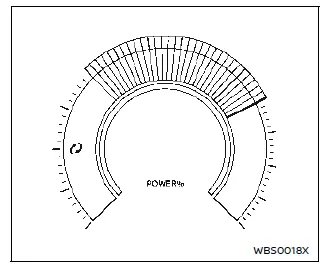
Vehicle information display
Power meter:
This meter displays the actual traction motor power consumption and the regenerative brake power provided to the Li-ion battery.
For additional information, see "Power meter".
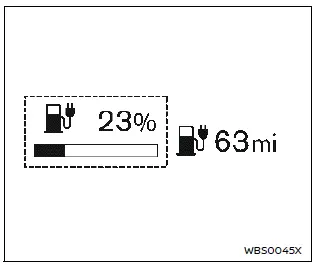
Estimated driving range:
This indicator displays the estimated driving range (calculated based on a program that accounts for current driving style and operational conditions) that can be driven before recharging is necessary.
For additional information, see "Estimated driving range".

Li-ion battery available charge gauge:
This indicator displays the available Li-ion battery power remaining to drive the vehicle.
For additional information, see "Li-ion battery available charge gauge".
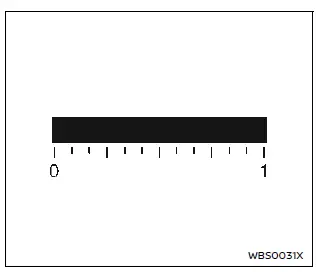
Li-ion battery capacity level gauge:
This gauge displays the available capacity of the Li-ion battery remaining to store power.
To check this gauge, select it in the trip computer menu. For additional information, see "Battery Capacity".
Other information:
The other EV unique information is displayed on the trip computer as well. For additional information, see "Trip computer".
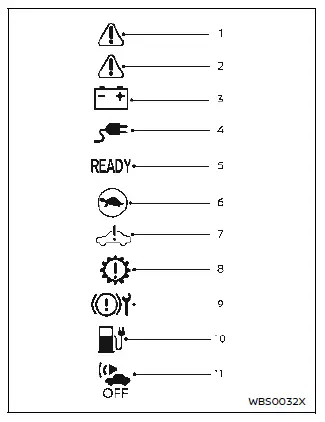
Warning and indicator lights
The EV system uses the following EV specific warning and indicator lights, located in the meter panel.
- Master warning light (red)
- Master warning light (yellow)
- 12-volt battery charge warning light
- Plug in indicator light
- READY to drive indicator light
- Power limitation indicator light
- EV system warning light
- Electric shift control system warning light
- Brake system warning light (yellow)
- Low battery charge warning light
- Approaching Vehicle Sound for Pedestrians (VSP) system off indicator light
For additional information, see "Warning lights, indicator lights and audible reminders".
Approaching Vehicle Sound for Pedestrians (VSP) system Nissan Ariya SUV

The Approaching Vehicle Sound for Pedestrians (VSP) system is a function that uses sound to alert pedestrians of the presence of the vehicle when it is being driven at a low speed.
When the vehicle starts to move, it produces a sound.
The sound stops when the vehicle speed is more than approximately 40 km/h while accelerating.
The sound starts when the vehicle speed is less than approximately 35 km/h while decelerating.
WARNING
- If the sound from the VSP system is not heard while driving, stop the vehicle in a safe and quiet location.
Open a window and then place the vehicle in the R (Reverse) position with the brake pedal firmly depressed. Check that the operating sound can be heard from the front of the vehicle.
- If the sound cannot be heard when the VSP system is operational, or the VSP OFF indicator light is illuminated, it is recommended that you visit a NISSAN certified ARIYA dealer immediately for inspection.
EV functions
EV (Electric Vehicle) screen
The EV (Electric Vehicle) screen allows you to use the following features: Available items may vary depending on models, specifications, software versions and conditions.
- Energy Usage
- Driving Range
- Charging Stations
- Charge Timer
- Climate Ctrl. Timer
- Battery Heater
How to show the screen:
Home screen → all app → second page → EV
Refer to the separate NissanConnect Owner's Manual.
EV unique function settings
The EV unique function settings allow you to use the following items:
Available setting items may vary depending on models, specifications, software versions and conditions.
- Battery & Power Alerts
- Charging Messages
- Map icons for charging stations
- Filter for Map Icons
- Autosave New Charging Stations
- Charging Availability
- Favorite Charging Locations
- Battery Heater
Home screen → Settings → EV
Refer to the separate NissanConnect Owner's Manual.