AM-FM electronic tuning radio - Operating the radio
GENERAL INFORMATION
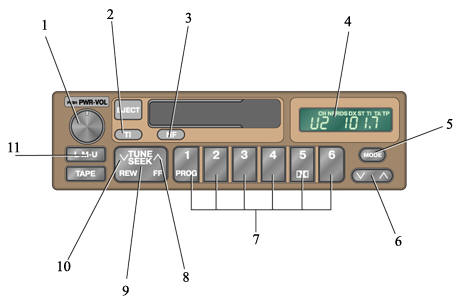
Radio
1. Volume control knob
2. Radio tuning and TI (traffic information) mode button
3. NF button for automatic RDS network search across the entire band
4. Display
5. Tone or balance selection button
6. Tone or balance adjustment button
7. Station selection buttons
8. Up-tuning side of the button
9. Station tuning button
10. Down-tuning side of the button
11. Radio power button and AM or FM selection button
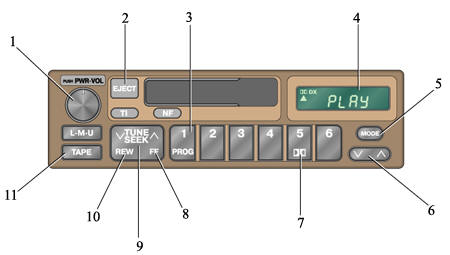
Cassette player
1. Volume control knob
2. Stop and eject button
3. Tape side selection button for playback
4. Display
5. Tone or balance selection button
6. Tone or balance adjustment button
7. Dolby noise reduction button
8. Fast-forward side of the button
9. Button for rewinding the cassette in both directions
10. Rewind side of the button
11. Cassette player power button
PROCEDURE
1. Turn on the radio by pressing the L.M.U. button, select stereo or monaural reception mode, or press the TI button to receive a traffic information station (refer to subsection 1.5.4). The L, M, or U symbol will appear on the display. The radio can also be turned on by pressing the "PWR.VOL" knob.
2. Adjust the volume by turning the "PWR.VOL" knob.
3. Tune to the desired station (refer to subsection 1.5.2, subsection 1.5.3).
4. When tuned to an FM station, the receiver will automatically switch to stereo reception mode. The ST indicator will appear on the display. If the signal is weak, the reception bandwidth will automatically narrow to reduce noise. If the signal is very weak, the receiver will automatically switch to monaural reception mode.
5. Adjust the tone and balance (refer to subsection 1.5.5, subsection 1.5.6).
6. To turn off the receiver, press the "PWR.VOL" knob.
Test yourself
A quick Nissan Sunny quiz: every answer comes with an explanation and a link to the manual page.