AM-FM electronic tuning radio - Operating the radio
GENERAL INFORMATION
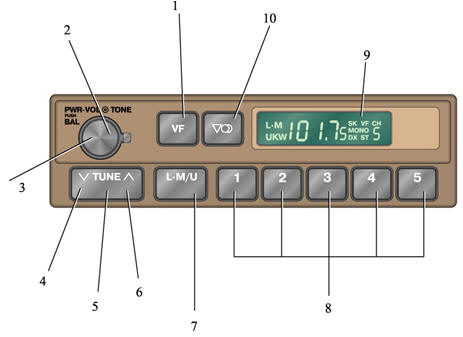
AM/FM Radio with Electronic Tuning
1. Auto-search button
2. Tone adjustment
3. Radio power switch, volume control and left/right speaker balance knob
4. Down-tuning button
5. Tuning button
6. Up-tuning button
7. AM or FM (UKW) mode selection button
8. Band selection button
9. Display
10. Stereo/mono selection button
PROCEDURE
1. Turn on the radio by rotating the "PWR.VOL" knob clockwise.
2. Adjust the volume by turning the "PWR.VOL" knob.
3. Tune to the desired station (refer to subsection 1.4.2, subsection 1.4.3).
4. To receive an FM station, switch to FM mode and select stereo or monaural reception mode.
If an FM stereo broadcast is received, the radio automatically switches to stereo reception and the ST symbol appears on the display. If the signal is weak, switch to monaural mode by pressing the corresponding button. The MONO symbol will appear on the display.
5. Adjust the tone and balance (refer to subsection 1.4.5, subsection 1.4.6).
6. To turn off the radio, rotate the "PWR.VOL" knob counterclockwise.
Test yourself
A quick Nissan Sunny quiz: every answer comes with an explanation and a link to the manual page.