Data List / Active Test
DATA LIST / ACTIVE TEST
DATA LIST
HINT:
The Techstream Data List allows you to read the values or status of switches, sensors, actuators and other components without removing any parts. This non-intrusive check can be very useful, since intermittent conditions or signals can be identified before parts or wiring are moved. Reading the Data List during troubleshooting saves time in diagnosis.
NOTICE:
In the table below, the values listed under "Normal Condition" are reference values. Do not determine whether a part is faulty based only on these reference values.
(a) Connect the Techstream to the DLC3.
(b) Turn the ignition switch to ON.
(c) Turn on the Techstream.
(d) Select the following menus: Body Electrical / Immobiliser, Engine / Data List.
(e) Read the Data List by following the instructions on the Techstream.
Body Electrical > Immobiliser > Data ListTester display | Item | Range | Normal Condition | Diagnostic Note |
|---|---|---|---|---|
D Door Courtesy SW |
Driver side door courtesy switch signal |
ON or OFF |
ON: Driver side door open OFF: Driver side door closed |
*1 |
Key SW |
Unlock warning switch signal |
ON or OFF |
ON: Key in ignition key cylinder OFF: No key in ignition key cylinder |
- |
IG SW |
Ignition switch signal |
ON or OFF |
ON: Ignition switch ON or engine started OFF: Ignition switch in ACC or OFF |
- |
Immobiliser |
Immobiliser system status |
Set or Unset |
Set: No key in ignition key cylinder, or 20 s have elapsed after the ignition switch was turned to ACC or OFF Unset: Key in ignition key cylinder |
- |
Response |
Transponder chip data |
NG or OK |
NG: Incorrect data OK: Correct data |
- |
Frame Error |
Transponder chip data |
NG or OK |
NG: Incorrect data OK: Correct data |
- |
Different Serial Number |
Transponder chip data |
NG or OK |
NG: Incorrect data OK: Correct data |
- |
Different Encrypt Code |
Transponder chip data |
NG or OK |
NG: Incorrect data OK: Correct data |
- |
Abnormal Status |
Transponder chip data |
NG or OK |
NG: Incorrect data OK: Correct data |
- |
Bcc Malfunction |
Transponder chip data |
NG or OK |
NG: Incorrect data transmission OK: Correct data transmission |
- |
Sub Key |
Secondary key ID code signal |
Reg or Unreg |
Reg: Registered secondary key ID code is sent Unreg: Non-matching secondary key ID code is sent |
*1 |
Master Key |
Main key ID code signal |
Reg or Unreg |
Reg: Registered main key ID code is sent Unreg: Non-matching main key ID code is sent |
- |
Transponder S-code |
Number of registered secondary keys |
min. 0, max. 15 |
Number of registered secondary keys |
- |
Transponder M-code |
Number of Registered Master Keys |
min. 0, max. 15 |
Number of Registered Master Keys |
- |
Reg Code Space Full |
Memory space available for registering key codes |
NOT FULL or FULL |
NOT FULL: Key code registration possible FULL: Key code registration not possible |
- |
+B |
Power source |
Break or Normal |
Break: Break in power supply Normal: Power supply normal |
- |
Antenna Coil Status |
Transponder Key Coil Status |
Normal or Fail |
Normal: Antenna coil normal Fail: Antenna coil malfunction |
- |
EEPROM Status |
EEPROM Status / OK or NG |
NG or OK |
NG: EEPROM malfunction OK: EEPROM normal |
- |
E/G Start Permission |
Engine start permitted |
NG or OK |
NG: Engine start not permitted OK: Engine start permitted |
- |
Immobi ECU Comm Spd |
Immobilizer ECU Communication Speed |
Unknown, 50bps, 200bps or No Res |
Unknown: ECU communication speed unknown 50bps: ECU communication speed 50 bits/s 200 bps: ECU communication speed 200 bits/s No Res: No communication response from ECU |
- |
The Number of DTCs |
Number of DTCs |
Min.: 0, Max.: 255 |
Number of Registered DTCs |
- |
- *1: Although the item is displayed on Techstream, it is not applicable to this vehicle.
HINT:
Actual vehicle data provided for reference.
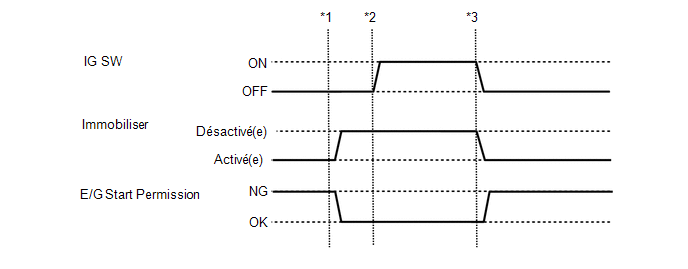
- *1: Insert the key into the ignition key cylinder and turn the ignition switch to ACC.
- *2: Turn the ignition switch ON.
- *3: Turn the ignition switch OFF and remove the key from the ignition key cylinder.
Tester display | Item | Range | Normal Condition | Diagnostic Note |
|---|---|---|---|---|
Immobiliser Fuel Cut |
Immobiliser fuel cut status |
ON or OFF |
- |
- |
ACTIVE TEST
HINT:
Using the Techstream to perform Active Tests allows relays, VSVs, actuators and other items to be operated without removing parts. This non-intrusive functional check can be very useful, because intermittent operation can be identified before parts or wiring are moved. Performing Active Tests at the start of troubleshooting saves time during diagnosis. Data List information can be displayed during Active Tests.
(a) Connect the Techstream to the DLC3.
(b) Turn the ignition switch to ON.
(c) Turn on the Techstream.
(d) Select the following menus: Body Electrical / Immobiliser / Active Test.
(e) Perform the Active Test by following the Techstream instructions.
Body Electrical > Immobiliser > Active TestTester display | Item | Control Range | Diagnostic Note |
|---|---|---|---|
Security Indicator |
Immobilizer Indicator |
ON / OFF |
- |