A new key cannot be registered
DESCRIPTION
If a new electronic key transmitter sub-assembly cannot be registered, a malfunction or radio wave interference is suspected in the certification ECU (smart key ECU assembly), the electronic key transmitter sub-assembly, the ID code box (immobiliser code ECU), the steering lock ECU (steering lock actuator or upper support assembly), or the electronic key and TPMS receiver assembly.
The procedure for registering another electronic key transmitter sub-assembly (without replacing parts) is called "additional key ID registration".
If additional registration is not possible, refer to "Additional key cannot be registered".
Click here
HINT:
If any of the following situations has occurred, all electronic key transmitter sub-assemblies must be registered:- The certification ECU (smart key ECU assembly) has been replaced.
- The certification ECU (smart key ECU assembly), the ID code box (immobiliser code ECU) and the steering lock ECU (steering lock actuator or upper support assembly) have been replaced.
WIRING DIAGRAM
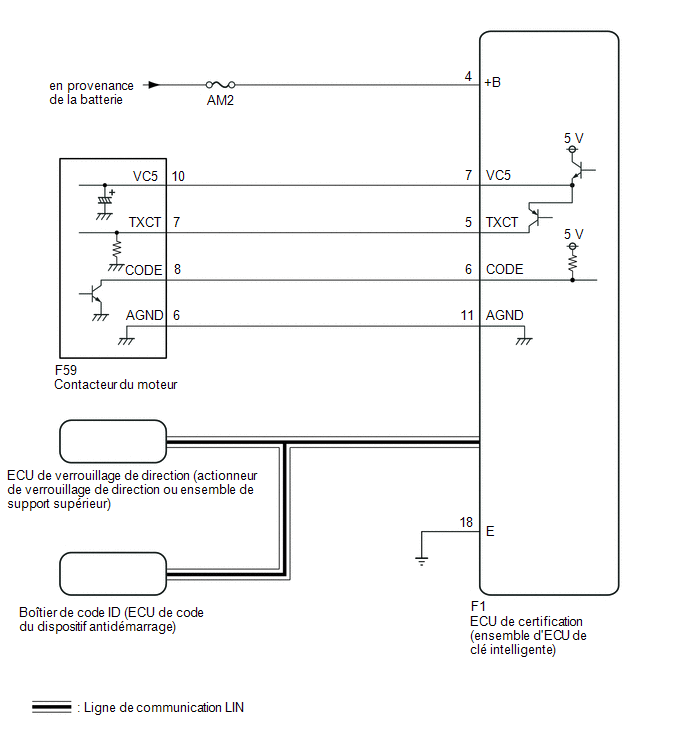
PRECAUTION / NOTICE / HINT
NOTICE:
- If an electronic key transmitter sub-assembly cannot be registered, confirm the procedure in the immobiliser system.
Click here
- A new registration mode can only be stored when no electronic key transmitter sub-assembly is registered in the memory of the certification ECU (smart key ECU assembly).
- The Smart Key System (for Access Function) uses a LIN communication system and a CAN communication system. Check the communication function by following the procedure described in HOW TO USE TROUBLESHOOTING MODE. Troubleshoot the Smart Key System (for Access Function) after confirming that the communication systems operate normally.
Click here
- While using the Techstream with the vehicle engine switch OFF, connect the Techstream to the DLC3 and turn a welcome light switch ON and OFF at intervals of no more than 1.5 seconds until communication between the Techstream and the vehicle starts. Then select the vehicle type in manual mode and enter the following menus: Body Electrical / Smart Key. While using the Techstream, regularly switch a welcome light switch between ON and OFF at intervals of no more than 1.5 seconds to maintain communication between the Techstream and the vehicle.
- Before replacing the electronic key transmitter sub-assembly, the certification ECU (smart key ECU assembly), the steering lock ECU (steering lock actuator or upper support assembly) or the ID code box (immobiliser code ECU), refer to the precautions.
- Check the fuses for the circuits related to this system before performing the following procedure.
- After repair, confirm that no DTCs are output.
PROCEDURE
CHECK WHETHER DTCs ARE OUTPUT
(a) Check the DTCs.
Body Electrical > Smart Key > Trouble CodesNOTICE:
If a malfunction occurs, make sure not to remove/install the battery in the vehicle before checking the DTCs.
OK:
No DTCs are output.
| NG |  |
GO TO DIAGNOSTIC TROUBLE CODE CHART |
|

READ VALUE USING TECHSTREAM (NUMBER OF REGISTERED KEY CODES)
(a) Connect the Techstream to the DLC3.
(b) Turn the engine switch to ON (IG).
(c) Turn on the Techstream.
(d) Select the following menu items: Body Electrical / Smart Key / Data List.
(e) Read the Data List by following the instructions on the Techstream.
Body Electrical > Smart Key > Data ListTester display | Item | Range | Normal Condition | Diagnostic Note |
|---|---|---|---|---|
Number of Registered Key Codes |
Number of registered electronic key transmitter sub-assemblies: |
0 à 8 |
Number of registered electronic key transmitter sub-assemblies: |
Up to 7 electronic key transmitter sub-assemblies can be registered. |
Number of Registered Key Codes
HINT:
A new certification ECU (smart key ECU assembly) will have no electronic key transmitter subassembly registered.
OK:
"0" is displayed on the Techstream screen.
| NG | |
REPLACE CERTIFICATION ECU (SMART KEY ECU ASSY) |
|
CHECK THE VALUE USING THE TECHSTREAM (OPERATION HISTORY)
(a) Connect the Techstream to the DLC3.
(b) Turn the engine switch to ON (IG).
(c) Turn on the Techstream.
(d) Select the following menus: Body Electrical / Smart Key / Utility / Operation History / Registration Function (Reason for Non-operation).
Body Electrical > Smart Key > UtilityOperation History
(e) Check the freeze frame data.
Registration Function (Reason for Non-operation):
Parameter Name | Detection Condition | Suspected Area | Proceed to |
|---|---|---|---|
Registration Mode Failure |
|
Certification ECU (Smart Key ECU Assy) |
A |
Vehicle ID Not Activated |
No vehicle ID is registered in the memory of the certification ECU (smart key ECU assembly). |
Certification ECU (Smart Key ECU Assy) |
B |
Maximum Key Registration |
When the maximum number of electronic key transmitter subassemblies has already been registered, a registration request is sent. |
|
C |
ID Code Box Error |
A registration request is sent, but it is not certain that an ID code box was supplied with the vehicle. |
|
D |
Vehicle Speed Excessive (Applies only if registration fails even though the vehicle is stationary. First make sure the vehicle is stationary.) |
A registration request is output when the vehicle speed is 5 km/h or higher. |
Certification ECU (Smart Key ECU Assy) |
E |
No Response from ECU |
The steering lock ECU (steering lock actuator or upper support assembly) was not connected. |
|
F |
L Code Verification Error |
The L codes stored in the ID code box (immobiliser code ECU) and the steering lock ECU (steering lock actuator or upper support assembly) did not match. |
|
G |
L Code OK, S Code NG |
L code verification succeeded, but the S code stored in the ID code box (immobiliser code ECU) and the certification ECU (smart key ECU assembly) did not match. |
|
C |
Key Verification: Maximum Number |
The number of electronic key transmitter subassemblies registered in the ID code box (immobiliser code ECU) exceeded 7. |
ID Code Box (Immobilizer ECU) |
H |
Key Verification: Abnormal Amplifier |
Malfunction in the immobiliser amplifier, such as a short to ground. |
|
I |
Key Verification: Read Error |
Although a registered electronic key transmitter subassembly was held near the engine switch, immobiliser system certification failed. |
|
J |
Key Not Verified |
Although all registered electronic key transmitter subassemblies were held near the engine switch, registration of the electronic key transmitter subassembly is not possible because immobiliser system certification failed. |
|
K |
Transponder Key Amplifier Error |
Malfunction in the immobiliser amplifier, such as a short to ground. |
|
I |
New Key Registration Error |
Although an unregistered electronic key transmitter subassembly was held near the engine switch, registration of the electronic key transmitter subassembly is not possible because immobiliser system certification failed. |
|
L |
New Vehicle Key ID Code Error |
Although an unregistered electronic key transmitter subassembly was held near the engine switch, registration of the electronic key transmitter subassembly is not possible because the vehicle identification code was not registered correctly. |
|
L |
New Key Registration Failure |
After immobiliser certification succeeded, the elapsed time before confirmation of successful smart recognition or a registration cancellation request is transmitted. |
|
L |
New Key Already Registered |
Although a registered electronic key transmitter subassembly was held near the engine switch, the elapsed time before a registration cancellation request was transmitted. |
Certification ECU (Smart Key ECU Assy) |
M |
New Key ID Code Error |
Registration of the electronic key transmitter subassembly is not possible because the certification ECU (smart key ECU assembly) was unable to store the electronic key transmitter subassembly information in the EEPROM. |
Certification ECU (Smart Key ECU Assy) |
B |
No Response from L/S Code Registration |
The certification ECU (smart key ECU assembly), ID code box (immobiliser code ECU) or steering lock ECU (steering lock actuator or upper support assembly) was not connected. |
|
F |
S Code Verification NG |
The S code could not be stored by the certification ECU (smart key ECU assembly) or the ID code box (immobiliser code ECU). |
|
C |
L Code Verification NG |
The L code could not be registered by the steering lock ECU (steering lock actuator or upper support assembly) or the ID code box (immobiliser code ECU). |
|
G |
ECU ID Verification Error |
The code transmitted by the ID code box (immobiliser code ECU) when the S code is registered does not match the code of the certification ECU (smart key ECU assembly). |
|
C |
Key Number Write Error |
The certification ECU (smart key ECU assembly) could not store the number of electronic key transmitter subassemblies in the flash electrically erasable programmable read-only memory. |
Certification ECU (Smart Key ECU Assy) |
B |
ID Code Box Write Error |
The certification ECU (smart key ECU assembly) could not store the information about supplying an ID code box to the vehicle's flash electrically erasable programmable read-only memory. |
Certification ECU (Smart Key ECU Assy) |
B |
| B | |
REPLACE CERTIFICATION ECU (SMART KEY ECU ASSY) |
| C | |
GO TO STEP 5 |
| D | |
CHECK DTC B2789 |
| E | |
GO TO STEP 6 |
| F | |
CHECK DTC B2785 |
| G | |
GO TO STEP 7 |
| H | |
REPLACE ID CODE BOX (IMMOBILISER CODE ECU) |
| I | |
CHECK DTC B278A OR B2784 |
| J | |
GO TO STEP 9 |
| K | |
GO TO STEP 13 |
| L | |
GO TO STEP 15 |
| M | |
KEY REGISTRATION FAILED. CHECK THE KEY. |
|
INSPECT REGISTRATION MODE
(a) Make sure that another mode or another registration mode is not selected.
OK:
Another mode or another registration mode is selected.
HINT:
If a mode has been selected, it must be turned off.
| OK | |
REPLACE CERTIFICATION ECU (SMART KEY ECU ASSY) |
| NG | |
PERFORM REGISTRATION AGAIN |
REPLACE CERTIFICATION ECU (SMART KEY ECU ASSY)
(a) Replace the Certification ECU (Smart Key ECU Assembly) with a new one and register the Electronic Key Transmitter Assemblies.
Click here
HINT:
Refer to Registration.
Click here
OK:
All Electronic Key Transmitter Assemblies were registered to the new Certification ECU (Smart Key ECU Assembly).
| OK | |
END (CERTIFICATION ECU (SMART KEY SYSTEM ECU ASSEMBLY) WAS FAULTY) |
| NG | |
REPLACE ID CODE BOX (IMMOBILISER CODE ECU) |
READ THE VALUE USING TECHSTREAM (VEHICLE SPEED METER)
(a) Connect the Techstream to the DLC3.
(b) Turn the engine switch to ON (IG).
(c) Turn on the Techstream.
(d) Select the following menus: Body Electrical / Combination Meter / Data List.
(e) Read the Data List by following the instructions on the Techstream.
Body Electrical > Combination Meter > Data ListTester display | Item | Range | Normal Condition | Diagnostic Note |
|---|---|---|---|---|
Vehicle Speed Meter |
Vehicle speed |
Min.: 0 km/h, Max.: 255 km/h |
Almost identical to the actual vehicle speed |
- |
Vehicle Speed Meter
OK:
"0 km/h" is displayed when the vehicle is stopped.
| OK | |
REPLACE CERTIFICATION ECU (SMART KEY ECU ASSY) |
| NG | |
GO TO METER/GAUGE SYSTEM |
REPLACE CERTIFICATION ECU (SMART KEY ECU ASSY)
(a) Replace the Certification ECU (Smart Key ECU Assembly) with a new one and register the Electronic Key Transmitter Assemblies.
Click here
HINT:
Refer to Registration.
Click here
OK:
All Electronic Key Transmitter Assemblies were registered to the new Certification ECU (Smart Key ECU Assembly).
| OK | |
END (CERTIFICATION ECU (SMART KEY SYSTEM ECU ASSEMBLY) WAS FAULTY) |
|
REPLACE STEERING LOCK ECU (STEERING LOCK ACTUATOR OR UPPER SUPPORT ASSEMBLY)
(a) Temporarily replace the Steering Lock ECU (Steering Lock Actuator or Upper Support Assembly) with a new one and register the Electronic Key Transmitter Assemblies.
Click here
HINT:
Refer to Registration.
Click here
OK:
All Electronic Key Transmitter Assemblies were registered to the new Steering Lock ECU (Steering Lock Actuator or Upper Support Assembly).
| OK | |
END (THE STEERING LOCK ECU (STEERING LOCK ACTUATOR OR UPPER SUPPORT ASSEMBLY) WAS FAULTY) |
| NG | |
REPLACE ID CODE BOX (IMMOBILISER CODE ECU) |
CHECK ELECTRONIC KEY TRANSMITTER ASSEMBLY
(a) Make sure that a registered Electronic Key Transmitter Assembly is being used.
OK:
A registered Electronic Key Transmitter Assembly is being used.
| NG | |
USE A REGISTERED ELECTRONIC KEY TRANSMITTER ASSEMBLY AND PERFORM REGISTRATION AGAIN |
|
CHECK THE NUMBER OF REGISTERED ELECTRONIC KEY TRANSMITTER ASSEMBLIES
(a) Check the number of registered Electronic Key Transmitter Assemblies.
Result:
Result | Proceed to |
|---|---|
Only one Electronic Key Transmitter Assembly is registered. |
A |
2 or more Electronic Key Transmitter Assemblies are registered. |
B |
| A | |
GO TO STEP 12 |
|
REGISTRATION
(a) Register the Electronic Key Transmitter Assemblies again using different order combinations.
HINT:
Refer to Registration.
Click here
HINT:
If at least 2 Electronic Key Transmitter Assemblies are detected, make sure that the number of order combinations is the same as the number of assemblies, so that the Electronic Key Transmitter Assemblies can be verified.
Example: When 3 electronic key transmitter sub-assemblies (A, B and C) are registered.Combination | Order* |
|---|---|
1 |
A → B → C |
2 |
B → C→ A |
3 |
C → A → B |
- *: Except for the first Electronic Key Transmitter Assembly, the other assemblies can be verified in any order.
OK:
"Key Verification: Read Error" is not displayed.
| OK | |
REPLACE THE ELECTRONIC KEY TRANSMITTER ASSEMBLY (ELECTRONIC KEY TRANSMITTER ASSEMBLY THAT WAS KEPT WHEN "Key Verification: Read Error" WAS FAULTY IS DISPLAYED) |
|
REPLACE CERTIFICATION ECU (SMART KEY ECU ASSY)
(a) Replace the Certification ECU (Smart Key ECU Assembly) with a new one and register the Electronic Key Transmitter Assemblies.
Click here
HINT:
Refer to Registration.
Click here
OK:
All Electronic Key Transmitter Assemblies were registered to the new Certification ECU (Smart Key ECU Assembly).
| OK | |
END (CERTIFICATION ECU (SMART KEY SYSTEM ECU ASSEMBLY) WAS FAULTY) |
| NG | |
CHECK ELECTRONIC KEY TRANSMITTER ASSEMBLY |
CHECK ELECTRONIC KEY TRANSMITTER ASSEMBLY
(a) Make sure that all registered Electronic Key Transmitter Assemblies are available.
OK:
No registered Electronic Key Transmitter Assembly is missing.
| NG | |
DELETE ALL REGISTERED ELECTRONIC KEY TRANSMITTERS EXCEPT ONE, THEN REGISTER THE REMAINING ELECTRONIC KEY TRANSMITTERS |
|
REGISTRATION
(a) Register the Electronic Key Transmitter Assemblies using different order combinations.
HINT:
Refer to Registration.
Click here
HINT:
If at least 2 Electronic Key Transmitter Assemblies are detected, make sure that the number of order combinations is the same as the number of assemblies, so that the Electronic Key Transmitter Assemblies can be verified.
Example: When 3 electronic key transmitter sub-assemblies (A, B and C) are registered.Combination | Order* |
|---|---|
1 |
A → B → C |
2 |
B → C→ A |
3 |
C → A → B |
- *: Except for the first Electronic Key Transmitter Assembly, the other assemblies can be verified in any order.
OK:
"Key Verification: Read Error" is not displayed.
| OK | |
REPLACE CERTIFICATION ECU (SMART KEY ECU ASSY) |
| NG | |
REPLACE THE ELECTRONIC KEY TRANSMITTER ASSEMBLY (ELECTRONIC KEY TRANSMITTER ASSEMBLY THAT WAS KEPT WHEN "Key Verification: Read Error" WAS FAULTY IS DISPLAYED) |
REGISTRATION
(a) Register the ID using an unregistered Electronic Key Transmitter Assembly.
HINT:
Refer to Registration.
Click here
OK:
The key ID can be registered.
| OK | |
END (THE ELECTRONIC KEY TRANSMITTER WAS FAULTY) |
| NG | |
REPLACE CERTIFICATION ECU (SMART KEY ECU ASSY) |