Information Call, Roadside Assistance Call and Emergency Call Service
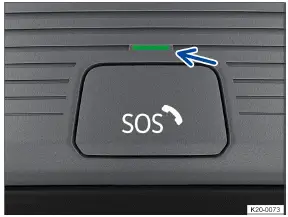
Fig. 1 Located on the roof console: Emergency Call Service button (behind a button cover) and indicator light.

Fig. 2 Located on the roof console: Emergency Call Service button.

Fig. 3 In the overhead console: Controls for the information call and roadside assistance call.
 Information call.
 Roadside assistance call.
The control in the roof console → fig. 1 , → fig. 2 , → fig. 3 can be used for voice services, depending on the Volkswagen ID.3 equipment and country of use. If the Emergency Call Service is available in the service portfolio for the vehicle, the Emergency Call Service is activated for a limited time as standard. The required connection is produced by a control module installed by the manufacturer.
Take note of the additional information about We Connect .
Indicator lights for the Emergency Call Service
The → fig. 1 indicator light (arrow) is located in the control panel. The indicator light comes on in different colors and light patterns depending on the Volkswagen ID.3 vehicle operating status of the Emergency Call Service:
 The indicator light does not come on: the Emergency Call Service is deactivated or not available.
 The red warning light flashes after the ignition is switched on: System error. The Emergency Call Service is deactivated.
 The red indicator light comes on and remains on: system error. The Emergency Call Service is limited or not available.
 The green indicator light comes on: The Emergency Call Service is available and the Volkswagen ID.3 vehicle system is ready for use.
 The indicator light blinks green: there is a call in progress.
Information call
With an information call, a call can be made to Volkswagen Customer Care.
The information call is only available in certain sales regions.
The contact partner will communicate in the language that is set in the ID.3's Infotainment system.
The information call can be executed out if the driver seat is occupied or the Volkswagen ID.3 ignition is switched on.
The information call can be manually executed with the control panel in the roof console or the function key in the telephone menu of the Infotainment system.
Roadside assistance call
If you break down, you can contact an authorized Volkswagen dealer or authorized Volkswagen Service Facility for assistance with the roadside assistance call.
Some Volkswagen ID.3 vehicle data, e.g. its current location, is transferred in parallel to the voice call.
The contact person will communicate in the language of the country in which the vehicle was registered withW e Connect.
If the ID.3 vehicle has not yet been registered with We Connect, the contact person will communicate in the language of the country for which the vehicle was produced.
Roadside Call Assist can be executed out if the driver seat is occupied or the Volkswagen ID.3 vehicle ignition is switched on.
Roadside Call Assist can be manually executed with the control panel in the roof console or the function key in the telephone menu of the Infotainment system.
Emergency Call Service
Using the Emergency Call Service, assistance can be organized as quickly as possible in dangerous situations.
When the Emergency Call Service is initiated, a connection will be established with the Volkswagen emergency call center.
If an emergency call is triggered manually or by a collision with airbag deployment or safety belt pretensioner deployment, data that is relevant to the emergency call, such as the Volkswagen ID.3's current location, is automatically transmitted .
The contact partner will communicate in the language that is set in the vehicle's Infotainment system. If this language is not available at the current emergency call location, English will be used.
To ensure the system functions correctly after a severe accident, additional components are installed at the factory, such as an emergency call microphone, emergency call speaker, and an integrated battery that is separate from the Volkswagen ID.3 vehicle electrical system.
The Emergency Call Service can be permanently deactivated by an authorized Volkswagen dealer or authorized Volkswagen Service Facility. Volkswagen recommends contacting an authorized Volkswagen dealer or authorized Volkswagen Service Facility.
If the legally required eCall Emergency System is available in the Volkswagen ID.3, the Emergency Call Service can be deactivated in the Infotainment system via the portal and app or by stopping data transmission. The legally required eCall Emergency System, if it is available in the vehicle, cannot be switched off or deactivated (→ Manage services) .
WARNING
The following conditions may restrict or prevent a manual or automatic emergency call:
The emergency call location is in an area with no cell phone and satellite reception, or insufficient reception.
You are in a location where there is sufficient mobile phone and satellite reception, but the telecommunications provider's mobile communications network is unavailable. In this case, the emergency call, if available in the Volkswagen ID.3, is routed to the legally required eCall Emergency System.
The Emergency Call Service is not permitted by law in some countries.
There is no valid license for the use of the Emergency Call Service.
The Volkswagen ID.3 vehicle components required for manual or automatic emergency calls are damaged or do not have sufficient power.
The Emergency Call Service has been deactivated via the portal or app. In this case, the emergency call, if available in the Volkswagen ID.3 vehicle, is routed to the legally required eCall Emergency System.
The Emergency Call Service has been deactivated by disabling of data transmission. In this case, the emergency call, if available in the vehicle, is routed to the legally required eCall Emergency System. If the legally required eCall Emergency System cannot perform its function for technical reasons, the Emergency Call Service is automatically reactivated.
The Volkswagen ID.3's ignition is not switched on.
Triggering an emergency call manually
If fitted, press on the button cover briefly → fig. 1 , and fold the cover downward.
Press the emergency call button → fig. 2 until the green indicator light starts to flash.
The emergency call will be triggered and a voice call will be made to the Volkswagen emergency call center.
If you pressed the emergency call button by mistake, cancel the emergency call immediately:
Press the emergency call button again until the indicator light remains green.
Only press the emergency call button in an emergency → fig. 2 .
Automatic emergency call
The automatic emergency call is only triggered when the ignition is on.
A call will automatically be made to the Volkswagen emergency call center immediately after the airbags or safety belt pretensioners deploy. The automatic emergency call cannot be stopped by pressing the emergency call button → fig. 2 .
If questions from the Volkswagen emergency call center are not answered, rescue operations will be initiated automatically.