Unlocking or locking using Keyless Access
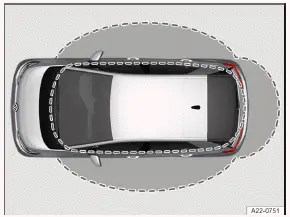
Fig. 1 Keyless Access: sensor range.

Fig. 2 In door handle: sensors.
Sensor surface on the inside of the door handle.
Sensor surface on the outside of the door handle.
Configuring Keyless Access
The behavior of Keyless Access can be set in the Volkswagen ID.3 Vehicle menu in the Infotainment system.
If the Keyless Access function is deactivated, it may be subject to functional limitations.
Unlocking the vehicle
Touch the sensor on the inside of the door handle→ fig. 2 (A) . All turn signals will flash twice.
If the sensor is touched twice, the entire vehicle will be unlocked.
Unlocking the vehicle upon approach
The vehicle can be unlocked upon approach. To do so, the function must be activated in the Infotainment system and the vehicle key must be within the sensor range of the Volkswagen ID.3 vehicle.
If the vehicle key is detected within the range of any of the sensors→ fig. 1 , the vehicle is unlocked. All turn signals will flash twice.
If the vehicle is not unlocked for a long period of time, the "Unlocking the vehicle upon approach" function is deactivated. The function is reactivated the next time the vehicle is locked.
If single door unlocking is activated in the central locking settings in the Infotainment system, this may restrict the "Unlocking the vehicle upon approach" function.
Locking the vehicle
Park the vehicle.
Touch the sensor on the outside of the door handle→ fig. 2 (B) .
All turn signals will flash once.
The unlock function is deactivated for several seconds so that you can check if the Volkswagen ID.3 vehicle locked correctly.
Unlocking the trunk lid
If the vehicle is locked and a vehicle key is within the trunk lid sensor range, the trunk lid will unlock automatically when opened. After closing, the trunk lid will lock again.
Please note: If Central locking for all doors and Keyless Access unlocking upon approach are activated in the Infotainment system, the vehicle remains unlocked after opening and closing the trunk lid. The vehicle must be actively locked.
Deactivating Keyless Access temporarily
The Keyless Access with push-button start unlocking function can be temporarily deactivated.
Lock the Volkswagen ID.3 vehicle with the
 button on the vehicle key.
Within five seconds of locking the vehicle, touch the sensor on the outside of the door handle once→ fig. 2 (B) .
Do not grasp the door handle during this process.
Keyless Access is now temporarily deactivated.
To check that it has actually been deactivated, wait at least 10 seconds and then pull on the door handle.
The door should not open.
The next time the vehicle is unlocked, you must use the electronic Volkswagen ID.3 vehicle key. Keyless Access will be reactivated the next time the vehicle is unlocked.
Deactivating Keyless Access permanently
Keyless Access can also be deactivated permanently in the Infotainment system.
Troubleshooting
If Keyless Access is not working
The sensor function may be impaired if the sensor is dirty.
Clean the sensors.
If all turn signals flash four times
The vehicle key that was last used is still in the Volkswagen ID.3 vehicle.
Remove the key and lock the vehicle.
Automatic sensor deactivation
The sensors will deactivate automatically under the following conditions:
If the vehicle is not unlocked or locked for a long period of time
If a sensor is triggered too frequently
Reactivating the sensor pads:
Unlock the vehicle using the
 button on the vehicle key.
 Valid vehicle key cannot be detected
The yellow indicator light turns on. A message will also appear in the instrument cluster display.
The vehicle key is no longer in the vehicle or within range of the sensors.
Do not end drive-ready mode.
Bring the vehicle key back into the vehicle or within range of the sensors.
If the problem persists, contact an authorized Volkswagen dealer or authorized Volkswagen Service Facility.
Volkswagen recommends contacting an authorized Volkswagen dealer or authorized Volkswagen Service Facility.
NOTICE
Strong streams of water or vapor could activate the sensors in the door handles if a valid vehicle key is located near the Volkswagen ID.3 vehicle. This may cause the windows to open and moisture may enter the vehicle interior. This could lead to damage to the Volkswagen ID.3 interior.
Never direct the jet of a high pressure cleaner or a steam jet directly towards the sensors in the door handles.
If at least one window is open and the sensors in one door handle are permanently activated, then all windows will close.
If the Keyless faulty. message appears in the ID. cockpit, there may be a malfunction in Keyless Access with push-button start. Contact an authorized Volkswagen dealer or authorized Volkswagen Service Facility.
Volkswagen recommends contacting an authorized Volkswagen dealer or authorized Volkswagen Service Facility.
The Keyless Access with push-button start may not function correctly if another signal, e.g. from a cell phone in the immediate vicinity, interferes with the vehicle key or if the vehicle key is covered by an object, such as a metal case. If there is no remote control vehicle key in the vehicle or the key is not detected, a corresponding message appears in the ID. cockpit.
Introduction
The doors can be manually locked and in some cases unlocked, for example if the vehicle key or the central locking system is malfunctioning.
The central locking system allows you to unlock and lock all doors, the trunk lid, and the battery charging flap from one location.
The Volkswagen ID.3 can be locked when the ignition is switched off or if the driver has exited the vehicle when the vehicle's drive system has been deactivated.
An image in the ID. cockpit indicates if one or more doors are not closed correctly.
 Do not continue driving!
Safely park the Volkswagen ID.3 vehicle, if necessary.
Open the respective door and close it again.
The image is also displayed when the ignition is switched off, and it turns off several seconds after the doors are closed and the vehicle has been locked.
WARNING
If a door is not closed correctly, it can open suddenly while driving and cause serious or fatal injuries.
Stop immediately and close the door.
When closing the door, make sure it engages securely and completely. When closed, the door must be flush with the areas of the vehicle body that are around the door.
WARNING
When the door is being held open by the door arrester, it may close by itself in high winds or on inclines, which can cause serious injuries.
Always hold the door handle firmly when opening and closing the door.
WARNING
Opening and closing the doors and trunk lid without due care can be dangerous and result in serious injuries.
Do not open or close the doors and trunk lid if anyone is in the way.
WARNING
The central locking system locks all the doors. In case of an emergency or accident, locked doors can make it more difficult for first responders to access the Volkswagen ID.3 interior. When the vehicle is locked from the outside, the doors and power windows cannot be opened from the inside. There is a risk of serious or fatal injuries.
Never leave children, people requiring assistance or animals unattended in the vehicle.
WARNING
All doors can be locked from the inside using the central locking button. Otherwise, children, people requiring assistance or animals could be locked inside the Volkswagen ID.3. In an emergency, they may not be able to exit the vehicle without assistance or help themselves. Otherwise, they may be subjected to very high or low temperatures. There is a risk of serious or fatal injuries.
Never leave children, people requiring assistance or animals unattended in the vehicle.
NOTICE
Removing caps without due care may result in damage to the Volkswagen ID.3 vehicle.
When using the emergency locking or emergency unlocking feature, remove and reinstall the parts carefully and correctly.
When the vehicle is locked from the inside, it reduces the risk of opening the doors unintentionally and of unauthorized people entering the vehicle.
People locked inside the vehicle can unlock the doors in an emergency by firmly pulling the door opening lever twice. To do so, you must pull beyond a noticeable resistance.
- Indicator light in the driver's door
- Control for central locking
- Locking the front passenger door and rear doors in an emergency
Indicator light in the driver's door
The indicator light for the central locking system is located in the driver's door.
The indicator light shows the status of the central locking system for around 30 seconds after the Volkswagen ID.3 vehicle is locked.
The red LED light blinks at short intervals for around 2 seconds.
The status of the central locking system is then displayed for around 28 seconds:
Vehicles with SAFELOCK
If the red LED light blinks at long intervals, the vehicle is locked with SAFELOCK.
If the red LED light does not come on, the vehicle is locked, but without SAFELOCK.
Vehicles without SAFELOCK
If the red LED light blinks at long intervals, the Volkswagen ID.3 vehicle is locked.
After around 30 seconds, the LED light blinks at slow intervals.
Special conditions
If the red LED light comes on continuously, there is a fault in the central locking system or the anti-theft alarm system.
Automatic locking and unlocking
Depending on how your Volkswagen ID.3 vehicle is equipped, settings for the central locking can be configured in theV ehicle settings menu in the Infotainment system.
Automatic locking (Auto Lock)
The vehicle locks automatically at speeds of about 15 km/h or higher. If the vehicle is locked, the  indicator light will turn yellow in the central locking button.
Automatic unlocking (Auto Unlock)
If one of the following conditions apply, all doors and the trunk lid will unlock automatically:
If the electronic parking brake is switched on and the ignition is switched off.
Or: if the door handle has been pulled. This applies at speeds up to 15 km/h.
Or: if airbags have deployed during a collision.
The Auto Unlock function makes it possible for first responders to access the inside of the Volkswagen ID.3 vehicle.
Control for central locking
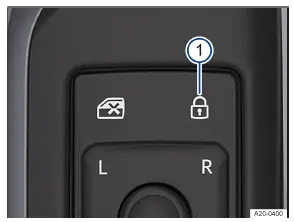
Fig. 1 In the driver door: Control for central locking.
Indicator light in the control panel for central locking.
Depending on the country, the control for central locking may also be located on the front passenger door.
If the Volkswagen ID.3 vehicle is locked from the outside with the vehicle key, the control for central locking is not activated.
If the vehicle is locked from the inside using the control for central locking, then:
The yellow indicator light in the control comes on if all the doors are shut and locked→ fig. 1 (1) .
The anti-theft alarm system will not be activated (→ Anti-theft alarm system) .
The doors can be opened from the inside by pulling the door handle. The indicator light  in the control turns off.
The unopened doors and the trunk lid will remain locked and cannot be opened from the outside.
The driver's door will not lock if it is open.
Locking the front passenger door and rear doors in an emergency
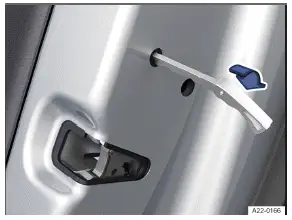
Fig. 1 In the front edge of a door: locking of the vehicle in an emergency with the emergency key (version 1).
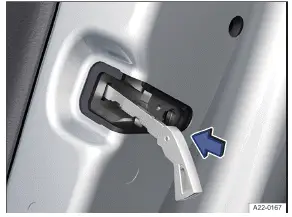
Fig. 2 In the front edge of a door: locking of the vehicle in an emergency with the emergency key (version 2).
If the door locking mechanism does not work, the front passenger door and the rear doors must each be locked manually. The anti-theft alarm system is not activated when this happens (→ Anti-theft alarm system) .
Open the door.
If available, remove the rubber seal
 in the front edge of the door → fig. 1 .
Insert the kit bit or emergency key in the vertical slot and turn or press→ fig. 2 .
If available, secure the rubber seal again.
Check that the door is locked.
Have the Volkswagen ID.3 vehicle checked immediately by a suitably qualified professional. Volkswagen recommends contacting an authorized Volkswagen dealer or authorized Volkswagen Service Facility.
If a door is locked manually it will unlock again when the vehicle is unlocked or if that door is opened from the inside.