Operating the windshield wiper lever
In this manual: Operating the windshield wiper lever
About this Owner's Manual — 1Illustrated index — 1Symbols in the instrument cluster — 1Warning and information texts — 1Introduction to the instrument cluster — 1ID. Light — 1Service menu/ Service display — 1Limits of the Driver Alert System — 1Correct seating position — 1Automatic safety belt retractor, safety belt pretensioner, safety belt load limiter — 1Indicator light — 1Installation locations and deployment zones of the airbags — 1Switching the Front Passenger's Front Airbag On and Off — 1Types of child restraints — 1Securing yourself and the vehicle — 1Emergency equipment — 1Information Call, Roadside Assistance Call and Emergency Call Service — 1Troubleshooting — 1Legally required eCall Emergency System — 1Vehicle key functions — 1Unlocking or locking using Keyless Access — 1Child safety lock — 1Anti-theft alarm system — 1Interior monitoring and towing protection — 1Opening and closing the trunk lid — 1Opening and closing the windows — 1Power window pinch protection — 1Adjusting the steering wheel position — 1Manually adjusting front seats — 1Adjusting the head restraints — 1Removing and installing the head restraints — 1Center armrest — 1Memory function — 1Massage feature — 1Switching the turn signals on and off — 1Switching the lights on and off — 1Switching the high beam headlights on and off — 1Switching the poor weather lights on and off — 1Switching on and off the rear fog light — 1Switching the parking light on and off — 1Entry and exit lighting (orientation lighting) — 1Headlight range control — 1Interior/reading lights, ambient lighting — 1Operating the windshield wiper lever — 1Rain/light sensor — 1General safety precautions — 1Overview of the Climatronic — 1Overview of seat heating — 1Operating the stationary air conditioning — 1Programming the stationary air conditioning — 1Functions of the electric drivetrain — 1Steering information — 1Information on the pedals — 1Information on the brakes — 1Switching the ignition on and off — 1Activating the vehicle's drive system — 1Exiting a vehicle while the vehicle's drive system is active — 1Deactivating the vehicle's drive system — 1Driving mode selector — 1Brake energy recuperation — 1Selecting the driving mode — 1Standard behavior of the driving mode and the vehicle systems — 1Eco tips — 1Operating the vehicle in different countries and continents — 1Limits of the sensor system — 1Operating the cruise control system — 1Operating the speed limiter — 1System Limitations of the Predictive Control — 1Driving with predictive control — 1Eco assist — 1Special driving situations — 1System Limitations of ACC — 1Switching ACC on and off — 1Adjusting the ACC settings — 1System Limitations of Predictive Cruise Control — 1Driving with predictive cruise control — 1Warning levels and braking support — 1System Limitations of Front Assist — 1Oncoming vehicle braking when turning — 1Lane Assist system limitations — 1Driving with Lane Assist — 1Operating Travel Assist — 1Using assisted lane changing — 1Driving with Emergency Assist — 1Side Assist system limitations — 1Driving with Side Assist — 1Parking — 1Electronic parking brake — 1Auto Hold — 1Safety instructions — 1Automatic braking intervention — 1Switching Park Distance Control (PDC) on and off — 1Parking (Rear View Camera system with parking mode selection) — 1Changing the camera perspective — 1Searching for parking spaces — 1Calibrating the parking process — 1Displaying and editing parking spaces — 1Driving into or out of a parking space — 1Rear Traffic Alert — 1Information about braking assistance systems — 1Switching ASR Sport on and off — 1Sockets in the vehicle — 1Cyber security — 1Downloading and installing an Over-the-Air Update — 1V2X limitations — 1Activating and deactivating V2X — 1Traffic hazard alert — 1USB port — 1Bluetooth interface — 1Setting up the Internet connection — 1Activating and deactivating a Wi-Fi hotspot — 1Apple CarPlay — 1Android Auto — 1MirrorLink — 1Introduction to online services — 1Viewing and enabling functions — 1Safety instructions — 1Overview of Infotainment system — 1Brands, licenses, copyright — 1Functions and radio symbols — 1Setting a 360º range display and Electric Vehicle Route Planner — 1Stowing luggage and cargo — 1Mounting the bicycle rack mount — 1Information on the roof rack — 1Warning signs for the high-voltage system — 1Handling the high-voltage battery — 1Charging — 1Placement — 1Information on bulb replacement — 1Replacing bulbs in LED headlights — 1Fuses in the hood space — 1Ground jump-start point — 1Instructions for towing — 1Safety precautions for working in the hood space — 1Preparing the vehicle for work in the hood space — 1Operating fluids and operating equipment — 1Charging, replacing, disconnecting, or connecting the 12 V vehicle battery — 1Handling tires — 1Preparing Your Vehicle — 1Maintenance procedures and digital maintenance schedule — 1Information about operating conditions — 1Scope of service — 1Vehicle care information — 1Washing the vehicle — 1Accessories and replacement parts — 1Sensors and Cameras — 1Repairs and technical modifications — 1Airbag system repairs and situations that can affect the system function — 1Mobile phone usage in the vehicle — 1Data Storage and Data Protection Information — 1Event data recorder (crash data recorder) — 1Labels and signs — 1Fluids in the air conditioning system — 1Infotainment system and aerials — 1Disposal of old batteries and electronic devices — 1Product recycling — 1Old vehicle return and scrap disposal — 1Useful information on vehicles with N1 type approval (light commercial vehicle) — 1Radar Sensors — 1Specifications & Consumer information — 1
9steps
~54min
2/5difficulty
Done 0 of 9

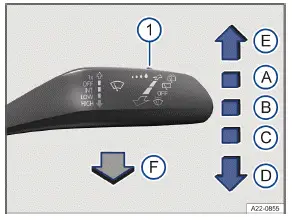
Volkswagen ID.3. Fig. 1 On the right side of the steering column: operating the windshield wipers.
Fig. 1 On the right side of the steering column: operating the windshield wipers.

The windshield wipers only function when the ignition is switched on and the driver door, front passenger door, the hood and trunk lid are closed. Move the wiper lever into the desired position → :

  1. Wipers are switched off.

  2. Interval wiping for the windshield or rain sensor mode. Interval wiping for the windshield depends on the driving speed. The higher the speed, the faster the wipers will move.

  3. Slow wiper speed.

  4. Fast wiping.

  5. One-tap wiping - brief wiping. Hold the lever down for longer to increase the wiper speed.

  6. Pull the lever to activate the automatic wiper/washer system to clean the windshield. While the wiper/washer system is active, the Climatronic system switches to recirculation mode for approximately 30 seconds to help prevent the washer fluid odor from entering the Volkswagen ID.3 vehicle interior.

  7. Switch for interval levels (vehicles without rain/light sensor) or to adjust the sensitivity of the rain/light sensor.

Volkswagen ID.3. Fig. 2 On the right side of the steering column: operating the rear window wiper.
Fig. 2 On the right side of the steering column: operating the rear window wiper.

Move the wiper lever into the desired position → :

  1. Interval wiping for the rear window. The wiper moves approximately every six seconds.

  2. Press the lever to activate the automatic wiper/washer system to clean the rear window.

WARNING

Without the sufficient freeze protection, washer fluid can freeze on the window glass and reduce visibility. This can cause accidents and serious or fatal injuries.

  • Only use the washer system with sufficient freeze protection in winter temperatures.

  • Never use the window washer system in winter temperatures if the windshield has not been warmed up with the air conditioning system.

WARNING

Worn or dirty wiper blades reduce visibility and increase the risk of accidents and serious injuries.

  • Always replace wiper blades if they are damaged or worn and are no longer cleaning the window glass sufficiently (→ Wiper blades) .

NOTICE

Incorrect handling of the windshield wipers can cause damage to the windshield, the wiper blades and the wiper motor.

  • Before driving and before the ignition is switched on, check that the windshield wiper lever is in the basic position.

  • Remove any snow and ice from the windshield wipers and the windshield.

  • Always carefully loosen wiper blades that have frozen onto the windshield from the windshield.

  • Do not turn on the windshield wipers when the windshield is dry.

The activated wiper speed temporarily changes to the next lower speed when the Volkswagen ID.3 vehicle is stationary.

If the driver or front passenger door is opened when the Volkswagen ID.3 vehicle is stationary, then the windshield wipers return to their initial position and are switched off. If the door is shut again within a few seconds or the windshield wiper lever is moved, the windshield wipers are switched back on again.

Some settings can be saved in the driver personalization user profiles and will change when the user profile is switched.

When parking the vehicle in cold weather conditions, moving the windshield wipers to the service position may be helpful for loosening the wiper blades more easily from the windshield (→ Wiper blades) .

Wiper function

Automatic rear window wiping

The rear window wiper switches on automatically when the windshield wipers are switched on and reverse gear is engaged. The automatic activation in reverse gear function can be activated and deactivated in the Volkswagen ID.3 vehicle settings in the Infotainment system (→ Vehicle settings menu) .

Heated washer nozzles

The heat thaws frozen washer fluid nozzles. The heat output is automatically regulated when the ignition is switched on and is dependent on the outside temperature. Only the window washer nozzles are heated and not the washer fluid hoses.