Driving with Lane Assist
- Switching on and off
- Driver intervention request
- Driving with Travel Assist
Switching on and off
Depending on the country, Lane Assist always switches on after switching on the ignition. You can also switch Lane Assist on and off in the Infotainment system (→ Vehicle settings menu) and view the switched on condition there.
Open the Assistance systems menu.
Switch Lane Assist on or off in the corresponding submenu.
If there is a system malfunction, Lane Assist may switch off automatically.
Displays
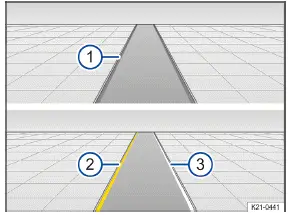
Fig. 1 In the instrument cluster display: displays of Lane Assist
Grey line: lane marking detected. The system is not ready to monitor on the indicated side.
Yellow line: Lane marking detected. The system is monitoring on the indicated side.
White line: Lane marking detected. The system is ready to monitor on the indicated side.
Depending on the Volkswagen ID.3 vehicle equipment, further details about lane marking, such as broken road markings, may also be shown on the instrument cluster display.
Depending on the equipment, a display may also appear in the head-up display.
One of the following indicator lights will light up, depending on the driving situation:
 System active and ready to control.
 System in operation (corrective steering intervention).
If the indicator light does not light up, Lane Assist is not ready for operation on both sides(i nactive system status) or is switched off.
If Travel Assist is actively controlling, there will not be any steering intervention and no Lane Assist display.
Driver intervention request
If there is no steering activity, Lane Assist prompts you to drive in the center of your lane with an indicator in the instrument cluster display and warning chimes.
If you do not respond accordingly, Lane Assist becomes inactive.
Depending on the Volkswagen ID.3 vehicle equipment, semi-automatic vehicle control in a medical emergency( Emergency Assist) is activated when Emergency Assist is switched on in the Infotainment system.
Independently of steering activity, you are also prompted by an indicator on the instrument cluster display and by a warning chime to drive in the middle of the lane if the corrective steering intervention takes a long time.
Steering wheel vibration
The following situation may cause the steering wheel to vibrate:
A lane is no longer detected during a sharp corrective steering intervention by the system.
In addition, you can select the Vibration or Steering wheel vibration option in the Assistance systems menu in the Infotainment system. If you select this option, the steering wheel will vibrate if Lane Assist is active and you drift onto a road lane marking that the system has detected.
Troubleshooting
 Lane Assist not available
The yellow indicator light turns on. In addition, a message is shown in the instrument cluster display.
The camera field of view is dirty. Clean the windshield (→ Vehicle care) .
The camera's view is limited due to weather conditions, such as snow, or from soap residue or coatings. Clean the windshield (→ Vehicle care) .
The camera's view is limited by attachments or stickers. Keep the area around the camera field of view clear (→ Accessories and replacement parts) .
The camera is misaligned or damaged, for example as a result of damage to the windshield. Check if there is noticeable damage (→ Accessories and replacement parts) .
The camera was automatically deactivated due to a high ambient temperature or long exposure to direct sunlight.
Lane Assist will be available once the camera is available again. Deactivate the Volkswagen ID.3 vehicle's drive system and activate it again.
Malfunction or fault. Deactivate the vehicle's drive system and activate it again.
If the problem persists, contact an authorized Volkswagen dealer or authorized Volkswagen Service Facility.
Volkswagen recommends contacting an authorized Volkswagen dealer or authorized Volkswagen Service Facility.
It can take a few seconds once the ignition has been switched on for a system fault to be recognized.
If Lane Assist is not available, Emergency Assist is not available either.
If Lane Assist is not available, Travel Assist is not available either.
The system is functioning differently than expected
Do not mount any objects on the steering wheel.
Controls are responding differently than expected
Moisture, dirt and grease may limit the functioning of the controls.
Always keep the control panels clean and dry.
Introduction
Thanks to the comfort drive Travel Assist, within the system limitations, the Volkswagen ID.3 vehicle can maintain a distance, which has been preselected by the driver, to the vehicle in front and hold the preferred position within the lane (adaptive lane guidance).
Does this vehicle have Travel Assist?
The vehicle has Travel Assist, if the  button on the multi-function steering wheel is available.
Speed range
Travel Assist regulates from approximately 20 km/h, or from approximately 0 km/h for extended adaptive lane guidance. This speed range may vary depending on the country.
System Limitations of Travel Assist
Travel Assist detects driving situations using the same sensor technology as the Adaptive Cruise Control A(CC ) and Lane Keeping System (Lane Assist).
Also observe the system limitations of and information on ACC and Lane Assist. Always remain attentive and intervene manually if necessary.
Driving with Travel Assist
Travel Assist automatically regulates the speed and steers the Volkswagen ID.3 vehicle. Within the system limitations, Travel Assist can also bring the vehicle to a halt behind a stopping vehicle and drive on again.
You can override the Travel Assist regulation function at any time.
Displays
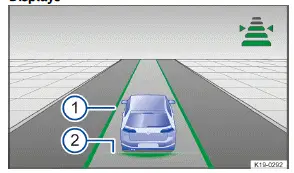
Fig. 1 In the instrument cluster display: Display during active control (general example).
The color of the lane marking shows the status of adaptive lane guidance.
Green: adaptive lane guidance is active.
Grey: adaptive lane guidance is inactive.
Set distance.
Depending on the equipment, a display may also appear in the head-up display.
Depending on the Volkswagen ID.3 vehicle equipment, further details may also be shown on the instrument cluster display, such as broken road markings and road users driving in front.
Indicator lights on the instrument cluster display show the Travel Assist status:
 Travel Assist active, Adaptive Cruise Control and adaptive lane guidance active.
 Travel Assist inactive, Adaptive Cruise Control (ACC) active and adaptive lane guidance inactive.
 Travel Assist deactivated, no regulation.
Driver intervention request
If you remove your hands from the steering wheel, the system will ask you to take over the steering wheel after a few seconds with a message in the instrument cluster display and with audible warnings.
If you do not respond to this, Travel Assist is deactivated.
Alternatively, depending on the vehicle equipment, semi-automatic Volkswagen ID.3 vehicle control in a medical emergency (Emergency Assist) is activated when Emergency Assist is switched on in the Infotainment system.
Travel Assist with mass location data
Travel Assist with mass location data uses online map data to improve the functioning of Travel Assist( depending on the vehicle equipment and not available in all countries).
This allows the availability of Travel Assist in selected driving situations, e.g. in the event of incomplete road markings or markings missing on one side, to be increased.
Requirements:
Travel Assist has been activated.
Your We Connect membership has been activated.
An Internet connection has been established.
The use of the online map data has been activated.
The upload function of the collected map data from your Volkswagen ID.3 vehicle has been activated( optional).
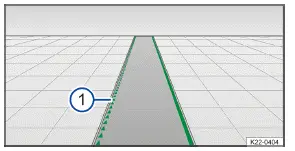
Fig. 2 In the instrument cluster display: Display during use of mass location data (general example).
Green triangle line: Lane marking detected by use of mass location data.
WARNING
Travel Assist is not a replacement for the driver's attention and works only within the system limitations. Travel Assist cannot detect all driving situations and may not react, or may react with a delay, or may react in a way that is not desired. If you are careless, there is a risk of accidents, serious injuries and death.
Always stay attentive and do not rely solely on the system. The driver is always responsible for control of the Volkswagen ID.3.
Observe the system limitations of ACC (→ Adaptive Cruise Control (ACC)) and Lane Assist (→ Lane Keeping System (Lane Assist)) .
Always adapt your speed and distance to vehicles driving ahead based on the visual, weather, road, and traffic conditions.
Always keep your hands on the steering wheel so that you are prepared to steer at any time.
Take over steering immediately if a driver intervention prompt appears in the instrument cluster display or the deceleration by Travel Assist is not sufficient.
Apply the brakes if the Volkswagen ID.3 vehicle continues to roll unintentionally, e.g. after a driver intervention prompt.