Introduction to the instrument cluster
The vehicle is equipped with a Volkswagen Digital Cockpit. The instrument cluster shows essential information, such as speed.
In addition, the following functions, among others, are available depending on the equipment:
Various menus, such as for the driver assistance systems.
Status displays for the driver assistance systems.
Volkswagen ID.3 Display messages.
Warning and indicator lights.
Information about economy and range.
Content can be individually adapted and settings can be changed in the menus.
WARNING
Operating the Volkswagen Digital Cockpit and Infotainment system can distract you from traffic. If the driver is distracted while driving, accidents and serious or fatal injuries can occur.
Always drive attentively and responsibly.
Never operate the instrument cluster of Volkswagen ID.3 while driving.
Only adjust any settings in the instrument cluster or Infotainment system when the vehicle is stationary.
WARNING
If there is a serious fault in the instrument cluster, the display may be turned off. The warning light may also come on here. No further warnings can be displayed. This may result in vehicle breakdowns while driving, accidents and serious or fatal injuries.
Safely stop the vehicle.
See an authorized Volkswagen dealer or authorized Volkswagen Service Facility for assistance.
After activating the vehicle's drive system when the 12 V vehicle battery is severely drained or has been replaced or jump-started, system settings, e.g. personal convenience settings and programming, may be adjusted or deleted. Check and correct the settings after the 12 V vehicle battery is sufficiently recharged.
ID. Cockpit
The ID. cockpit is a Volkswagen Digital Cockpit with a high-resolution LCD color display. By selecting different information profiles, you can display notifications from the driver assistance systems and other notifications, as well as the digital speedometer. The term "Volkswagen Digital Cockpit" is used for the ID. cockpit below.
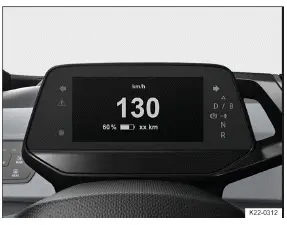
Fig. 1 In the instrument panel: digital instrument cluster (general example).
- Operating the Volkswagen Digital Cockpit
- Volkswagen Digital Cockpit information displays
- Charge status and range in the digital instrument cluster
- Power display
- Head-up display (HUD)
Operating the Volkswagen Digital Cockpit
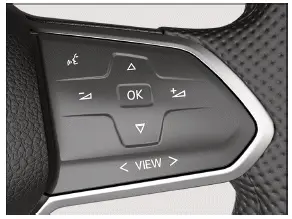
Fig. 1 Right side of the multi-function steering wheel: operating the Volkswagen Digital Cockpit
Views in the display
Volkswagen ID.3 Information and warnings are displayed as events in the digital instrument cluster. The event pops-up from the top of the digital instrument cluster screen and is hidden again after a certain time.
The different views offer you a better overview of the vehicle data, navigation or information about the driver assistance system.
Depending on the vehicle equipment, the amount of information shown and the scope thereof may vary.
The digital instrument cluster can display the following views:
Summary
Before establishing drive-ready mode: display with information about mileage, battery charge level and range.
Basic
Driving displays with information about speeds, driving data, driver assistance systems and navigation.
Driver assistance systems
Display of the active driver assistance systems and the speed. The navigation context is hidden.
Navigation
Display with notes on route guidance and speed. The graphical view of the driver assistance systems is hidden.
Situation-related messages, such as navigation information, are shown as popups.
Setting views
The button  on the multi-function steering wheel of Volkswagen ID.3 can be used to select between theD riving Data, Driver assistance system and Navigation views.
To switch to the Driving Data or Navigation view, press the
 button in the right-hand area or swipe to the right over the button.
Press the
 button in the left-hand section or swipe to the left over the button to change toD river assistance systems view.
If warning messages about malfunctions appear when the ignition is switched on, settings or information displays may not appear as described. If the malfunction persists, contact a suitably qualified professional.
Volkswagen recommends contacting an authorized Volkswagen dealer or authorized Volkswagen Service Facility.
WARNING
Operating the Volkswagen Digital Cockpit and Infotainment system can distract you from traffic. If the driver is distracted while driving, accidents and serious or fatal injuries can occur.
Always drive attentively and responsibly.
Never operate the instrument cluster while driving.
Only adjust any settings in the instrument cluster or Infotainment system when the vehicle is stationary.
Volkswagen Digital Cockpit information displays
Possible displays in the digital instrument cluster
Depending on the vehicle equipment, different information may be shown in the Volkswagen Digital Cockpit:
Outside temperature display.
Detected road sign from the traffic sign recognition.
Open doors, hood and trunk lid.
Speed warnings.
Speed warning for winter tires.
Odometer displays.
ID.3 Navigation information.
Range display.
Driver personalization: greeting and user selection.
Remaining charging time for the high-voltage battery (→ Charging process indicator) .
Service display.
Volkswagen ID.3 Warning and information texts.
Outside temperature display
When outside temperatures are colder than about +4 ºC( about +39 ºF), a snowflake symbol  appears in the digital instrument cluster from above. This symbol remains on until the outside temperature rises above +6 ºC (+43 ºF).
In the following situations, the temperature displayed may be higher than the actual outside temperature due to heat radiating from the vehicle:
When the vehicle is stationary
When the driving speed is very low
The measurement range is from -45 ºC (-49 ºF) to +76 ºC (+169 ºF)
WARNING
Roads may be icy when outside temperatures are low, even if they are above the freezing point. There is an increased risk of an accident on icy roads. This could result in serious or fatal injuries.
If the
 symbol is displayed in the instrument cluster display, drive with extra caution.
Always adapt your speed and driving style to the visibility, weather, road and traffic conditions.
Never rely solely on the outside temperature display.
Open doors, hood and trunk lid
If, after unlocking the Volkswagen ID.3 vehicle and while driving, any doors and/or the hood or trunk lid are open, this is displayed in the Volkswagen Digital Cockpit and an audible signal may also sound.
Speed warning for winter tires
If the set maximum speed is exceeded, this will be shown in the digital instrument cluster.
Settings for the speed warning can be adjusted in the vehicle settings in the ID.3 Infotainment system (→ Vehicle settings menu) .
Odometer displays
The odometer registers the total distance that the vehicle has driven.
Range display
The approximate distance in kilometers which can still be driven with the remaining battery capacity, if driven in the same manner and with the same energy consumption. The calculation is based on the current energy consumption.
Some displays in the Volkswagen Digital Cockpit may be hidden due to events that occur suddenly, e.g. speed warnings.
Depending on the equipment, some settings and displays may also appear in the Infotainment system.
Charge status and range in the digital instrument cluster
Charge status display
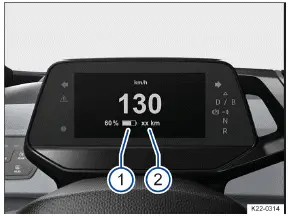
Fig. 1 In the Volkswagen Digital Cockpit: The high-voltage battery charge level (1) and vehicle range (2) (general example).
The current battery charge level of the high-voltage battery is shown by the  symbol with a percentage value in the Volkswagen Digital Cockpit → fig. 1 1 . The battery level on the symbol changes with the charge status.
Range display
The Volkswagen ID.3 vehicle range is displayed in kilometers (km) or miles (mi), depending on the setting → fig. 1 (2) .
The value displayed is calculated and updated according to your driving style and the environmental conditions.
Therefore, the range can vary even with a fully charged high-voltage battery.
Reserve range
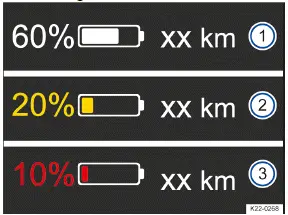
Fig. 2 In the digital instrument cluster: range and reserve display (general example).
Battery charge level and range
Reserve display warning level 1 and range.
Reserve display warning level 2 and range.
Warning levels for the reserve range  :
Yellow
The charge status is equal to 20 % or less than 20 %→ fig. 2 .
Red
The charge status is equal to 10 % or less than 10 %→ fig. 2 .
Charge the high-voltage battery of Volkswagen ID.3 as soon as possible to prevent vehicle breakdowns→ fig. 2 !
WARNING
Driving with the high-voltage battery low on charge could lead to breakdowns in road traffic, accidents and serious or fatal injuries.
Always ensure your high-voltage battery has a sufficient battery charge level.
WARNING
If the charge level of the high-voltage battery has reached the reserve charge level, the handling characteristics, e.g.
the acceleration behavior, of the vehicle may be altered. This can cause accidents and serious injuries.
Always adapt your speed and driving style to the current visual, weather, road, and traffic conditions, as well as the charge level of the high-voltage battery.
Always ensure your high-voltage battery has a sufficient battery charge level.
NOTICE
Self-discharging of the high-voltage battery, for example due to a long stationary period of several months, may damage the high-voltage battery in high ambient temperatures and with a low battery charge level.
Always ensure your high-voltage battery has a sufficient battery charge level.
In very low outside temperatures, when the high-voltage battery is very cold, you may experience a limited range for electric driving.
Power display
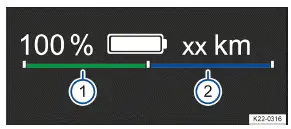
Fig. 1 In the Volkswagen Digital Cockpit: Power display (general example).
During travel, the power display shows the current performance of the electric drivetrain and the current electric drive power or energy recuperation power.
Display concept
If the Volkswagen ID.3 vehicle's drive system is operational, the  indicator light lights up in the instrument cluster.
Using a bar split down the middle, the power display always shows the availability of energy recuperation→ fig. (1) (1) (green) to the left and forward motion → fig. 1 (2) (blue) to the right. If the respective bar reaches to the end marking, there is unlimited availability. If there is any restriction, the bar is shown as correspondingly shortened.
The current drive power is displayed dynamically using a lighter bar, either as recuperation power( light green) to the left or as propulsive power (light blue) to the right.
If current drive power and currently available performance are equal in size (bars equal in length), the power limit of the electric drivetrain has been reached.
The power limit cannot be reached at all vehicle speeds.
Influencing factors
In additional to vehicle speed, the following influencing factors exist:
The availability of forward motion and energy recuperation depends on the battery charge level of the highvoltage battery. The energy recuperation can be limited if the battery charge level is high, as can the forward motion if the battery charge level is low.
The high-voltage battery being at a very low or very high temperature can lead to a decrease in the available drive power. This affects forward motion and energy recuperation.
WARNING
If the drive power of the electric drivetrain is reduced, the handling characteristics, e.g. the acceleration behavior, of the vehicle may be altered. This can cause accidents and serious injuries.
Always adjust your speed and driving style to the current visibility, weather, road, and traffic conditions, and to the battery charge level of the high-voltage battery.
Always ensure your high-voltage battery has a sufficient battery charge level.
Head-up display (HUD)
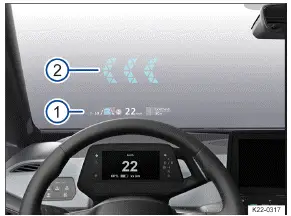
Fig. 1 In the driver's field of vision: indicators on the headup display (general example).
Immediate area.
Long-distance with AR function.
The head-up display projects selected information displays or warning messages from assist systems or from the Infotainment system in the visual range of drivers.
Displays
Explanations of the display areas shown in the head-up display (HUD ) → fig. 1 :
HUD immediate area
The area around the HUD
contains information about speed, navigation, and driver assistance systems.
Augmented Reality HUD (AR-HUD)
In the AR HUD
information regarding the situation can be projected directly into the driver's field of vision. This is done for navigation, for example.
Depending on the Volkswagen ID.3 vehicle equipment, the amount of information shown and the scope thereof may vary.
Switching the head-up display on and off
The head-up display can be switched on and off in the vehicle settings in the Infotainment system.
Tap the Volkswagen ID.3 function key.
In the Vehicle selection, select the Inside view and tap the Head-up display function key.
Switch the head-up display on or off as required. The activated functions are highlighted in color.
Height adjustment
To adapt the vertical image position to your individual seating position, set the head-up display in the corresponding menu in the vehicle settings of the Infotainment system:
Setting the optimal seat position of your Volkswagen ID.3.
Use the function keys to set the preferred position and angle of the head-up display.
The rotation of the immediate area can also be adjusted in the vehicle settings of the Infotainment system.
Settings in the Infotainment system
Additional settings for the head-up display can be adjusted in the vehicle settings in the Infotainment system.
In the Head-up display settings submenu of the Volkswagen ID.3:
Setting the brightness of the head-up display.
Select the display contents for the head-up display, for example messages from the driver assistance systems.
Alternative head-up display colors in poor weather conditions, e.g. snow.
Some display contents cannot be hidden, such as warning messages.
The brightness of the display reduces automatically as the ambient brightness decreases. The basic brightness is set together with the instrument illumination (→ Instrument and switch illumination) .
Reflections are possible due to unfavorable sunlight.
Sunglasses with polarization filters can negatively influence the readability.
The optimal readability of the head-up display depends on the position of the seat and the height adjustment of the head-up display.
Clean the head-up display only with a soft cloth and mild cleaning agent. Microfiber cloths can scratch the head-up display.
Some settings can be saved in the driver personalization user profiles so that they change over automatically whenever the user profile is changed .