USB port

In this manual: USB port
About this Owner's Manual — 1Illustrated index — 1Symbols in the instrument cluster — 1Warning and information texts — 1Introduction to the instrument cluster — 1ID. Light — 1Service menu/ Service display — 1Limits of the Driver Alert System — 1Correct seating position — 1Automatic safety belt retractor, safety belt pretensioner, safety belt load limiter — 1Indicator light — 1Installation locations and deployment zones of the airbags — 1Switching the Front Passenger's Front Airbag On and Off — 1Types of child restraints — 1Securing yourself and the vehicle — 1Emergency equipment — 1Information Call, Roadside Assistance Call and Emergency Call Service — 1Troubleshooting — 1Legally required eCall Emergency System — 1Vehicle key functions — 1Unlocking or locking using Keyless Access — 1Child safety lock — 1Anti-theft alarm system — 1Interior monitoring and towing protection — 1Opening and closing the trunk lid — 1Opening and closing the windows — 1Power window pinch protection — 1Adjusting the steering wheel position — 1Manually adjusting front seats — 1Adjusting the head restraints — 1Removing and installing the head restraints — 1Center armrest — 1Memory function — 1Massage feature — 1Switching the turn signals on and off — 1Switching the lights on and off — 1Switching the high beam headlights on and off — 1Switching the poor weather lights on and off — 1Switching on and off the rear fog light — 1Switching the parking light on and off — 1Entry and exit lighting (orientation lighting) — 1Headlight range control — 1Interior/reading lights, ambient lighting — 1Operating the windshield wiper lever — 1Rain/light sensor — 1General safety precautions — 1Overview of the Climatronic — 1Overview of seat heating — 1Operating the stationary air conditioning — 1Programming the stationary air conditioning — 1Functions of the electric drivetrain — 1Steering information — 1Information on the pedals — 1Information on the brakes — 1Switching the ignition on and off — 1Activating the vehicle's drive system — 1Exiting a vehicle while the vehicle's drive system is active — 1Deactivating the vehicle's drive system — 1Driving mode selector — 1Brake energy recuperation — 1Selecting the driving mode — 1Standard behavior of the driving mode and the vehicle systems — 1Eco tips — 1Operating the vehicle in different countries and continents — 1Limits of the sensor system — 1Operating the cruise control system — 1Operating the speed limiter — 1System Limitations of the Predictive Control — 1Driving with predictive control — 1Eco assist — 1Special driving situations — 1System Limitations of ACC — 1Switching ACC on and off — 1Adjusting the ACC settings — 1System Limitations of Predictive Cruise Control — 1Driving with predictive cruise control — 1Warning levels and braking support — 1System Limitations of Front Assist — 1Oncoming vehicle braking when turning — 1Lane Assist system limitations — 1Driving with Lane Assist — 1Operating Travel Assist — 1Using assisted lane changing — 1Driving with Emergency Assist — 1Side Assist system limitations — 1Driving with Side Assist — 1Parking — 1Electronic parking brake — 1Auto Hold — 1Safety instructions — 1Automatic braking intervention — 1Switching Park Distance Control (PDC) on and off — 1Parking (Rear View Camera system with parking mode selection) — 1Changing the camera perspective — 1Searching for parking spaces — 1Calibrating the parking process — 1Displaying and editing parking spaces — 1Driving into or out of a parking space — 1Rear Traffic Alert — 1Information about braking assistance systems — 1Switching ASR Sport on and off — 1Sockets in the vehicle — 1Cyber security — 1Downloading and installing an Over-the-Air Update — 1V2X limitations — 1Activating and deactivating V2X — 1Traffic hazard alert — 1USB port — 1Bluetooth interface — 1Setting up the Internet connection — 1Activating and deactivating a Wi-Fi hotspot — 1Apple CarPlay — 1Android Auto — 1MirrorLink — 1Introduction to online services — 1Viewing and enabling functions — 1Safety instructions — 1Overview of Infotainment system — 1Brands, licenses, copyright — 1Functions and radio symbols — 1Setting a 360º range display and Electric Vehicle Route Planner — 1Stowing luggage and cargo — 1Mounting the bicycle rack mount — 1Information on the roof rack — 1Warning signs for the high-voltage system — 1Handling the high-voltage battery — 1Charging — 1Placement — 1Information on bulb replacement — 1Replacing bulbs in LED headlights — 1Fuses in the hood space — 1Ground jump-start point — 1Instructions for towing — 1Safety precautions for working in the hood space — 1Preparing the vehicle for work in the hood space — 1Operating fluids and operating equipment — 1Charging, replacing, disconnecting, or connecting the 12 V vehicle battery — 1Handling tires — 1Preparing Your Vehicle — 1Maintenance procedures and digital maintenance schedule — 1Information about operating conditions — 1Scope of service — 1Vehicle care information — 1Washing the vehicle — 1Accessories and replacement parts — 1Sensors and Cameras — 1Repairs and technical modifications — 1Airbag system repairs and situations that can affect the system function — 1Mobile phone usage in the vehicle — 1Data Storage and Data Protection Information — 1Event data recorder (crash data recorder) — 1Labels and signs — 1Fluids in the air conditioning system — 1Infotainment system and aerials — 1Disposal of old batteries and electronic devices — 1Product recycling — 1Old vehicle return and scrap disposal — 1Useful information on vehicles with N1 type approval (light commercial vehicle) — 1Radar Sensors — 1Specifications & Consumer information — 1
~1min read

Using the USB port, you can transfer data and charge devices or only charge devices.

USB-C port
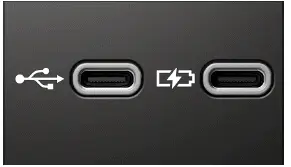
Volkswagen ID.3. Fig. 1 USB-C connection in the vehicle (general example).
Fig. 1 USB-C connection in the vehicle (general example).

The Volkswagen ID.3 vehicle may contain the following USB -C ports:

Symbol for a USB port for data transmission and charging.

Symbol for a USB port for charging only.

You can find information about charging options and charging power here (→ Sockets) .

Possible USB port installation locations

The number and installation locations of USB ports depend on the Volkswagen ID.3 vehicle and vehicle equipment and are not available in all countries.

  • In the center console.
  • At the base of the interior rearview mirror.
  • In the storage compartment in the center console.
  • In the compartment underneath the center armrest.

USB ports at the rear seats only come with a charging function.

Available Data Transfer Functions

The following USB data transfer functions are available depending on the vehicle equipment.

  • App-Connect .
  • Media playback .
  • Update, e.g. of the navigation data (→ Navigation) .

Instructions and restrictions

  • Only use suitable USB connection cables. The USB connection cable must match the USB port installed in the Volkswagen ID.3 vehicle.
  • Dirty, overheated or damaged data carriers are not to be used. Read and heed the information provided by the manufacturer.
  • Difference in quality between data carriers from different manufacturers can cause problems with media playback.
  • Using USB extension cables, USB adapters or USB hubs may result in malfunctions or failure of the USB functions.