Searching for parking spaces
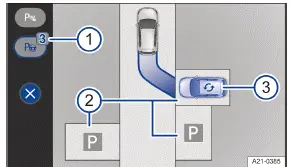
Fig. 1 Infotainment system: selecting a parking space (general example).
Number of detected parking spaces.
Possible parking modes:
Cross parking driving forward.
Cross parking in reverse.
Parallel parking in reverse
Change the preferred parking space (blue vehicle) and parking scenario.
Searching for parking spaces
Tap the control for the parking menu.
While paying attention to traffic around your Volkswagen ID.3 vehicle, drive slowly past a row of parked vehicles.
Park Assist Plus will automatically look for possible parking spaces.
Park Assist Plus will automatically select a parking space and display it as the preferred parking space( blue vehicle) in the Infotainment system → fig. 1 (2) and (3) .
The number of detected parking spaces is displayed on the
 function key → fig. 1 (1) .
Come to a complete stop and stop the vehicle with the brake pedal.
Changing parking spaces
If there are multiple parking spaces shown along the street in the Infotainment system, you can change the parking space.
Tap the desired parking space on the Infotainment system screen→ fig. 1 (2) .
A new preferred parking space (blue vehicle) is displayed.
Changing parking scenarios
If the parking scenario shown in the Infotainment system can be changed, the symbol will be displayed on the parking space → fig. 1 (3) .
Tap the
 symbol.
A new parking scenario is displayed.
Park Assist Plus can be activated subsequently. If you drive past a suitable parking space, this will be indicated.
- Driving into parking spaces
- Exiting a parking space
Driving into parking spaces
Requirements
Park Assist Plus has been activated.
A parking space has been found and selected.
The Volkswagen ID.3 vehicle is in the starting position and its path is highlighted in blue in the Infotainment system.
Driving into parking spaces
Stop the vehicle with the brake pedal.
Tap
 in the Infotainment system.
The process of driving into a parking space starts.
Pay attention to the displays in the Infotainment system.
If necessary, Park Assist Plus can change the direction of travel independently.
At the end of a parking maneuver, always wait until Park Assist Plus has completed all rotational movements of the steering wheel in order to achieve an optimum parking result →
 .
When the process of driving into a parking space is finished, a message will appear in the Infotainment system and a chime will sound.
The electronic parking brake is switched on.
Park the Volkswagen ID.3 vehicle.
WARNING
During maneuvering, the steering wheel turns quickly. Interfering with the steering wheel can result in serious injury.
Do not take over the steering until the system prompts you to do so.
Take over the steering in dangerous situations.
Assistance during a parking attempt
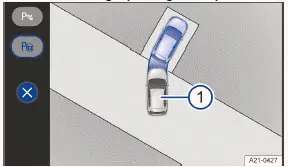
Fig. 1 Infotainment system: taking over the parking process from the driver.
Vehicle "during" a parking attempt.
In difficult parking situations where an "attempt" at parking has already been made, Park Assist Plus can take over the parking process and guide the vehicle into the parking space → fig. 1 .
Requirements
Park Assist Plus is not activated.
The Volkswagen ID.3 vehicle has been driven forward or backward into a parking space.
Reversing into a parking space
Stop the vehicle with the brake pedal.
In the Infotainment system, the
 function key indicates a detected parking space.
To switch to Park Assist Plus, tap
 .
Tap
 to start the process of driving into a parking space.
Pay attention to the displays in the Infotainment system.
Drive the front of the Volkswagen ID.3 vehicle into a parking space
Stop the vehicle with the brake pedal.
Tap the
 control for the parking menu.
Tap
 in the Infotainment system to start the process of driving into a parking space.
Pay attention to the displays in the Infotainment system.
You can reduce the speed when automatic parking by operating the brake pedal.
Exiting a parking space
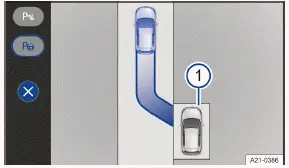
Fig. 1 Infotainment system: exiting procedure (general example).
Vehicle in a parallel parking space.
This function depends on the Volkswagen ID.3 vehicle equipment.
Activate the vehicle's drive system.
Press and hold the brake pedal.
Activate Park Assist Plus (→ Park Assist parking feature) .
Activate the turn signal for the side of the road where the vehicle should drive out of the parking space.
Tap
 on the Infotainment system screen → fig. 1 (2) .
The parking maneuver to exit the space starts.
Pay attention to the displays in the Infotainment system.
A chime and a message from the Infotainment system signal that you have exited the parking space.
Control of the Volkswagen ID.3 vehicle is transferred to the driver in neutral N.
Resume control of the vehicle and fully exit the parking space in the direction of trave→
 .
WARNING
When you maneuver out of a parking space, there is a danger of pulling into moving traffic. Accidents and serious or fatal injuries may occur.
Only drive the vehicle out of the parking space when the traffic situation allows it.
WARNING
Park Assist Plus does not support pulling out of perpendicular parking spaces because obstacles in road traffic cannot be detected fully. There is a risk of accidents and serious injuries.
Pull out of a perpendicular parking space yourself and pay attention to the traffic situation.
The lane shown on the Infotainment system during a parking process is a general example. It does not correspond to the actual parking process with Park Assist Plus.
Introduction
Park Assist (Park Assist Plus) with memory function helps drivers to park in parking spaces they frequently use, e.g.
garages and driveways. The Volkswagen ID.3 vehicle automatically maneuvers toward a parking space on a previously saved vehicle path
The availability of Park Assist Plus with memory function depends on the vehicle equipment.
System function
Park Assist Plus with memory function is an extension of Park Assist( Park Assist Plus).
The parking system uses the front camera to detect the surrounding area and saves the vehicle path to the parking space over a maximum distance of approx. 50 m (approx. 164 ft). Once the parking process has been saved in the Infotainment system, the vehicle can automatically drive the route to or from the parking space.
The driver should continuously monitor the area surrounding the Volkswagen ID.3 vehicle→ .
Automatic braking support may intervene if there are obstacles in the vehicle's path or in dangerous situations (→ Automatic braking support) .
Automatic, hands-free parking with Park Assist Plus with memory function may be prohibited or limited in some regions. Use Park Assist Plus with memory function only where permitted by legal provisions
Requirements
There are geocoordinates available for the vehicle position.
There is enough space to maneuver in. The vehicle may need to move a few meters to reach the calibrated vehicle path.
Driving with a Bicycle Rack
Park Assist Plus with memory function cannot be activated if a bicycle rack is connected electrically to the factoryinstalled bicycle rack mount.
WARNING
Park Assist Plus with memory function is not a replacement for the driver's attention and works only within the system limitations. Park Assist Plus with memory function cannot detect all driving situations and may not react, or may react with a delay, or may react in a way that is not desired. If you are careless, there is a risk of accidents, serious injuries and death.
Always stay attentive and do not rely solely on the system. The driver is always responsible for control of the Volkswagen ID.3 vehicle.
In a hazardous situation, apply the brakes using the brake pedal.
Only drive the vehicle into the parking space if you possess a valid driving license.
Abide by the traffic regulations in the relevant country.
Do not leave the driver seat during the parking process.
Do not use Park Assist with memory function for parking spaces which do not have structural boundaries, e.g.
near the water's edge or near inclines with no structural separation.
WARNING
The system only has limited reactions to quickly changing environmental conditions. This can result in collisions with other road users, damage to the vehicle and serious or fatal injuries.
Do not use Park Assist Plus in flowing traffic at speeds of more than 80 km/h.
Always maintain a distance of at least one Volkswagen ID.3 vehicle's length from junctions.
Do not park on the side of oncoming traffic or across several lanes.
WARNING
During automatic parking, the vehicle may swing out or turn into oncoming traffic. This may lead to Volkswagen ID.3 vehicle damage and serious or fatal injuries.
Pay close attention to the parking process and the traffic and brake the vehicle if necessary.
WARNING
If the road is icy, the parking process cannot be properly carried out and the vehicle may slide away. This may lead to accidents resulting Volkswagen ID.3 vehicle damage and serious injuries.
Do not use Park Assist Plus with memory function to park on slippery or icy roads.
Park Assist Plus may not be available in some regions of the same country for technical reasons.
Pay attention to the display in the Infotainment system.