Switching the high beam headlights on and off
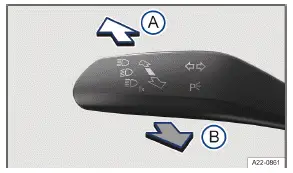
Fig. 1 On the left side of the steering column: turn signal
 Turn on the high beam headlight.
Activate the headlight flashers or turn off the high beam headlights.
If the high beam headlights or headlight flashers are turned on, the blue  indicator light will come on in the Volkswagen Digital Cockpit →
 .
Turning on the high beam headlight
Switch the ignition on.
Switch on the low beam headlight.
Push the lever forwards out of the center position→ fig. 1 (A) .
Turning off the high beam headlight
Pull the lever backwards out of the center position→ fig. 1 (B) .
Turning the headlight flasher on and off
Pull the lever backwards out of the center position and hold it in place→ fig. 1 (B) .
To deactivate, release the lever.
Light Assist
Depending on the equipment, high beam control (Light Assist) may be available (→ High beam control (Light Assist) (static)) (→ High beam control (Light Assist) (dynamic)) .
WARNING
Incorrect use of the high beam headlight may distract and blind other road users. This can cause accidents and serious or fatal injuries.
Use the high beam headlights only if other road users cannot be distracted or blinded.
- High Beam Control (Light Assist)
- Advanced high beam control (Dynamic Light Assist)
High Beam Control (Light Assist)
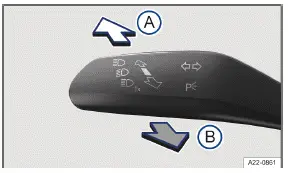
Fig. 1 On the left side of the steering column: turn signal and high beam lever.
High beam control (Light Assist) switches off automatically if the system detects oncoming Volkswagen ID.3 vehicles or vehicles driving ahead. In addition, Light Assist generally detects well-lit areas such as towns and deactivates the high beam headlights when driving through these areas.
The high beam headlights switch on and off automatically within the limits of the system, depending on the environmental and traffic conditions and the vehicle speed →  .
 Switching on high beam control (Light Assist)
Switch the ignition on.
Switch on the automatic headlights
 .
Tap the lever forwards out of the basic position→ fig. 1 (A) .
When high beam control (Light Assist) is switched on, the indicator light lights up in the Volkswagen Digital Cockpit display. If Light Assist is active, the blue
 indicator light for the high beams in the instrument cluster will turn on.
Switching off high beam control (Light Assist)
Switch off
 automatic headlights.
Or: Light Assist switched on and active, pull the lever backwards→ fig. 1 (B) .
Or: Light Assist switched on and not active, tap the lever forwards→ fig. 1 (A) . The manual high beam headlights are now switched on. To switch off the manual high beam if necessary, pull the lever backwards (B) .
Or: Switch off the ignition.
System limitations
The high beams must be switched off manually in the following situations, because Light Assist may not switch them off at the right time or at all:
In poorly lit towns which cannot be recognized as a town by the system.
On poorly lit roads with strongly reflective signs.
If there are others on the road who have inadequate lighting, such as pedestrians or cyclists.
On tight curves where the view of traffic is partially obstructed, on steep rises, or in dips.
When there are oncoming Volkswagen ID.3 vehicles on roads with a center barrier and the drivers in the oncoming vehicle can clearly see above the barrier, for example truck drivers.
In fog, snow, and heavy rain.
hen there are dust and sand in the air.
If the windshield is damaged in the camera's field of vision.
If the camera visual field is fogged over, dirty, or covered by a sticker, snow, or ice.
If the camera switches off automatically due to a high ambient temperature or exposure to direct sunlight for a prolonged period. Light Assist will be available once the camera is available again.
If the camera is faulty and the power supply is interrupted.
WARNING
Light Assist may not detect all traffic situations correctly and the function may be restricted in certain situations.
High beam control (Light Assist) is only an aid. The driver is always responsible for turning on the correct Volkswagen ID.3 vehicle lighting. Switching on the high beam headlight at the wrong time may distract and blind other road users. This can cause accidents and serious or fatal injuries.
Always control the headlights yourself and adapt them to the lighting, visual, and traffic conditions.
Switch the high beam off manually if it could blind other road users.
WARNING
If the camera lens is dirty, covered, or damaged, the Light Assist function may be limited. This is also the case if the Volkswagen ID.3 vehicle lighting system is changed, such as by adding auxiliary headlights. This can cause accidents and serious or fatal injuries.
Regularly clean the camera view area and keep it free of snow and ice.
Do not cover the camera view area.
Regularly check the windshield for damage in the camera lens area.
Advanced high beam control (Dynamic Light Assist)
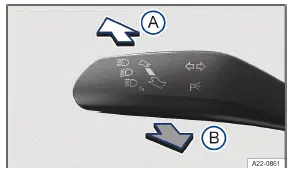
Fig. 1 On the left side of the steering column: turn signal and high beam lever.
Advanced high beam control (Dynamic Light Assist) lights up the road and its edge areas as much as possible. At the same time, it avoids dazzling traffic ahead or oncoming traffic. The system uses a camera to detect other selfilluminating road users and their distance from your Volkswagen ID.3 vehicle and specifically switches off areas in the light distribution. If it is no longer possible to prevent another road user from being dazzled, the high beam is completely switched off. Dynamic Light Assist also generally detects well-lit areas such as towns and deactivates the high beam headlights when driving through these areas.
The high beam headlights switch on and off automatically within the limits of the system, depending on the environmental and traffic conditions and the vehicle speed → .
Dynamic Light Assist can be activated and deactivated in the vehicle settings in the Infotainment system (→ Vehicle settings menu) .
 Switching on Dynamic Light Assist
Switch the ignition on.
Switch on the automatic headlights
 .
Tap the lever forwards out of the basic position→ fig. 1 (A) .
When Dynamic Light Assist is switched on, the indicator light  lights up in the Volkswagen Digital Cockpit display. If Dynamic Light Assist is active, the blue
 indicator light for the high beams in the instrument cluster will turn on.
Switching off Dynamic Light Assist
Switch off
 automatic headlights.
Or: Dynamic Light Assist switched on and active, pull the lever backwards→ fig. 1 (B) .
Or: Dynamic Light Assist switched on and not active, tap the lever forwards→ fig. 1 (A) . The manual high beam headlights are now switched on. To switch off the manual high beam if necessary, pull the lever backwards.
Or: Switch off the ignition.
System limitations
The high beams must be switched off manually in the following situations, because Dynamic Light Assist may not switch them off at the right time or at all:
In poorly lit towns which cannot be recognized as a town by the system.
On poorly lit roads with strongly reflective signs.
If there are others on the road who have inadequate lighting, such as pedestrians or cyclists.
On tight curves where the view of traffic is partially obstructed, on steep rises, or in dips.
When there are oncoming Volkswagen ID.3 vehicles on roads with a center barrier and the drivers in the oncoming vehicle can clearly see above the barrier, for example truck drivers.
In fog, snow, and heavy rain.
When there are dust and sand in the air.
If the windshield is damaged in the camera's field of vision.
If the camera visual field is fogged over, dirty, or covered by a sticker, snow, or ice.
If the camera switches off automatically due to a high ambient temperature or exposure to direct sunlight for a prolonged period. Dynamic Light Assist will be available once the camera is available again.
If the camera is faulty and the power supply is interrupted.
WARNING
Dynamic Light Assist may not detect all traffic situations correctly and the function may be restricted in certain situations. Dynamic Light Assist is only an aid. The driver is always responsible for turning on the correct Volkswagen ID.3 vehicle lighting. Switching on the high beam headlight at the wrong time may distract and blind other road users. This can cause accidents and serious or fatal injuries.
Always control the headlights yourself and adapt them to the lighting, visual, and traffic conditions.
Switch the high beam off manually if it could blind other road users.
WARNING
If the camera lens is dirty, covered or damaged, the functionality of the Dynamic Light Assist may be limited. This is also the case if the Volkswagen ID.3 vehicle lighting system is changed, such as by adding auxiliary headlights. This can cause accidents and serious or fatal injuries.
Regularly clean the camera view area and keep it free of snow and ice.
Do not cover the camera view area.
Regularly check the windshield for damage in the camera lens area.
Dynamic cornering light
The dynamic cornering lights provide optimum illumination of the roadway.
The dynamic cornering light only works when the automatic headlights  are switched on and at speeds of more than approximately 10 km/h.
Some settings can be saved in the driver personalization user profiles and will change when the user profile is switched.