Instructions for towing
A Volkswagen ID.3 vehicle being towed can still signal a turn using the turn signals even if the emergency flashers are switched on. To do this when the ignition is switched on, activate the turn signal for the desired direction. The emergency flashers will stop while the turn signal is active. The emergency flashers will automatically activate again once the turn signal and high beam lever returns to the neutral position.
When may this vehicle not be towed?
If one of the following situations is applicable, the Volkswagen ID.3 vehicle must not be towed with a tow bar or tow rope.
If the 12 V vehicle battery is drained.
A red warning light
 and the Towing: Damaged e-system - see manual! message will appear the instrument cluster display.
The power supply to the 12-volt vehicle electrical system cannot be secured.
The indicator in the instrument cluster display does not function perfectly.
If the towing distance is greater than approx. 50 km( approx. 30 miles).
The driving mode selector cannot be moved to idle (position
 ).
The anti-roll function cannot be deactivated.
The electronic parking brake cannot be released.
The steering lock cannot be released.
If the wheel clearance or the steering function can no longer be secured after an accident.
If the Volkswagen ID.3 vehicle cannot be towed on its own wheels, contact an authorized Volkswagen dealer or authorized Volkswagen Service Facility and have the vehicle transported by a tow truck if necessary.
Inform the relevant people, particularly the organizing office and transportation, that an electric vehicle is involved.
- Towing
- Installing the front towing eye
Towing
If the towing conditions have not been met, the vehicle may be pushed or towed on its own four wheels only in emergency situations. The Volkswagen ID.3 vehicle may be towed to the tow truck only at walking pace and up to a maximum of 100 meters → .
WARNING
If you tow your vehicle in spite of the message Towing damages the electrical system. Owner's manual! appearing in the instrument cluster, vibrations could occur in the drive system and the driven wheels could lock, particularly on ice or wet roads. Wheels that lock may cause you to lose control of the vehicle or lead to accidents and serious or fatal injuries.
If the message Towing damages the electrical system. Owner's manual! appears in the instrument cluster, do not push or tow the Volkswagen ID.3 vehicle unless it is an emergency.
Secure the tow rope or tow bar only at the permitted points:
Towing lug.
WARNING
Vehicle components can be badly damaged by incorrectly attached tow ropes or tow bars. This increases the risk of accident and could result in serious or fatal injuries.
Only ever secure the Volkswagen ID.3 vehicle to be recovered and towed at the points designed for this purpose.
Never secure the tow rope or the tow bar to axle or suspension components.
Contact an authorized Volkswagen dealer or authorized Volkswagen Service Facility and have the vehicle taken away on a tow truck, if necessary.
Preparations
Make sure the tow rope is not twisted. Otherwise it could disconnect from the towing eye while towing.
Switch the ignition and emergency flashers on in both Volkswagen ID.3 vehicles. However, do not do this if it is prohibited by law.
Read and comply with the information and instructions for towing given in the Owner's Manual for the other vehicle.
Towing vehicle (front)
The vehicle is not suitable to tow other vehicles. You cannot secure the towing eye to the rear bumper.
Vehicle being towed (rear)
Make sure the ignition is always switched on so that the steering wheel is not locked and so that the turn signal and windshield wiper can be used if needed. The brake booster and power steering only work when the ignition is switched on. Otherwise, the brake pedal needs to be pressed much harder and more force is required to steer.
Make sure the vehicle key is always in the Volkswagen ID.3 vehicle during the towing process.
Select gear
 .
Deactivate the anti-roll function .
Or: The driver remains seated in the driver seat throughout the towing process and always wears their safety belt, and the driver door is closed.
Ensure that the electronic parking brake is always switched off throughout the towing process→
 .
Make sure the tow rope is always taut.
NOTICE
If the electronic parking brake switches on during the towing process, wheels may lock. Serious damage to the vehicles may result.
End the towing process immediately.
Contact an authorized Volkswagen dealer or authorized Volkswagen Service Facility and have the vehicle taken away on a tow truck, if necessary.
NOTICE
If the battery charge level of the 12 V vehicle battery is insufficient, you will not be able to release the electronic parking brake and steering lock. The Volkswagen ID.3 vehicle may be damaged when towed.
To release the electronic parking brake and steering lock, put the vehicle into drive-ready mode, if necessary by means of a jump-start if there is a loss of power or malfunctions.
Contact an authorized Volkswagen dealer or authorized Volkswagen Service Facility and have the vehicle taken away on a tow truck, if necessary.
Installing the front towing eye
Depending on the country and Volkswagen ID.3 vehicle equipment, the mount for the towing eye is situated behind the bumper cover.
Before having it towed, check that your vehicle has a threaded mount for the towing lug.
Read and heed the information about towing.
Otherwise, contact an authorized Volkswagen dealer or authorized Volkswagen Service Facility and have the vehicle taken away by a tow truck if necessary.
The towing eye must always be kept in the vehicle→ .
NOTICE
Using a towing eye that is not suitable for the Volkswagen ID.3 vehicle can damage the vehicle.
When towing, always use the towing eye enclosed with your own vehicle in the vehicle tool kit, or another suitable towing eye.
Installing the front towing eye
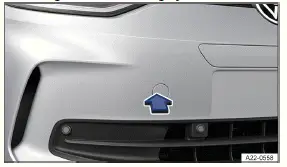
Fig. 1 In the right front bumper: Remove cover.
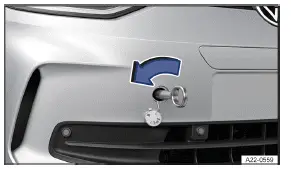
Fig. 2
Remove the towing eye from the Volkswagen ID.3 vehicle tool kit in the luggage compartment.
Press on the marked area of the cover in the direction of the arrow to release the catch on the cover→ fig. 1 .
Remove the cover, let it hang from the vehicle or place it in the vehicle if necessary→
 .
Rotate the towing eye in the direction of the arrow as far as possible to install it in the mount→ fig. 2 , →
 .
Use a suitable object to tighten the towing eye completely and securely in the mount.
After the vehicle has been towed, unscrew the towing eye with a suitable object in the opposite direction to the arrow.
Insert the cap into the respective opening and press in until it engages.
If necessary, clean the towing eye and return it to the Volkswagen ID.3 vehicle tool kit in the luggage compartment.
WARNING
If the towing eye is not fully and tightly screwed into the mount, it may tear out of the mount. This may result in accidents and serious injuries during the towing process.
Before towing, check that the towing eye is fully screwed in.
NOTICE
Removing and fitting the cover and towing eye incorrectly may cause damage to the vehicle's paint and body.
Always remove and fit the cover and towing eye carefully.