Instrument cluster, digital - overview
The digital instrument cluster of the Volvo S80 (2nd generation, 2013–2016) allows the display to be adjusted to personal preferences. This section explains the themes Elegance, Eco and Performance and shows how contrast and color can be adjusted to ensure optimal readability. In addition to customization, the section highlights the role of the digital displays in improving safety and efficiency. Drivers receive precise information on speed, engine speed and other vehicle data so that they can stay in control at all times.
The information display in the instrument cluster shows information on certain vehicle functions as well as messages.
Information display

Information display, digital instrument*.
The information display in the instrument cluster shows information on certain vehicle functions, e.g. cruise control and trip computer, as well as messages.
The information is shown with symbols and text. Further descriptions can be found under the functions that use the display.
* Option/accessory. For more information, see "Introduction".
Gauges and displays
Different themes can be selected for the digital instrument cluster.
Available themes are Elegance, Eco and Performance.
A theme can only be selected when the engine is running.
To select a theme, press the OK button on the left steering wheel lever and select the menu option Themes by turning the thumb wheel on the steering wheel lever. Press the OK button. To select the theme, turn the thumb wheel and confirm the selection by pressing the OK button.
On certain model variants, the appearance of the center console screen is matched to the theme of the instrument cluster.
You can also adjust the contrast and color of the instrument cluster using the left steering wheel lever.
For more information on using the menus, see Menu operation - instrument cluster.
The theme as well as the contrast and color settings can be saved separately for each transponder key*, see Transponder key - personalization*
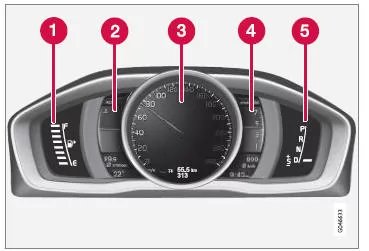
Gauges and displays, "Elegance" theme.
- Fuel gauge. When the needle is only on the white marker5, the yellow low fuel warning light starts to illuminate. See also On-board computer - additional information and Refueling.
- Engine coolant temperature gauge
- Speedometer
- Tachometer. The gauge shows the engine speed in thousands of revolutions per minute.
- Gear indicator6/Selected gear indicator7. See also Gear indicator*, Automatic transmission - Geartronic* or Automatic transmission - Powershift*.
5 As soon as the display message "Distance to empty:" shows "----", the color of the marker changes to red.
6 Manual transmission
7 Automatic transmission.
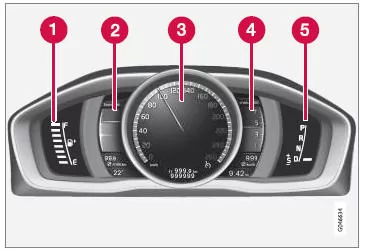
Gauges and displays, "Eco" theme.
Fuel gauge. When the needle is only on the white marker5, the yellow low fuel warning light starts to illuminate. See also On-board computer - additional information and Refueling.
Eco guide. See also Eco guide & Power guide*.
Speedometer
Tachometer. The gauge shows the engine speed in thousands of revolutions per minute.
Gear indicator6/Selected gear indicator7. See also Gear indicator*, Automatic transmission - Geartronic* or Automatic transmission - Powershift*.
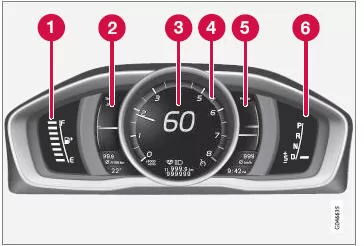
Gauges and displays, "Performance" theme.
- Fuel gauge. When the needle is only on the white marker5, the yellow low fuel warning light starts to illuminate. See also On-board computer - additional information and Refueling.
- Engine coolant temperature gauge
- Speedometer
- Tachometer. The gauge shows the engine speed in thousands of revolutions per minute.
- Power guide. See also Eco guide & Power guide*.
- Gear indicator6/Selected gear indicator7. See also Gear indicator*, Automatic transmission - Geartronic* or Automatic transmission - Powershift*.
Indicator and warning symbols

Indicator and warning symbols, digital instrument cluster.
- Indicator symbols
- Indicator and warning symbols
- Warning symbols8
6 Manual transmission
7 Automatic transmission.
5 As soon as the display message "Distance to empty:" shows "----", the color of the marker changes to red.
8 Not all engine versions have a low oil pressure warning system. In these vehicles, the low oil pressure symbol is not shown; instead, the warning appears as text on the display. For more information, see Engine oil - general
* Option/accessory. For more information, see "Introduction".
Function check
All indicator and warning symbols, except the symbols in the center of the information display, illuminate in ignition position II or when starting the engine. After the engine has started, all symbols must go out, except the parking brake symbol, which only goes out when the parking brake is released.
If the engine does not start, or the function check is carried out in ignition position II, all symbols go out within a few seconds, except the exhaust emission control system fault symbol and the low oil pressure symbol.
Related information
- Instrument cluster
- Instrument cluster - meaning of indicator symbols
- Instrument cluster - meaning of warning symbols
The digital instrument cluster of the Volvo S80 (2nd generation, model years 2013–2016) allows the display to be individually adapted to your personal driving style. With themes such as Elegance, Eco and Performance, the display is optimally tailored to your needs.
The combination of modern design and intuitive operation underlines the premium character of the vehicle. This way you always keep all important information in view and enjoy maximum comfort.
FAQ
How do I change the display theme?
Using the menu on the left steering wheel lever, you can select and confirm the desired theme while the engine is running.
What are the advantages of the different themes?
They allow the display to be individually adapted, for example for a sportier or more economical driving experience.
Test yourself
A quick Volvo S80 quiz: every answer comes with an explanation and a link to the manual page.