Instrument cluster - meaning of warning symbols. Outside temperature gauge. Trip odometer. Clock
The warning symbols in the Volvo S80 (2nd generation, 2013–2016) provide immediate information about safety-related faults or defects. This section explains the meaning of the symbols for the brake system, engine oil level and other critical systems, and gives recommendations on correct action in case of a fault. It also covers additional functions such as the outside temperature gauge, the trip odometer and the clock. These displays increase driving comfort and help ensure the driver is always well informed.
Instrument cluster - meaning of warning symbols
Warning symbols alert the driver that an important function has been activated, or that a serious fault or a serious defect has occurred.
Warning symbols
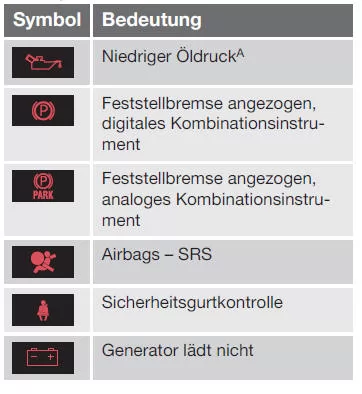

A Not all engine versions have a low oil pressure warning system. In these vehicles, the low oil pressure symbol is not displayed; instead, the warning is shown as text in the display. For more information, see Engine oil - general.
Low oil pressure
If the symbol lights up while driving, engine oil pressure is too low. Stop the engine immediately and check the engine oil level; top up oil if necessary.
If the symbol lights up and the oil level is normal, contact a workshop.
Volvo recommends that you contact a Volvo authorised workshop.
Parking brake applied
This symbol stays on when the parking brake is applied. The symbol flashes while the parking brake is being applied and then stays on continuously.
If the symbol flashes in any other situation, a fault has occurred. Read the message in the information display.
For more information, see Parking brake.
Airbags - SRS
If the symbol does not go out or lights up while driving, a fault has occurred in the seat belt buckle, SRS, SIPS or IC system. Drive to a workshop immediately to have the fault checked. Volvo recommends that you contact a Volvo authorised workshop.
Seat belt check
The symbol flashes if the driver or front passenger has not fastened their seat belt, or if a rear passenger has unfastened their seat belt.
Alternator not charging
This symbol lights up while driving if a fault has occurred in the electrical system. Contact a workshop. Volvo recommends that you contact a Volvo authorised workshop.
Brake system fault
If the symbol lights up, the brake fluid level may be too low. Stop in a safe place and check the fluid level in the brake fluid reservoir, see Brake and clutch fluid - level.
If the brake and ABS symbols light up at the same time, a fault in the brake force distribution may have occurred.
- Stop in a safe place and switch off the engine.
- Restart the engine.
- If both symbols go out, you can continue driving.
- If the symbols remain on, check the fluid level in the brake fluid reservoir, see Brake and clutch fluid - level.
If the brake fluid level is normal and the symbols remain on, the vehicle may be driven with extreme caution to a workshop for a brake system check. Volvo recommends that you contact a Volvo authorised workshop.
If the brake fluid level is below the MIN mark in the brake fluid reservoir, do not drive the vehicle until brake fluid has been topped up.
Brake fluid loss must be checked by a workshop. Volvo recommends that you contact a Volvo authorised workshop.
WARNINGIf the brake and ABS symbols light up at the same time, the rear of the vehicle may break away under heavy braking.
Warning
The red warning symbol lights up when a fault has been indicated that may affect vehicle safety and/or handling. At the same time, an explanatory text message appears in the information display.
The symbol remains visible until the fault is rectified, but the text message can be acknowledged by pressing the OK button, see Menu operation - instrument cluster. The warning symbol may also light up in combination with other symbols.
Action:
- Stop in a safe place. The vehicle must not be driven further.
- Read the message in the display. Carry out the action as indicated in the display message.
Clear the message with the OK button.
Check - doors not closed
If one of the doors is not properly closed, the information or warning symbol illuminates and at the same time an explanatory graphic appears in the information display.
Stop the vehicle in a safe place immediately and close the open door.
 If the vehicle is driven at a speed of less than approx. 7 km/h, the information symbol illuminates.
 If the vehicle is driven at a speed of more than approx. 7 km/h, the warning symbol illuminates.
If the bonnet11 is not properly closed, the warning symbol lights up and at the same time an explanatory illustration appears in the information display. Stop the vehicle immediately in a safe place and close the bonnet.
If the trunk lid is not properly closed, the information symbol illuminates and at the same time an explanatory graphic appears in the information display.
Stop the vehicle in a safe place immediately and close the trunk lid.
Related information
- Instrument cluster
- Instrument cluster - meaning of indicator symbols
- Instrument cluster, digital - overview
11 Only vehicles with alarm system*.
Outside temperature gauge
The outside temperature gauge reading is shown in the instrument cluster.
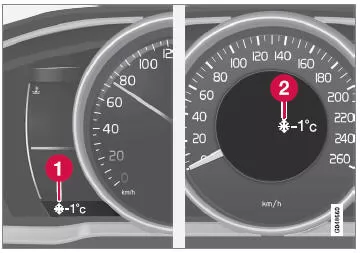
- Outside temperature gauge display, digital instrument cluster
- Outside temperature gauge display, analogue instrument cluster
At temperatures between +2 °C and -5 °C, a snowflake symbol appears in the display. This symbol warns of slippery conditions. If the vehicle has been stationary, the display may show a value that is too high.
Related information
- Instrument cluster
* Option/accessory. For more information, see "Introduction".
Trip odometer
The trip odometer is shown in the instrument cluster.
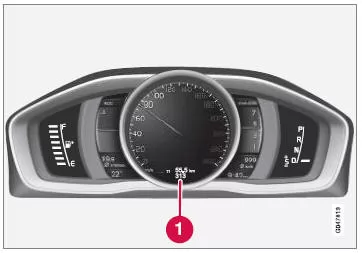
Trip odometer, digital instrument cluster.
- Trip odometer display12
The two trip odometers T1 and T2 are used to measure shorter distances. The distance is shown in the display.
Turn the thumbwheel on the left steering wheel stalk to display the desired odometer.
Press and hold the RESET button on the left steering wheel lever until the display changes to reset the trip odometer to zero. For more information, see Trip computer - additional information.
12 Depending on the version of the instrument cluster, the appearance of the display may vary.
Related information
- Instrument cluster
Clock
The clock display is shown in the instrument cluster.
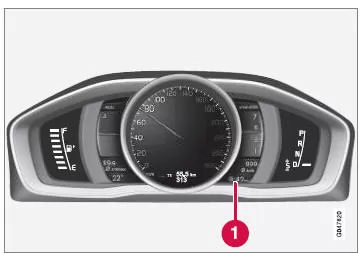
Clock, digital instrument.
- Display with clock indication13
Setting the clock
The clock can be set in the MY CAR menu system, see MY CAR.
Related information
- Instrument cluster
13 In the analog instrument, the time is shown in the center of the instrument.
The warning symbols in the Volvo S80 (2nd generation) alert the driver to serious faults or safety-relevant defects. Whether low oil pressure, a fault in the brake system or problems with the airbags, each symbol calls for targeted action to protect the occupants.
The clear display and accompanying messages in the display enable the driver to react correctly right away. This ensures safety is maintained even in critical situations.
Volvo combines modern technology with a high level of safety to give you a reassuring driving experience at all times.
Test yourself
A quick Volvo S80 quiz: every answer comes with an explanation and a link to the manual page.