Instrument Cluster - License Agreement. Symbols in the Display. Volvo Sensus. Key Positions
This section on the License Agreement and the symbols in the Volvo S80 (2nd generation, 2013–2016) explains the legal basis of the software used in the instrument cluster. It also clearly describes the most important warning, indicator and information symbols in order to clarify their meaning and function in everyday driving. The Volvo Sensus system is also described; it serves as the central control element, combining numerous functions. It enables intuitive control of infotainment, navigation and vehicle settings and thus supports safe operation while driving.
Instrument Cluster - License Agreement
A license is an agreement granting the right to perform certain activities or the right to use rights held by third parties. The following text in English represents the agreement between Volvo and the manufacturer/developer.
Combined Instrument Panel Software Open Source Software Notice
This product uses certain free / open source and other software originating from third parties, that is subject to the GNU Lesser General Public License version 2 (LGPLv2), The FreeType Project License ("FreeType License") and other different and/or additional copy right licenses, disclaimers and notices.
The links to access the exact terms of LGPLv2, and the other open source software licenses, disclaimers, acknowledgements and notices are provided to you below. Please refer to the exact terms of the relevant License, regarding your rights under said licenses. Volvo Car Corporation (VCC) offers to provide the source code of said free/open source software to you for a charge covering the cost of performing such distribution, such as the cost of media, shipping and handling, upon written request. Please contact your nearest Volvo Dealer.
The offer is valid for a period of at least three (3) years from the date of the distribution of this product by VCC / or for as long as VCC offers spare parts or customer support.
Portions of this product uses software copyrighted 2007 The FreeType Project (www.freetype.org). All rights reserved.
Portions of this product uses software with Copyright 1994-2013 Lua.org, PUC-Rio (http://www.lua.org/)
This product includes software under following licenses:
LGPL v2.1: http://www.gnu.org/licenses/oldlicenses/ lgpl-2.1.html
- GNU FriBidi
- DevIL
The FreeType Project License: http:// git.savannah.gnu.org/cgit/freetype/ freetype2.git/tree/docs/FTL.TXT
- FreeType 2
MIT License: http://opensource.org/licenses/ mit-license.html
- Lua
Symbols in the display
A number of symbols may appear in the vehicle displays. The symbols can be divided into warning, indicator and information symbols.
The most frequently appearing symbols and their meanings are listed below, together with page references for further information in the owner's manual.
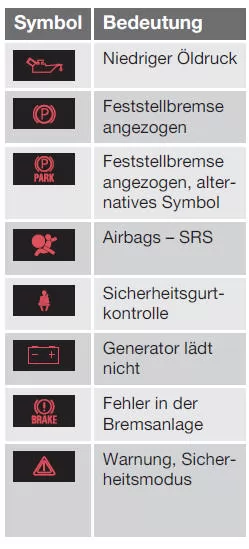
 - Red warning symbol. Lights up when a fault has been detected that may affect the safety and/or handling of the vehicle. At the same time, an explanatory text message appears in the information display in the instrument cluster.
 - Information symbol. Lights up and a text appears in the information display in the instrument cluster when a deviation has been detected in one of the vehicle systems. The information symbol may also light up in combination with other symbols.
Warning symbols in the instrument cluster
Indicator symbol in the instrument cluster
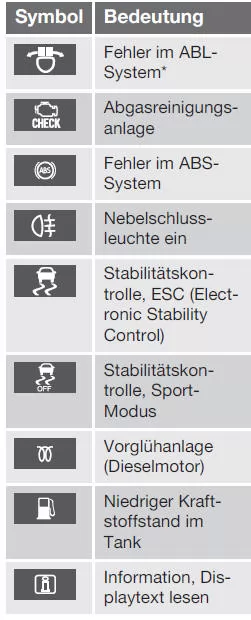
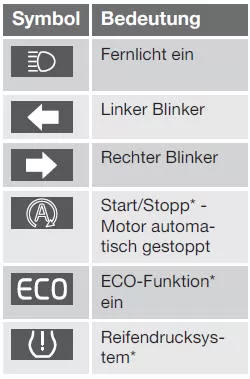
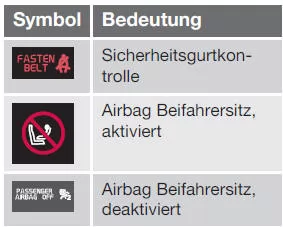
Information symbols in the instrument cluster
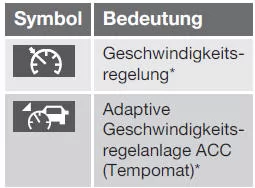


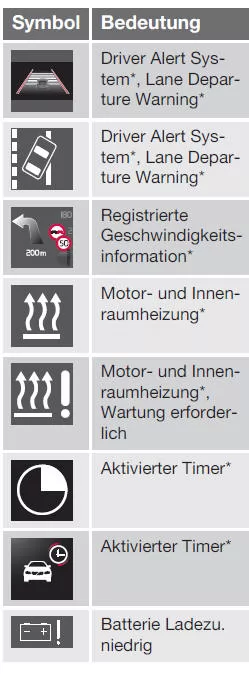
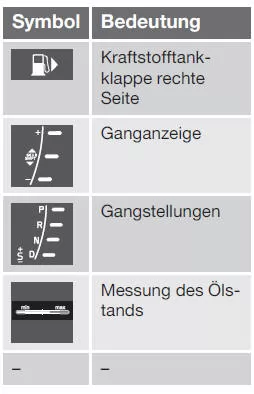
Information symbols in the overhead console display
Related information
- Instrument cluster - meaning of indicator symbols
- Instrument cluster - meaning of warning symbols
- Messages - Management
Volvo Sensus
Volvo Sensus is the heart of your personal Volvo experience and connects you with the vehicle and the outside world. Sensus provides information, entertainment and assistance when you need it. Sensus includes intuitive functions that enhance the driving experience and simplify operating the vehicle.
The intuitive menu structure allows the driver to access information, assistance and entertainment functions without being distracted from driving.
Sensus combines all of the vehicle's connectivity solutions* for communicating with the outside world and the intuitive control of numerous vehicle functions.
Volvo Sensus brings together many functions from several vehicle systems and presents them on the center console screen. Volvo Sensus allows the vehicle to be personalized using an easy-to-use user interface.
Settings can be made in Vehicle settings, Audio and Media, Climate, etc.
Functions can be activated or deactivated and many different settings can be made using the buttons and controls or the right-hand keypad*.
Pressing MY CAR displays all settings related to driving and vehicle control, e.g. City Safety, locks and alarm, automatic fan speed, clock settings, etc.
Pressing RADIO, MEDIA, TEL, *, NAV* and CAM* can activate other sources, systems and functions, e.g. AM, FM, CD, DVD*, TV*, Bluetooth*, navigation* and parking aid camera*.
For more information on all functions/systems, see the relevant section of the owner's manual or its supplement.
Overview
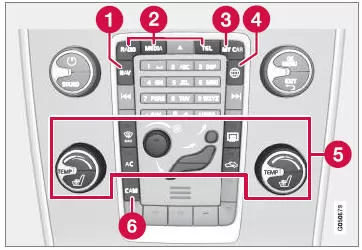 <>
Control panel in the center console. The illustration
is a schematic representation. Key Positions The transponder key can be used to put the vehicle's electrical system into different modes or levels, which make different functions available, see Key Positions - Functions in Different Levels
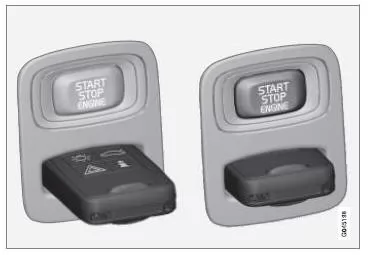
Ignition lock with the transponder key removed/inserted. CAUTIONOn vehicles with the Keyless* function, the transponder key does not need to be inserted into the ignition lock; it can, for example, be kept in a pocket. For more information about the Keyless functions, see Keyless Drive* Inserting the transponder key 1Hold the transponder key by the detachable key blade at its end and insert it into the ignition lock.2Then press the transponder key into the lock until it reaches the end position. IMPORTANTForeign objects in the ignition lock can impair its function or destroy the lock. Do not insert the transponder key upside down - hold the key by the detachable key blade at its end, see Detachable Key Blade - Removing/Attaching Removing the transponder key Hold the transponder key and pull it out of the ignition lock. The Volvo S80 (2nd generation, model years 2013–2016) stands out with an innovative instrument cluster featuring well-designed symbols that keep the driver reliably informed at all times. This is complemented by Volvo Sensus, which enables intuitive control of many vehicle functions and enhances the driving experience. Thanks to clear menu navigation and intelligent connectivity, numerous settings can be individually adjusted. This makes the Volvo S80 the ideal companion for demanding drivers who value comfort and safety.FAQWhich functions does Volvo Sensus control?
Volvo Sensus combines audio, climate, vehicle functions, navigation and connectivity in one system with intuitive operation.What do the warning and information symbols mean?
Warning symbols indicate safety-relevant faults, while information symbols show deviations or messages that should be observed.
Test yourself
A quick Volvo S80 quiz: every answer comes with an explanation and a link to the manual page.