Trip computer - analog instrument cluster
The analog instrument cluster in the Volvo S80 (2nd generation, 2013–2016) combines classic styling with modern functions. This section shows how the driver can navigate the menus, select functions and customize the trip computer information. Of particular help are the explanations on resetting the trip odometers and average speed, and on selecting the heading shown in the display. This makes using the trip computer intuitive and effective.
The trip computer menus form a continuous loop. One alternative is that the trip computer display goes out, which also marks the start/end of the loop.
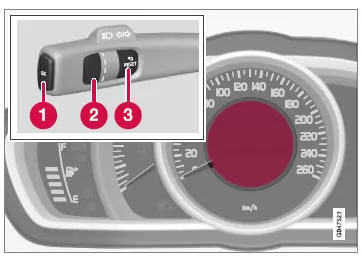
Information display and controls.
- OK - Opens the loop with the trip computer functions + activates the highlighted option.
- Thumbwheel - Opens the loop with the trip computer headings + scrolls through the options.
- RESET - Reverses, resets or goes back from a function after a selection has been made.
Functions
To check or adjust functions, proceed as follows:
- To make sure no controls are in the middle of an operating sequence, first reset them by pressing the RESET button twice.
- Press OK - the loop with all functions opens.
- Scroll through the functions with the thumbwheel and select/confirm with OK.
- To finish a completed check/adjustment, press RESET twice.
The functions of the trip computer are listed in the following table:
| Functions | Service Program |
| Digital speed - km/h - mph - No display |
Shows the vehicle speed digitally in the center of the instrument cluster:
|
Heater*
|
For a description of programming the timer, see Engine and Interior Heating* - Timer |
Auxiliary heater*
|
For more information, see Auxiliary Heater* |
TC options
|
Here the options that are to be selectable as headings in the trip computer are selected/activated. The symbols for those already selected are WHITE and marked with a checkmark - the others are GRAY and have no checkmark:
|
| Service status | Shows the number of months and the distance until the next service. |
| Oil levelA | For more information, see Engine Oil - Checking and Topping Up |
| Messages (##) | For more information, see Messages - Management |
A Certain engines.
Headings
One of the headings in the following table can be selected so that it can be permanently displayed in the instrument cluster. To select it, proceed as follows:
- To make sure no controls are in the middle of an operating sequence, first reset them by pressing the RESET button twice.
- Turn the thumbwheel - the selectable trip computer headings are displayed in a loop.
- Stop at the desired heading.
| Trip computer heading in the instrument cluster | Service Program |
| Trip odometer T1 and total distance |
|
| Trip odometer T2 and total distance |
|
| Distance to empty tank | For more information - see section "Range - distance until the tank is empty" |
| Fuel consumption | Current fuel consumption. |
| Avg. speed |
|
| No trip computer information. | This option shows a blank display - this also marks the start and end of the loop. |
The trip computer heading of the instrument cluster can be changed to another alternative at any time while driving. Proceed as follows:
- Turn the thumbwheel - stop at the desired heading.
Resetting - trip odometer and average speed
When the current trip computer heading T1 and total distance, T2 and total distance or Avg. speed is shown in the instrument cluster:
- Press and hold RESET - the selected heading is reset to zero.
Each heading must be reset to zero individually.
Related information
- On-board computer
- Trip computer - supplementary information
- Trip computer - Trip statistics*
* Option/accessory. For more information, see "Introduction".
The analog instrument cluster of the Volvo S80 (2nd gen) offers clear displays and a well-organized menu structure. Drivers can easily access important data such as average speed, consumption or range and reset it when needed.
The logical arrangement of the controls ensures that all functions can be used quickly and safely. This way you keep control of all relevant information while driving.
FAQ
How is the trip odometer reset?
By pressing and holding the RESET button, the desired counter can be set to zero.
What information does the analog instrument cluster show?
It shows, among other things, the digital speedometer, consumption values, range and service status.
Test yourself
A quick Volvo S80 quiz: every answer comes with an explanation and a link to the manual page.