Menu operation - instrument cluster. Menu overview - instrument cluster. Messages. Messages - Management
The Volvo S80 (2nd generation, 2013–2016) is equipped with a user-friendly instrument cluster that clearly displays all important vehicle information. This section explains menu operation using the left steering wheel lever and shows the available options depending on the key position. It also describes managing messages that inform the driver about the vehicle's condition, so the driver can handle warnings and notices effectively and respond in time to ensure safety.
Menu operation - Instrument cluster
The left steering wheel lever controls the menus shown in the instrument cluster information display. Which menus are shown depends on the key position.
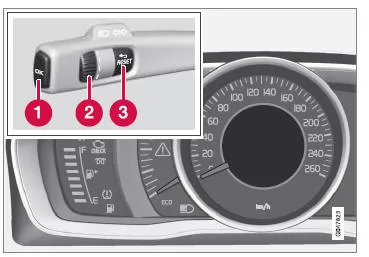
Display (analog instrument cluster) and controls for menu operation.
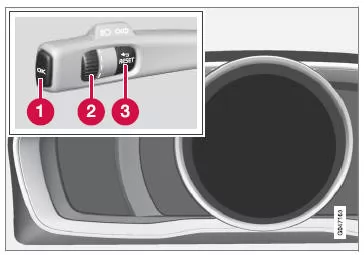
Display (digital instrument cluster) and controls for menu operation.
- OK - Access the message list and confirm messages.
- Thumbwheel - Scroll between menu options.
- RESET - Reset the active function.
Used in certain cases to select/activate a function; see the explanation under the respective function.
When a message is displayed, it must be confirmed with OK before the menus can be displayed.
Related information
- Messages - Management
Menu overview - Instrument cluster
Which menus are shown in the instrument cluster information display depends on the key position.
Some of the menu options listed below require the corresponding functions and equipment to be installed in the vehicle.
Analog instrument cluster Digital speedometer
Heater*
Auxiliary heater*
TC options
Service status
Oil level23
Messages (##)24
Digital instrument cluster settings*
Themes
Contrast mode/Color mode
Service status
Messages24
Oil level23
Parked heater*
Reset Info Center
Related information
- Instrument cluster, analog - overview
- Instrument cluster, digital - overview
- Menu operation - Instrument cluster
23 Certain engines.
24 The number of messages is shown in brackets.
Messages
When a warning, information or indicator symbol lights up, a supplementary message is shown in the information display at the same time.
| Message | Meaning |
| Stop safelyA | Stop and switch off the engine. High risk of damage - contact a workshopB. |
| Switch off engineA | Stop and switch off the engine. High risk of damage - contact a workshopB. |
| Service urgentA | Contact a workshopB immediately for a vehicle check. |
| Service requiredA | Contact a workshopB as soon as possible for a vehicle check. |
| See manualA | Read the relevant sections in the owner's manual. |
| Book service | Book service - contact a workshopB. |
| Service due | Have service carried out - contact a workshopB. The timing depends on vehicle mileage, date of last service, engine running time and oil quality. |
| Service overdue | If service intervals are not observed, the warranty may not cover damaged parts - contact a workshopB. |
| Transmission oil change required | Contact a workshopB as soon as possible for a vehicle check. |
| Transmission reduced power | The transmission cannot deliver full power. Continue carefully until the message clearsC. If the message appears repeatedly - contact a workshopB. |
| Transmission hot Reduce speed | Drive more calmly or bring the vehicle to a safe stop. Shift to neutral and let the engine idle until the message clearsC. |
| Transmission hot Stop safely Wait for cooling | Critical fault. Stop the vehicle safely immediately and contact a workshopB. |
| Temporarily switched offA | A function has been temporarily switched off and will automatically reactivate while driving or after a restart. |
| Battery charge low Energy saving mode | The audio system has been switched off to save energy. Charge the battery. |
A Part of a message, displayed together with information about where the fault occurred.
B A Volvo authorized workshop is recommended.
C For more information about the automatic transmission, see Automatic transmission - Geartronic*
* Option/accessory. For more information, see "Introduction".
Related information
- Messages - Management
- Menu operation - Instrument cluster
Messages - Management
Use the left steering wheel lever to scroll through the messages shown in the information display.
When a warning, information or indicator symbol lights up, a supplementary message is shown in the display at the same time.
Fault messages are stored in a fault list until the fault has been rectified.
Press OK on the left steering wheel lever to confirm the message. Use the thumbwheel to scroll between messages.
CAUTIONIf a warning message is displayed while using the trip computer, the message must be read (press OK) before the previous activity can be resumed.
Related information
- Menu overview - Instrument cluster
The instrument cluster menus of the Volvo S80 (2nd gen) provide easy control of numerous vehicle functions. Whether warning messages, settings or vehicle information, all information is clearly structured and easy to access.
It is particularly useful to manage messages selectively and keep an eye on relevant data such as oil level or service status. This keeps the driver informed and safe at all times.
The S80 thus underlines its commitment to top functionality and intuitive operation for a relaxed driving experience.
Test yourself
A quick Volvo S80 quiz: every answer comes with an explanation and a link to the manual page.