Trip computer
 Controls
The function switch (A) and the reset button ("Reset") (B) are integrated into the wiper control lever.
With the ignition switched on, press the upper / lower side of the function switch (A) repeatedly. The functions are shown on the display in sequence.
In addition, the warning level 2 of the speed warning is set with the function switch. 1) On vehicles with the Driver Information System (FIS).
Pressing and holding the Reset button (at least 1 second) clears the stored values for "travel time, average fuel consumption and average speed". In addition, briefly pressing the button interrupts the computer warning indication about exceeding the maximum continuous driving time.
If necessary, the digital instrument cluster display can be switched on and off by pressing the Reset button.
When the ignition is switched on, the function that was displayed when the ignition was switched off is shown.
When the battery terminals are disconnected, all stored values are erased.
Display
The trip computer provides the following information: · current fuel consumption · driving range on fuel · continuous driving time · average fuel consumption · average speed
l/100 km current fuel consumption
The current fuel consumption value, measured in l/100 km, is shown.
Consumption is calculated for each 30 m section of distance. While the vehicle is stopped, the last calculated value remains displayed.
If the current fuel consumption function is activated after starting the engine, its average value is shown during the first 30–40 m of travel.
This display can be used to select a driving style that corresponds to optimal fuel consumption.
km driving range on fuel
The driving range on fuel is shown in discrete values, counted in 10 km steps. This display shows how many kilometers the vehicle can travel on the remaining fuel in the current driving mode.
The driving range calculation is based on the fuel consumption over the last 30 km. If subsequent driving is more economical, the driving range increases.
h travel time
The travel time is shown, counted from the moment the memory was last reset. When the ignition is switched off, the travel time value is stored. When driving continues, the time count is added to it. The travel time display limit is 23 hours and 59 minutes.
If you want to start the travel time count from a specific moment, clear the memory by pressing the "Reset" button.
Reminder to take a break
Two hours after the start of driving, the display automatically switches to travel time, regardless of the programmed function. The flashing indication "2:00" reminds the driver to take a break.
Briefly press the upper or lower side of the function switch, or the "Reset" button, to switch off this indication. If the ignition remains on, or if the break lasts less than 10 minutes, the reminder to stop for a rest will repeat every two hours thereafter with travel time indications of 4:00, 6:00, etc. If the break lasts more than 10 minutes with the ignition switched off, the travel time count is reset.
l/100 km average fuel consumption
The average fuel consumption since the memory was last reset is shown. Do not confuse it with the current fuel consumption.
With the ignition switched off, the average fuel consumption value is stored in memory. When driving continues, subsequent consumption data is taken into account.
To reset the memory, press the "Reset" button. During the first 30 m after the reset, the display shows zero.
km/h – average speed
The average speed since the memory was last reset is shown. With the ignition switched off, this value is stored in memory. When driving continues, subsequent distance data is taken into account.
 To reset the memory, press the "Reset" button.
Fuel consumption, driving range and speed are shown in metric units, and in certain export versions in imperial units (l/100 km – mpg, km – mi, km/h – mph).
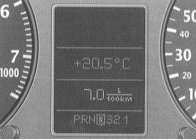
The illustration shows the current fuel consumption display as an example.
Test yourself
A quick Audi A3 quiz: every answer comes with an explanation and a link to the manual page.