Programmable speed limiter
For more information, refer to the General Recommendations for driving and manoeuvring aids.
 This system prevents the vehicle from exceeding the speed set by the driver (set speed).
The speed limiter is switched on manually.
The minimum set speed is 30 km/h.
The set speed value is retained in memory when the ignition is switched off.
Steering wheel control
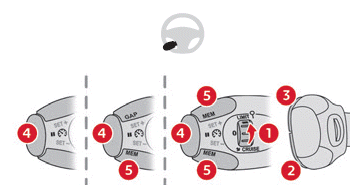
- ON (LIMIT position) / OFF (0 position)
- Decrease the set speed
- Increase the set speed
- Pause / Resume the limiter with the previously stored set speed
- Depending on version:
Display of the speed thresholds stored with Speed memorisation
or
Use of the speed suggested by the Traffic sign recognition function (MEM display)
For more information on Speed memorisation or Traffic sign recognition, refer to the corresponding sections.
Instrument cluster displays
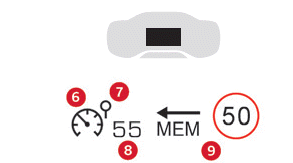
- Speed limiter active (amber) / paused (grey) indicator
- Speed limiter mode indicator
- Set speed value
- Speed suggested by the
Traffic sign recognition function (depending on version)
Activate / Pause
► Turn dial 1 to the "LIMIT" position to select speed limiter mode. The function is paused.
► If the speed limit is suitable (last speed set in the system), press 4-II to activate the speed limiter.
► Press 4-II again to temporarily interrupt the function (pause).
Setting the speed limit (set speed)
It is not necessary to activate the speed limiter to set the speed.
To change the speed limit from the current vehicle speed:
► For steps of +/- 1 km/h, press 2-SET- or 3-SET+ briefly and repeatedly.
► For steps of +/- 5 km/h, press and hold 2-SET- or 3-SET+.
To change the speed limit using the stored speed thresholds and the touchscreen:
► Press 5-MEM to display the stored speed thresholds.
► Press the button corresponding to the desired speed threshold on the touchscreen.
The selection screen closes after a few seconds.
This threshold becomes the new speed limit.
To change the speed limit from the speed suggested by the Traffic sign recognition function shown in the instrument cluster:
► Press 5-MEM once; a message appears to confirm the request to store the speed.
► Press 5-MEM a second time to store the suggested speed.
The new set speed value is shown in the instrument cluster.
Temporary exceeding of the set speed
► Fully press the accelerator pedal.
The speed limiter is temporarily overridden and the displayed set speed flashes.
► Release the accelerator pedal to return below the set speed.
When the speed is exceeded without driver action (e.g. on a steep downhill), an audible warning sounds immediately.
On a steep downhill or during strong acceleration, the speed limiter does not prevent the vehicle from exceeding the set speed.
Brake if necessary to control the vehicle speed.
When the vehicle speed returns to the set speed, the speed limiter operates again: the displayed set speed stops flashing and becomes steady.
Off
► Turn dial 1 to the "OFF" position: the speed limiter information display disappears.
Malfunction

In the event of a malfunction, dashes flash and then remain steady in place of the set speed.
Have it checked by a CITROËN dealer or a qualified workshop.
Test yourself
A quick Citroen C5 Aircross quiz: every answer comes with an explanation and a link to the manual page.