Adaptive cruise control
For more information, refer to the General recommendations for driving and manoeuvring aids and the Specific recommendations for cruise control.
This system automatically maintains the vehicle speed at a value set by the driver (set speed), while keeping a safe distance from the vehicle ahead (target vehicle) previously set by the driver. The system automatically manages the acceleration and deceleration of the vehicle.
With a manual gearbox, the system decelerates the vehicle until a speed of 30 km/h is reached.
With the Stop function, the system manages braking until the vehicle comes to a complete stop.
With the Stop & Go function, the system manages braking until the vehicle comes to a complete stop and then restarts it.
Any deceleration of the vehicle performed by the system switches on the brake lights.
Driving without fully working brake lights can be dangerous.
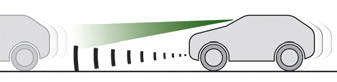
To do this, the system uses a camera mounted at the top of the windscreen and, depending on version, a radar mounted in the front bumper.
Designed mainly for driving on expressways and motorways, this system only works with moving vehicles travelling in the same direction as your vehicle.
If the driver activates the indicator to overtake a slower vehicle, adaptive cruise control may temporarily reduce the distance to the target vehicle to facilitate the overtaking, without exceeding the set speed.
Steering wheel control
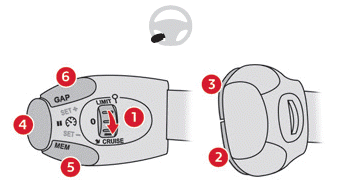
- ON (position CRUISE) / OFF (position 0)
- Activate cruise control at the current speed / Decrease set speed
- Activate cruise control at the current speed / Increase set speed
- Pausing / resuming cruise control at the previously stored set speed
Confirmation of vehicle restart after automatic stop (versions with Stop & Go function) - Adopting the speed proposed by the Traffic Sign Recognition function (MEM display)
- Display and adjustment of the following distance setting to the vehicle ahead
Operation
System activation (paused)
► Turn wheel 1 downwards to the CRUISE position, engine running. Cruise control is ready to operate (grey display).
Switching on cruise control and selecting a speed
With a manual gearbox, your speed must be between 30 and 180 km/h.
With an EAT6 automatic gearbox, your speed must be between 2 and 180 km/h.
With an EAT8 automatic gearbox, your speed must be between 0 and 180 km/h.
► Press 2-SET- or 3-SET+: the current speed becomes the set speed (minimum 30 km/h) and cruise control is active immediately (green display).
► Press 3-SET+ to increase or 2-SET- to decrease the set speed (step of 5 km/h if the button is held).
Holding down 2-SET- or 3-SET+ causes the vehicle speed to change rapidly.
Pausing / resuming cruise control
► Press 4-II or the brake pedal (grey display).
Cruise control may also have been paused:
- Automatically when the electronic stability programme (ESC) is triggered.
- When shifting into neutral.
- When the vehicle speed drops below 30 km/h with a manual gearbox.
- When the engine speed drops below 1,100 rpm with a manual gearbox.
- By pressing the clutch pedal for more than 10 seconds.
- By using the electric parking brake.
► Press 4-II to reactivate cruise control (green display).
With an EAT6 gearbox, after braking that brought the vehicle to a stop, the system holds the vehicle stationary and cruise control pauses. The driver must press the accelerator pedal to move off, then, above 2 km/h, reactivate the function by pressing 2-SET-, 3-SET+ or 4-II. With an EAT8 gearbox, after braking that brought the vehicle to a stop, if traffic conditions do not allow the vehicle to move off within 3 seconds of stopping, press 4-II or the accelerator pedal to move off.
If the driver takes no action after the vehicle has stopped, the electric parking brake applies automatically after approximately 5 minutes.
Cruise control remains active after a gear change, whatever the type of gearbox.
When cruise control is paused and the driver tries to reactivate it, the message "Activation refused, conditions not suitable" is displayed briefly if reactivation is not possible (safety conditions not met).
Changing the set speed with the Traffic Sign Recognition function
► Press 5-MEM to accept the speed proposed by the function on the instrument cluster, then press again to confirm.
To avoid any sudden acceleration or deceleration of the vehicle, select a set speed close to the current vehicle speed.
Changing the following distance
► Press 6 to display the following distance levels ("Far", "Normal", "Close"), then press again to select a level.
After a few seconds, the option is accepted and will be stored when the ignition is switched off.
Temporarily exceeding the set speed
► Fully press the accelerator pedal.
Distance monitoring and cruise control are deactivated as long as acceleration is maintained. "Cruise control suspended" is displayed.
Switching off the system
► Turn wheel 1 upwards to the OFF position.
Instrument cluster display
The following information is visible on the instrument cluster in "Driving" display mode.
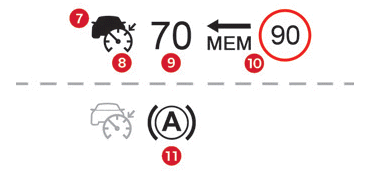
- Vehicle detected by the system (solid symbol)
- Cruise control active (not grey)
- Set speed value
- Speed proposed by the
Traffic Sign Recognition function - Vehicle held stationary (versions with automatic gearbox)

- Following distance setting
- Position of the vehicle detected by the system
Messages and warnings
The "Driving" display mode of the digital instrument cluster must have been selected beforehand.
The actual display order of these messages or warnings may differ.
 "Cruise control paused" or "Cruise control suspended" following a momentary acceleration by the driver.
 "Cruise control active", no vehicle detected.
 "Cruise control paused", vehicle detected.
 "Cruise control active", vehicle detected.
 (orange)
"Take back control".
► Brake or accelerate, depending on the situation.
 (red)
"Take back control".
► Take back control of the vehicle immediately: the system cannot handle the current driving situation.
 "Activation refused, conditions not suitable".
The system refuses to activate cruise control because the required conditions are not met.
Stop function
 "Cruise control paused" (for a few seconds).
The system has braked the vehicle to a complete stop and holds it stationary; cruise control pauses.
The driver must accelerate to move off, then reactivate cruise control.
Stop & Go function
 "To move off: accelerate or press the II button".
The system has braked the vehicle to a complete stop.
Within 3 seconds, the vehicle restarts automatically and progressively.
After more than 3 seconds, the driver must accelerate or press 4-II to move off.
While the vehicle is stationary, it is recommended:
- That the driver does not leave the vehicle.
- Not to open the boot.
- Not to drop off or pick up passengers.
- Not to engage reverse gear.
When the vehicle restarts, watch for cyclists, pedestrians or animals that may not be correctly detected.
Operating limits
Adaptive Cruise Control works day and night, in dry weather or light rain.
Some situations may not be handled by the system and require the driver to intervene.
Situations the system does not detect:
- Pedestrians, cyclists, animals.
- Stationary vehicles (e.g., traffic jam, breakdown).
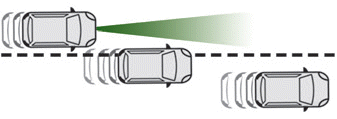
- Vehicles crossing the lane.
- Oncoming vehicles.
Driver must pause the system in the following cases:
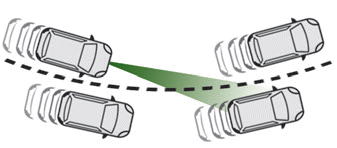
- Vehicles on a tight bend.
- When approaching a roundabout.
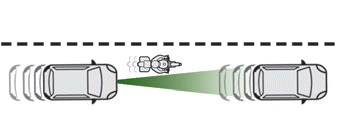
- When following a narrow vehicle.
Reactivate the system when conditions allow.
Cases requiring the driver to take immediate manual control:
- Sudden deceleration of the vehicle ahead.
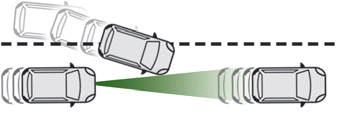
- Sudden cut-in of a vehicle between your vehicle and the one ahead.
Some vehicles on the road may be poorly detected or misinterpreted by the camera and/or radar (e.g., trucks), which may lead to incorrect distance assessment and inappropriate acceleration or braking.
Pay particular attention:
- When motorcycles and offset vehicles are present in the lane.
- When entering a tunnel or on a bridge.
If any of these malfunction cases occur, do not use the system:
- After an impact on the windshield at the camera location or on the front bumper (versions with radar).
- Faulty brake lights.
After any of these vehicle modifications, do not use the system:
- Transporting long objects on roof bars.
- Towing.
- Use of a "pancake" type spare wheel (depending on version).
- Modified front of the vehicle (added long-range headlights, paint on the bumper).
- Radar obstructed.
Malfunction
 In case of a malfunction, dashes are displayed in place of the set speed.
 This warning light, together with a message and an audible signal, confirms a malfunction.
Have it checked by a CITROËN dealer or a qualified workshop.
Test yourself
A quick Citroen C5 Aircross quiz: every answer comes with an explanation and a link to the manual page.