Programmable cruise control
For more information, refer to the General recommendations for driving and manoeuvring aids and the Specific recommendations for cruise control.
 This system automatically maintains the vehicle speed at the value set by the driver (set speed), without any action on the accelerator pedal.
Cruise control is activated manually.
It requires a minimum vehicle speed of 40 km/h.
With a manual gearbox, at least 3rd gear must be engaged.
With an automatic gearbox, D mode or at least 2nd gear in M mode must be selected.
Regardless of gearbox type, cruise control remains active after a gear change on engines fitted with Stop & Start.
Switching off the ignition cancels any set speed.
Steering wheel control
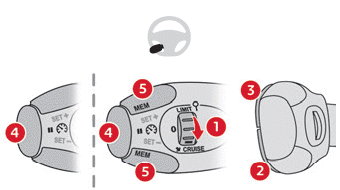
- ON (position CRUISE) / OFF (position 0)
- Activate cruise control at the current speed / Decrease set speed
- Activate cruise control at the current speed / Increase set speed
- Pause / Resume cruise control at the previously stored set speed
- Depending on version:
Display of the speed thresholds stored with Speed memorisation
or
Use of the speed suggested by the Traffic sign recognition function (MEM display)
For more information on Speed memorisation or Traffic sign recognition, refer to the corresponding sections.
Instrument cluster displays
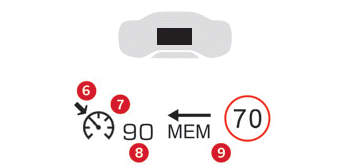
- Speed limiter active (amber) / paused (grey) indicator
- Cruise control mode selection indicator
- Set speed value
- Speed suggested by traffic sign recognition (depending on version)
Activate / Pause
► Turn wheel 1 to the "CRUISE" position to select cruise control mode; the function is paused.
► Press 2-SET- or 3-SET+ to activate cruise control and set a set speed as soon as the vehicle reaches the desired speed; the current vehicle speed becomes the set speed.
► Release the accelerator pedal.
► Pressing 4-II temporarily suspends the function (pause).
► Press 4-II again to resume cruise control (ON).
Cruise control operation can also be temporarily interrupted (pause):
- By pressing the brake pedal.
- Automatically when the electronic stability programme (ESC) is triggered.
Changing the cruise speed (set speed)
Cruise control must be active.
To change the cruise speed from the current vehicle speed:
► For steps of +/- 1 km/h, press 2-SET- or 3-SET+ briefly and repeatedly.
► For steps of +/- 5 km/h, press and hold 2-SET- or 3-SET+.
Pressing and holding either 2-SET- or 3-SET+ changes the vehicle speed quickly.
As a precaution, it is recommended to set a set speed fairly close to the current vehicle speed, to avoid any sudden acceleration or deceleration.
To change the cruise speed using the stored speed thresholds and the touchscreen:
► Press 5-MEM to display the stored speed thresholds.
► Press the button corresponding to the desired speed threshold on the touchscreen.
The selection screen closes after a few seconds.
This threshold becomes the new cruise speed.
To change the cruise speed from the speed suggested by the Traffic sign recognition function shown in the instrument cluster:
► Press 5-MEM once; a message appears to confirm the request to store the speed.
► Press 5-MEM a second time to store the suggested speed.
The new set speed value is shown in the instrument cluster.
Off
► Turn wheel 1 to the "0" position: the cruise control information display disappears.
Malfunction

In the event of a malfunction, dashes flash and then remain steady in place of the set speed.
Have it checked by a CITROËN dealer or a qualified workshop.
Test yourself
A quick Citroen C5 Aircross quiz: every answer comes with an explanation and a link to the manual page.