Park Assist
For more information, refer to the General Recommendations for driving and manoeuvring aids.
This system provides active parking assistance: it detects a parking space, then controls the steering system to park the vehicle in that space.
With manual and automatic gearboxes, the driver manages acceleration, braking, and shifting between forward and reverse.
While entering and leaving the parking space, the system provides visual and audible information to the driver to make maneuvers safer.
Several forward and reverse maneuvers may be required.
At any time, the driver can take back steering control by holding the steering wheel.
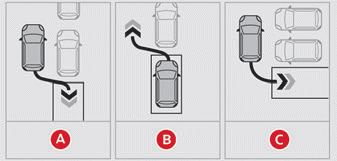
Park Assist provides assistance for the following maneuvers:
- Parallel parking
- Parallel parking exit
- Perpendicular parking
Park Assist cannot operate with the engine off.
When Park Assist is activated, it prevents the Stop & Start system from entering STOP mode.
In STOP mode, activating Park Assist restarts the engine.
Park Assist supports up to 4 maneuver cycles. It deactivates after these 4 cycles. If the vehicle is not positioned correctly, take back steering control to complete the maneuver.
The maneuver progress and driving instructions are displayed on the touchscreen.
 Assistance is active: the display of this symbol and a speed limit indicates that steering maneuvers are controlled by the system. Do not touch the steering wheel.
 Assistance is inactive: the display of this symbol indicates that steering maneuvers are no longer controlled by the system. Take back steering control.
Activating Park Assist disables Blind Spot Monitoring.
The Parking Assistance function is unavailable during the available space measurement phase. It takes effect later, during maneuvers, to warn that the vehicle is approaching an obstacle: the audible signal becomes continuous as soon as the distance to the obstacle is less than 30 cm.
If the Parking Assistance function has been deactivated, it will be automatically reactivated during assisted maneuver phases.
During parking or parking exit maneuvers, the Top Rear Vision - Top 360 Vision functions may activate. They help you better monitor the vehicle's surroundings by showing additional information on the touchscreen.
For more information on the Top Rear Vision - Top 360 Vision functions, refer to the corresponding section.
In some cases, the sensors may not detect small obstacles located in their blind spots.
Park Assist does not detect any object extending beyond the vehicle's outline (e.g. ladder on the roof, towing ball) during a maneuver.
Always check the surroundings of the vehicle before starting a maneuver.
If the lateral distance between the vehicle and the space is too large, the system may not be able to measure the space.
During maneuvers, the steering wheel turns rapidly: do not hold the steering wheel, and do not place your hands between the spokes of the steering wheel.
Be careful of any object that could block the maneuver (e.g. loose clothing, scarves, ties). Risk of injury!
Parallel parking assistance
 ► When parking, select "Park Assist" in the Driving / Vehicle menu on the touchscreen to activate the function.
 With a digital instrument cluster, this indicator lights up in the cluster to confirm that the function is activated.
 ► Limit the vehicle speed to a maximum of 20 km/h or 12 mph and select "Parallel parking entry" on the touchscreen.
For parallel parking entry, the system does not signal spaces that are significantly smaller or larger than the vehicle's outline.
 ► Activate the turn signal toward the chosen parking side to activate the measuring function. The vehicle must drive at a distance of 0.5 m to 1.5 m from the row of parked vehicles.
 ► Drive at a speed below 20 km/h or 12 mph, following the instructions, until the system finds an available space.
 ► Move forward slowly until a message appears, accompanied by an audible signal, asking you to shift into reverse.
 ► Shift into reverse, release the steering wheel, and start without exceeding a speed of 7 km/h or 5 mph.
 The assisted parking maneuver is in progress.
 ► Without exceeding a speed of 7 km/h or 5 mph, perform the forward or reverse maneuvers, following the Parking Assistance warnings, until the end-of-maneuver indication appears.
 ► At the end of the maneuver, the operating indicator goes off in the instrument cluster, accompanied by a message and an audible signal.
Assistance deactivates: you can take back control.
Perpendicular parking assistance
 ► When parking, select "Park Assist" in the Driving / Vehicle menu on the touchscreen to activate the function.
 With a digital instrument cluster, this indicator lights up in the cluster to confirm that the function is activated.
 ► Limit the vehicle speed to a maximum of 20 km/h or 12 mph and select "Perpendicular parking entry" on the touchscreen.
 ► Activate the turn signal toward the chosen parking side to activate the measuring function. The vehicle must drive at a distance of 0.5 m to 1.5 m from the row of parked vehicles.
 ► Drive at a speed below 20 km/h or 12 mph, following the instructions, until the system finds an available space.
When several consecutive spaces are detected, the vehicle will be directed to the last one.
 ► Move forward slowly until the message appears, accompanied by an audible signal, asking you to shift into reverse.
 ► Shift into reverse, release the steering wheel, and start without exceeding a speed of 7 km/h or 5 mph.
The assisted parking maneuver is in progress.
► Without exceeding a speed of 7 km/h or 5 mph, follow the instructions and warnings of the Parking Assistance function until the end-of-maneuver indication appears.
At the end of the maneuver, the operating indicator goes off in the instrument cluster, accompanied by a message and an audible signal.
Assistance deactivates: you can take back control.
During perpendicular parking, the Park Assist function is automatically deactivated as soon as the rear of the vehicle gets closer than 50 cm to an obstacle.
Parallel parking exit assistance
► When leaving a parallel parking space, start the engine.
 ► With the vehicle stationary, select "Park Assist" in the Driving / Vehicle menu on the touchscreen to activate the function.
 With a digital instrument cluster, this indicator lights up in the cluster to confirm that the function is activated.
 ► Press "Parallel parking exit" on the touchscreen.
 ► Operate the turn signal towards the chosen exit side.
 ► Engage reverse or first gear and release the steering wheel.
The assisted parking maneuver is in progress.
 ► Without exceeding a speed of 5 km/h or 3 mph, carry out the forward or reverse manoeuvres following the Park Assist warnings, until the end-of-manoeuvre indication appears.
The manoeuvre is complete as soon as the front axle of the vehicle has left the parking space.
At the end of the maneuver, the operating indicator goes off in the instrument cluster, accompanied by a message and an audible signal.
Assistance deactivates: you can take back control.
Deactivation
The system is deactivated via the Driving / Vehicle menu on the touchscreen.
The system deactivates automatically in the following cases:
- When the ignition is switched off.
- If the engine stalls.
- If the driver's seat belt is unfastened.
- When the driver's door is opened.
- If no manoeuvre is started within 5 minutes after selecting the type of manoeuvre.
- After the vehicle has been stationary for an extended period during the manoeuvre.
- If the wheel anti-slip regulation (ASR) activates.
- If the vehicle speed exceeds 70 km/h.
- When the driver interrupts the steering wheel rotation.
- After more than 4 manoeuvre cycles.
- If one of the front wheels meets an obstacle.
- When a trailer is connected and plugged in.
The operating indicator goes out in the instrument panel and a message is displayed with an audible signal.
The driver must then regain control of the vehicle's steering.
If the system is deactivated during a manoeuvre, the driver must reactivate it to resume the manoeuvre in progress.
For prolonged deactivation of the system, consult a CITROËN dealer or a qualified workshop.
Operating faults
 When the function is not active, the temporary flashing of this indicator (with a type 2 instrument panel) and/or an audible signal indicates a system fault.
If the fault occurs while the system is in use, the indicator goes out.
Consult a CITROËN dealer or a qualified workshop.
 In the event of a power steering fault, this indicator is displayed in the instrument panel together with a warning message.
Stop the vehicle immediately.
Park in the safest possible conditions and switch off the ignition.
Contact a CITROËN dealer or a qualified workshop.
Test yourself
A quick Citroen C5 Aircross quiz: every answer comes with an explanation and a link to the manual page.