Road sign recognition
For more information, refer to the General Recommendations for driving and manoeuvring aids.
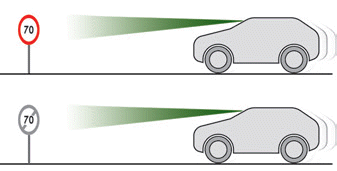
This system shows the locally permitted maximum speed on the instrument cluster, based on:
- Speed limit signs detected by the camera.
- Speed limit information from the navigation system map.
- Signs indicating a shared space zone detected by the camera.
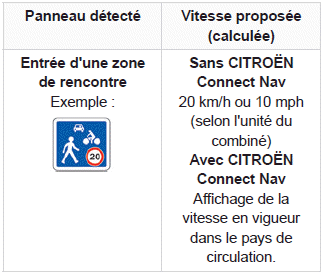
- Certain supplementary plates detected by the camera.
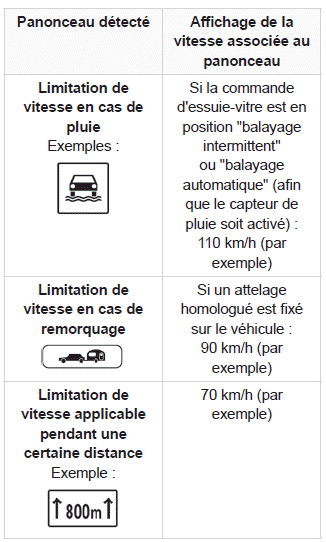
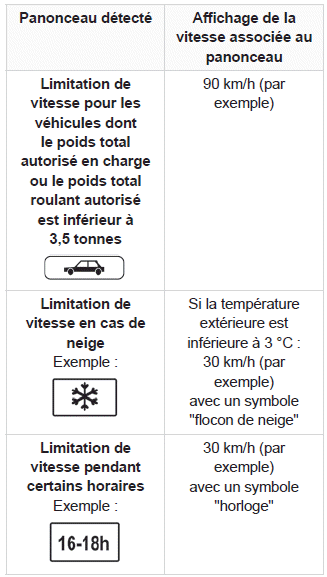
To obtain relevant speed limit information from the navigation system, the map must be updated regularly.
The speed limit unit (km/h or mph) depends on the country in which you are driving.
Take it into account when observing the permitted maximum speed.
For the system to work correctly after a change of country, the instrument cluster speed unit must match the country in which you are driving.
Automatic sign reading is a driving aid and does not always display the correct speed limits.
Speed limit signs on the road always take priority over those shown by the system.
The system is designed to detect signs that comply with the Vienna Convention on Road Signs and Signals.
Specific speed limits, such as those for heavy goods vehicles, are not displayed.
The speed limit shown on the instrument cluster is updated when passing a sign intended for cars (light vehicles).
Activation / Deactivation
By default, the system is automatically activated at each start-up.
 Settings are made via the Driving / Vehicle menu on the touchscreen.
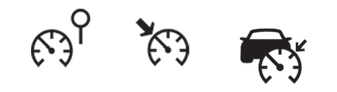
Instrument cluster displays
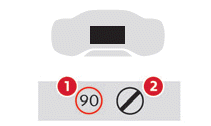
- Detected speed limit indication
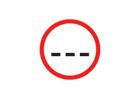
or - End of speed limit indication
The system is active but is not detecting any speed limit information.
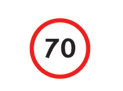
When speed limit information is detected, the system displays the value.

For a proposed maximum speed, the first time the vehicle speed exceeds it by more than 5 km/h, the speed flashes for 10 seconds (depending on version).
Operating limits
The system does not take into account speed limit reductions imposed in particular in the following cases:
- Bad weather (rain, snow).
- Air pollution.
- Towing.
- Driving with a space-saver spare wheel or snow chains.
- Tyre repaired with the temporary puncture repair kit.
- Young drivers.
The system may not display a speed limit if it does not detect any signs for a certain time, in the following situations:
- Signs obscured, non-compliant, damaged or deformed.
- Outdated or incorrect map data.
Recommendation
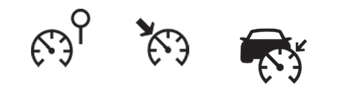
In addition to Road sign recognition, the driver can store the displayed speed as the set speed for the speed limiter or cruise control using the memory button on the speed limiter or cruise control control.
For more information on the Speed limiter, Cruise control or Adaptive cruise control, refer to the corresponding sections.
Steering wheel controls
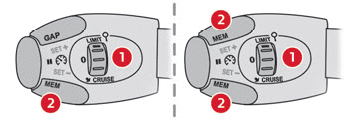
- Selecting the limiter / cruise control mode
- Storing the set speed
Instrument cluster display
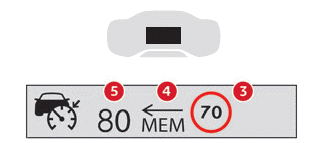
- Speed limit indication
- Speed storage proposal
- Current set speed
Storing the speed
► Switch on the limiter / cruise control.
The speed limiter / cruise control information display appears.
When a sign proposing a new set speed is detected, the system displays the value and "MEM" flashes for a few seconds to offer storing it as the new set speed.
If the difference between the set speed and the speed shown by Road sign recognition is less than 9 km/h, the "MEM" symbol is not displayed.
Depending on road conditions, several speeds may be displayed.
► Press button 2 once to request storage of the proposed speed.
A message appears to confirm the request.
► Press button 2 a second time to confirm and store the new set speed.
The display then returns to the current display.
Extended road sign recognition
For more information, refer to the General Recommendations for driving and manoeuvring aids.
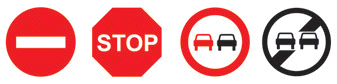
This additional system recognises these road signs and displays them on the instrument cluster.
When approaching one, the pictogram of the corresponding sign appears on the instrument cluster.
Actual road signs always take priority over those shown by the system.
Signs must comply with the Vienna Convention on Road Signs and Signals.
Activation / Deactivation
Settings are made via the Driving / Vehicle menu on the touchscreen.
Test yourself
A quick Citroen C5 Aircross quiz: every answer comes with an explanation and a link to the manual page.