Interface Dial
For vehicles equipped with a navigation system only
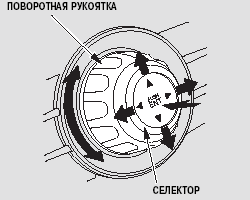
The interface dial, which is located on the control panel of your vehicle, is used to control the climate control system, audio system and navigation system.
Most functions of these systems can be controlled using the corresponding buttons, switches and levers; however, some functions can only be controlled using the dial.
For more detailed information, refer to the sections describing each of the systems mentioned above.
The interface dial consists of two parts: the selector (four-way joystick) and the ring-shaped rotary knob. The rotary knob is used to scroll through lists shown on the display and to adjust certain settings. The selector, which can be pressed in four directions (up, down, right and left), is used to highlight the selected item of information shown on the display. The highlighted item is easy to see on the screen.
To confirm a selection or store a setting, press the ENTER button, which is the center part of the selector.
Test yourself
A quick Honda Civic quiz: every answer comes with an explanation and a link to the manual page.