CD Storage and Cleaning
Store discs in their cases to protect them from dust and other contaminants. Keep discs away from moisture, direct sunlight, and any source of high heat.
Clean discs with a soft, clean cloth.
Wipe discs in straight lines, moving the cloth from the center of the disc toward the outer edge.
New discs may have roughness with small plastic burrs on the outer edge and the center hole. When such a disc is played, plastic particles may get onto the playing surface, which can cause laser focus errors and other problems. Therefore, before using such a disc, run the side of a pencil along its edges and wipe the disc.
Make sure that no foreign objects or debris get into the CD player or the CD changer magazine.
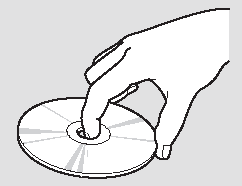
Hold the compact disc only by its outer edge and center hole. Do not touch the flat surfaces of the disc with your fingers.
Do not allow compact discs to become contaminated with fingerprints, fluids, etc. Do not write on discs with a felt-tip pen or attach labels to them. Otherwise, the compact disc may not play properly. In addition, a faulty disc may become jammed in the player.
Test yourself
A quick Honda Civic quiz: every answer comes with an explanation and a link to the manual page.