Audio System (Vehicles with GPS) - Radio Operation
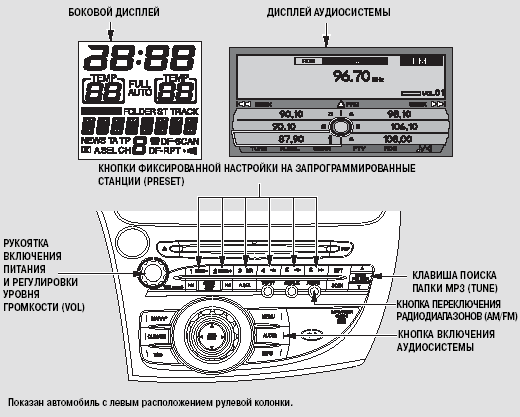
Radio Operation
The radio can be used with the ignition key in the following positions: ACCESSORY (I) and ON (II). To turn on the audio system, press the VOL knob or the AM/FM band selection button.
Adjust the volume by turning the VOL knob.
You can also turn on the audio system by pressing the AUDIO button on the audio system control panel.
You can control the audio system functions from its control panel without using the navigation system display controls.
Audio system settings will be shown on the side display. When the navigation system is operating, you will also see the audio system settings on the side display.
When using the navigation system display, you can scroll through the audio system information and make settings using the interface rotary switch. The indicator will appear on the display ,
 ,
 or

These indicators show the position of pressing on the four-way selector of the interface switch. For more details on using the interface rotary switch, refer to page 188.
When the audio system is turned on, the display of the audio unit shows the current radio band and the frequency to which the radio was tuned before power was turned off. If the RDS function is active (see page 243), the station name appears on the navigation system display and the side display.
To switch to another radio band, press the AM/FM band button or press the upper part of the selector built into the interface switch.
Each time you press the button or selector, the bands change in the following order:
FM1, FM2, AM (MW) and LW. When the FM band is selected and the radio is tuned to a station broadcasting in stereo, the STEREO indicator appears on the display and the ST indicator appears on the side display.
Stereo reception of radio broadcasts is not available in the AM band.
The AM band has automatic noise suppression.
Test yourself
A quick Honda Civic quiz: every answer comes with an explanation and a link to the manual page.