Audio System (Vehicles without GPS) - Compact Disc Playback
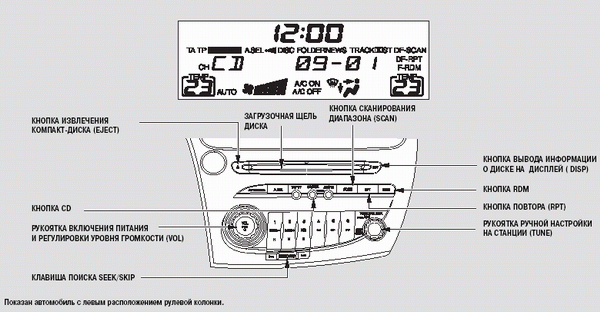
Compact Disc Playback
Using the CD Player: The CD player can be used when the ignition switch is in the following positions: ACCESSORY (I) and ON (II).
The CD player is operated using the same knobs and buttons used to tune the radio.
To listen to a compact disc using the CD player, press the CD button. The CD symbol will appear in the display. The track number and playing time are shown in the display. Use the DISP (Display) button to select which information is shown (see page 227).
The system will continue to play the compact disc until you change the audio system mode.

WARNING
Do not use discs with labels attached. The label may peel off and jam in the player mechanism.
The audio system can play self-recorded CD-R and CD-RW discs, including discs in compressed MP3 or WMA formats.
When an MP3 disc is played, the MP3 indicator will appear in the display.
When a WMA disc is played, the WMA indicator will appear in the display. The CD player display shows the folder number and track number being played. The maximum number of folders and tracks does not exceed 255.
This audio system is not designed to play video discs or DVDs.
MP3 file format compatibility specifications:
— Frequency response:
32/44.1/48 kHz
— Bit rate:
32/40/48/56/64/80/96/112/128/160/192/224/256/320 kbps
— Compatible with variable bit rate; multi-session recording is permitted.
— Maximum number of directory levels (including the root directory): 8 levels
WMA file format compatibility specifications:
— Frequency response: 32/44.1/48 kHz
— Bit rate:
48/64/80/96/128/160/192 kbps
— Compatible with variable bit rate; multi-session recording is permitted.
— Maximum number of directory levels (including the root directory): 8 levels
When playing WMA compressed discs, this CD player cannot play DRM files. If a DRM file is detected on the disc, the system displays the message "CD FORMAT" (Invalid file format) for a few seconds.
The system then searches for and plays a valid file from the current folder or another folder on the disc.
Using the Compact Disc Player
Insert the compact disc into the disc slot about halfway. The disc is then automatically loaded into the playing position and playback starts. The track number of the disc being played is shown in the display.
The system will continue to play the compact disc until you change the audio system mode.
8 cm compact discs cannot be used in this type of audio system.
Disc Information Display Button (DISP)
If you press and release the DISP button during playback of a disc without text information, the message NO INFO (No Information) appears in the display.
If a CD DA disc contains text data, the display shows: the disc title, the track title and the artist.
Each time the DISP button is pressed, the display changes.
If an MP3 or WMA disc is being played, the display shows:
the folder and file names, as well as the artist, album and track information.
Each time the DISP button is pressed, the display changes.
The display shows the first 11 characters of the selected text information (folder name, file name, etc.). Together with the folder or file name, the FOLDER or TRACK indicator appears in the display.
If the text information has more than 11 characters, the display shows 10 characters and the > indicator. To display the next 11 characters, press and hold the DISP button. A total of up to 21 characters of text data can be displayed.
When the DISP button is pressed and held again, the first 11 characters of the text information are displayed again.
If any character cannot be shown on the display, it is replaced with a period symbol.
If the disc has no text information, the message NO INFO (No Information) appears in the display.
Text information is also shown in the display in the following cases:
When the folder or file is changed.
When switching to MP3 or WMA disc playback mode.
When an MP3 or WMA disc is loaded into the player after playback has started.
Up to 11 characters of text information can be shown in the display; however, the actual number of characters displayed depends on their size.
The previous setting made with the DISP button is retained the next time the audio system is turned on.
Selecting a Track or File
During disc playback, you can select another track or MP3 (WMA) file using the SEEK/SKIP button.
When playing an MP3 or WMA disc, first select the desired folder using the TUNE knob, then select the file using the SEEK/SKIP button.
Semi-automatic tuning button (SEEK/SKIP) — Each time you press and release one side of the SEEK/SKIP button, the player moves to the beginning of the next track on the disc (or to the next MP3 or WMA file on the disc). If you press and release one side of the
 button, the system moves to the beginning of the current track. If you press and release the same side of the button again, the system moves to the beginning of the previous track, and so on.
To fast-forward or rewind through an audio track, press and hold the respective side of the, orSEEK/SKIP button.
MP3 or WMA folder selection — To select a folder and go to its first file, turn the TUNE knob. Turn the knob clockwise until it clicks to go to the next folder, or counterclockwise until it clicks to go to the beginning of the current folder. Turning the knob again moves the system to the beginning of the previous folder, and so on. Turning the TUNE knob more than two clicks skips several folders.
Repeat playback (TRACK/FILE REPEAT) — To repeat playback of a single track (or MP3 or WMA file) continuously, press and release the RPT button. The RPT indicator will appear on the display. To cancel repeat playback, press the RPT button again.
To cancel this mode, you can also press either side of the SEEK/SKIP button.
Repeat playback of all MP3 or WMA files in a folder (FOLDER REPEAT) — When this function is activated, all files recorded in the selected folder in MP3 or WMA compressed format will be played continuously in the order they were recorded on the disc.
To activate folder repeat playback, press the RPT button.
The F RPT indicator will appear on the display.
The system will continuously play the files in this folder. To cancel repeat playback, press the RPT button again. Pressing the RDM button or selecting another folder with the TUNE knob automatically cancels continuous playback.
Each time you press the RPT button, the system mode changes from continuous file playback to continuous folder playback and back to normal operation.
RANDOM (Random playback of all disc tracks) — In this mode, all tracks on the active disc (or all files in all folders of an MP3 or WMA disc) will be played in random order. To activate this function, press and release the RDM button.
In MP3 or WMA file playback mode, press the RDM button several times to select random playback of all disc tracks. The RDM indicator will appear on the display. Pressing the RDM button again returns the system to normal operation.
Random repeat playback of all MP3, WMA files in a folder (FOLDER RANDOM) — When this function is activated, all files recorded in the selected folder in compressed format will be played in random order rather than the order in which they are arranged in the folder. To activate this function, press the RDM button. The F RDM indicator will appear on the display. The system will begin playing the audio files in random order. This continues until you cancel random playback by pressing the RDM button again or select another folder with the TUNE knob.
Each time you press the RPT button, the system mode changes from continuous folder playback to continuous disc playback and back to normal operation.
SCAN (Scanning for a desired disc track) — The SCAN function plays short excerpts of all audio tracks (or MP3 or WMA files) in the order they are recorded on the compact disc. To scan for a desired track, press and hold the SCAN button until you hear a beep. The SCAN indicator will appear on the display. 10-second excerpts of all tracks on the disc or in the folder will be played in turn. To exit this mode and play the track whose excerpt was playing last, press the SCAN button again.
To cancel this mode, you can also press either side of the SEEK/SKIP button.
F SCAN (Scanning for a desired MP3 or WMA folder) — In this mode, excerpts of the first files of each folder on the disc are played in turn, in the order the folders are arranged in the root directory. To scan for a desired folder, press and release the SCAN button. The F SCAN indicator will appear on the display. The system will start playing a 10-second excerpt of the first file in the root folder. If no further action is taken, the system will move on to 10-second excerpts of the first files in the following folders. When the excerpt of the file you want to listen to is playing, press the SCAN button again.
Pressing either side of the SEEK/SKIP button or selecting another folder with the TUNE knob cancels this function.
Each time you press the SCAN button, the system mode changes from file scanning to folder scanning and back to normal operation.
Test yourself
A quick Honda Civic quiz: every answer comes with an explanation and a link to the manual page.