Audio System (vehicles equipped with GPS) - Sound Adjustment
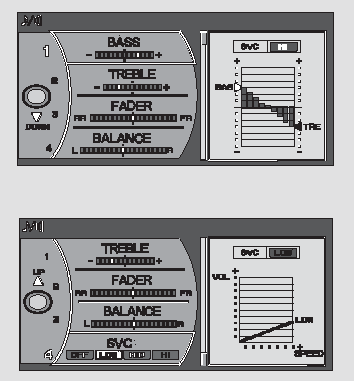
Sound Adjustment
You can adjust the sound quality using the navigation system display.
To do this, press the AUDIO button to display the audio system screen, then press the lower part of the interface selector switch. Turn the interface selector switch knob until the icon appears on the display (Sound Adjustment), then confirm your selection by pressing the ENT (Enter) button.
BASS – Low-frequency tone.
TREBLE – High-frequency tone.
FADER – Volume balance between front and rear speakers.
BALANCE — volume balance between the right and left speakers (stereo balance).
To set the level for the selected item, turn the interface selector switch knob, then press the ENT (Enter) button.
The current sound settings are shown on the display.
When adjusting the stereo balance and the balance between the left and right speakers, the relative volume of each speaker is shown in the lower right part of the display. The treble and bass settings are shown as vertical bars.
To adjust the sound, turn the interface selector switch knob to the right or left, then press the ENT button to save the settings.
SVC — vehicle speed sensitive volume compensation.
Speed-Dependent Volume Control (SVC System)
This audio system includes the SVC subsystem, which compensates the volume according to vehicle speed. There are four compensation levels: LOW, MID, HIGH and OFF (no compensation). The system monitors vehicle speed and adjusts the volume as the speed increases.
As vehicle speed increases, the audio system volume increases. As vehicle speed decreases, the audio system volume decreases.
If the battery is discharged or disconnected, the SVC system defaults to the MID (medium) volume compensation level.
To set any of the four compensation levels, turn the interface selector switch knob to select SVC, then press the ENT button. The current sound settings are shown on the display. To make the adjustment, turn the interface selector switch knob to the right or left, then press the ENT button to save the settings.
5 seconds after the adjustment is completed, the system automatically returns to normal audio display operation.
Test yourself
A quick Honda Civic quiz: every answer comes with an explanation and a link to the manual page.