Convenience Features
Audio System (Vehicles Equipped with GPS) - Error Messages for the Optional CD Changer
In this manual: Convenience Features
~1min read
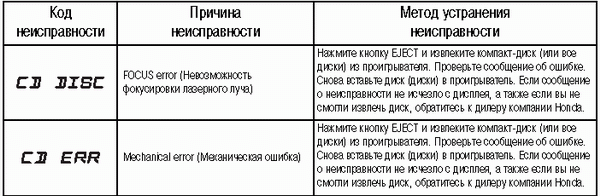
The table on the right side of this page explains the meaning of the fault codes.
If a warning message indicating a malfunction is displayed during CD playback, press the eject button. After ejecting the disc, make sure it is not damaged or warped. If the disc is in good condition, reinsert it.
If the problem persists, the warning message will be displayed again.
Press the EJECT button and remove the CD from the player.
Insert another disc. If the new disc plays, the problem is caused by the original disc being faulty. If the warning message appears again and you cannot clear it, contact your dealer to have the system checked.
Test yourself
A quick Honda Civic quiz: every answer comes with an explanation and a link to the manual page.
Was this page helpful?