Setting the time
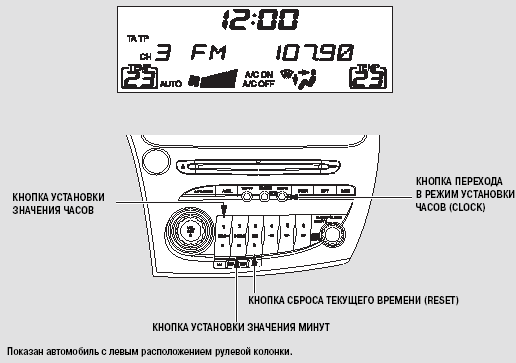
Clock Setting For vehicles with audio system (without navigation system)
The clock setting is erased from memory if the battery is discharged or disconnected from the vehicle's electrical system. In this case, set the time using the procedure described below.
To set the clock, press and hold the CLOCK (AM/FM) button until the time display starts flashing, then release the button. The time display continues to flash.
To set the hour, press and hold the H button (preset button 1). To set the minutes, press and hold the M button (preset button 2).
To enter the selected value, press the CLOCK button.
You can quickly set the time to the nearest hour. If the minutes are 30 or less, a beep sounds when you press the CLOCK button, and then pressing the R button (preset button 3) resets the minutes to zero. If the minutes are more than 30, pressing the R button also resets the minutes to zero and advances to the next hour.
For example, 1:06 will be set to 1:00, and 1:53 will be set to 2:00.
For vehicles equipped with a navigation system
The GPS navigation system receives precise time signals and automatically corrects the current time. For information on setting the current time, refer to the navigation system owner's manual.
For vehicles without audio system
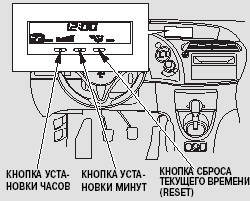
The clock setting is erased from memory if the battery is discharged or disconnected from the vehicle's electrical system. In this case, set the time using the procedure described below.
To set the current time, turn the ignition switch to the ON (II) position so the time appears on the display.
To set the hour, press and hold the H button. To set the minutes, press and hold the M button until the required value appears on the display.
You can quickly set the time to the nearest hour. If the minutes are 30 or less, pressing the R button resets the minutes to zero.
If the minutes are more than 30, pressing the R button also resets the minutes to zero and advances to the next hour.
For example, 1:06 will be set to 1:00, and 1:53 will be set to 2:00.
Test yourself
A quick Honda Civic quiz: every answer comes with an explanation and a link to the manual page.