Power Windows
GENERAL INFORMATION
Driver's Side Window Switch
The driver's side window switch is built into the armrest.
Normal window operation: the window moves while the switch is pressed.

To lower the window, lightly press the switch. To raise the window, pull the switch up.
Automatic window operation (lowering only)
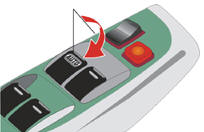
Fully press the switch (in the direction indicated by the arrow) and release it. The window will lower completely. To stop the window at an intermediate position, lightly pull the switch up and release it.
Passenger Side Window Switches
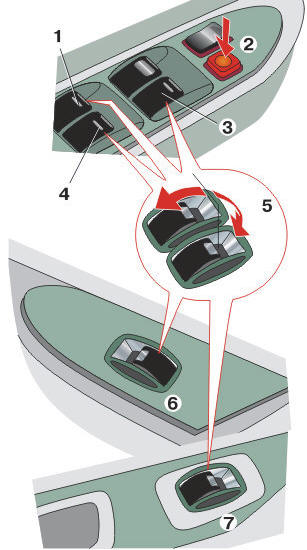
Passenger Side Window Switches
1. Rear left window switch
2. Power window lockout switch
3. Front passenger window switch
4. Rear right window switch
5. Down
6. Front passenger door switch
7. Rear passenger door switch
Provided by a switch on each passenger door or by the switches on the driver's door, which control the windows of all doors.
Normal window operation: the windows move while the corresponding switch is pressed. To lower the window, lightly press the switch. To raise the window, pull the switch up.
Raising and lowering of the passenger windows is disabled when the lockout button on the driver's door armrest is pressed.
Safety Precautions
To avoid injury to passengers, observe the following safety precautions.
Before raising the windows, make sure that no passenger is leaning out of the window and that all hands are out of the window openings. Otherwise, serious injury may occur if body parts are caught by the window while it is closing. Make sure all passengers know how to use the power window.
Do not allow small children to operate the power windows unsupervised. Engage the power window lockout to prevent unintended window raising when children press the switches.
Never leave children unattended in the vehicle, especially when the key is in the ignition, as a child may play with the switches and get their head caught in the window. Leaving children unattended may result in serious injury.
Test yourself
A quick Toyota Corolla quiz: every answer comes with an explanation and a link to the manual page.