AM/FM Radio with Electronic Tuning
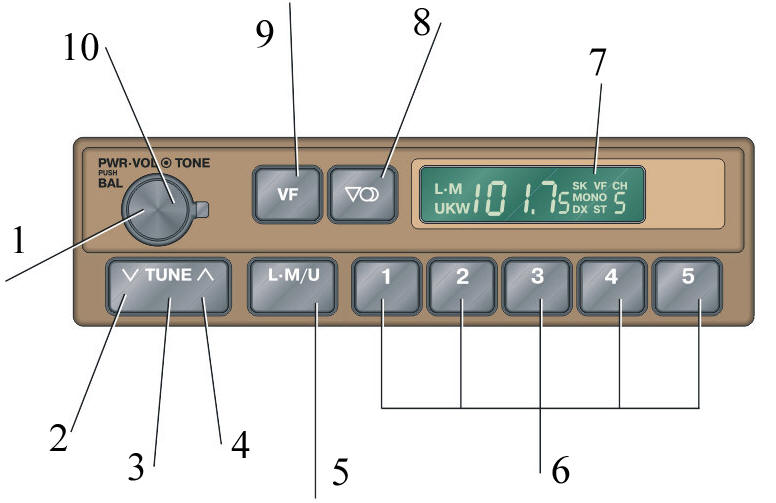
AM/FM Radio 1. Power switch, volume control and left/right speaker balance control
2. Tuning button:
3. Tuning down (lower frequency)
4. Tuning up (higher frequency)
5. AM or FM (UKW) mode selection button
6. Band selection buttons
7. Display
8. Stereo/mono selection button
9. Automatic tuning button
10. Tone control
Using the Radio
PROCEDURE
1. Turn on the radio by turning the "PWR.VOL" knob clockwise.
2. Adjust the volume by turning the "PWR.VOL" knob.
3. Tune to the desired station.
4. To receive an FM station, switch to FM mode and select stereo or monaural reception.
If an FM stereo broadcast is received, the radio automatically switches to stereo and the ST symbol appears on the display. If the signal is weak, switch to monaural mode by pressing the corresponding button. The MONO symbol will appear on the display.
5. Adjust the tone and balance.
6. To turn off the radio, turn the "PWR.VOL" knob counterclockwise.
Tuning to a Station
PROCEDURE
1. To select monaural or stereo reception, press the LM/U button. The LMW or UKW symbol will appear on the display.
2. Tune to the desired station using one of the methods below.
The tuning frequency will appear on the display.
Preset Mode
3. Press the preset station button that was previously stored in memory.
The radio automatically tunes to that station and the button number appears on the display.
Automatic Seek Mode
4. Press both sides of the TUNE button simultaneously and wait for a continuous sound signal. The radio starts automatically searching for the nearest station with a higher or lower frequency. Tuning stops after a station is received clearly. Pressing the button again continues the search until the next station is received clearly.
5. If the signal is too weak to tune to a station after one scan of the entire frequency band, the search continues with increased sensitivity and the DX symbol appears on the display. Tuning stops automatically after a station is received.
Manual Tuning
6. Press both sides of the TUNE button simultaneously for no longer than 0.5 seconds. Each press jumps to the next frequency on which a broadcast is possible.
Storing Preset Stations
PROCEDURE
1. Tune to the desired station.
2. Press and hold a station preset button until you hear a beep. The station is then stored and will be recalled when this button is pressed; the button number will appear on the display.
3. One AM station and one FM station can be stored on each button. To store a new station, repeat the procedure above.
Preset stations are erased when power is disconnected (battery disconnected, fuse blown, etc.).
Receiving ARI (Traffic Information) Stations
PROCEDURE
1. Press the LM/U button. The UKW symbol appears on the display.
2. Press the VF button. The radio switches to ARI reception mode and the VF symbol appears on the display.
3. Tune to the desired station broadcasting ARI information. After tuning to an ARI station, the SK symbol appears on the display.
4. To cancel ARI reception, press the VF button again.
Tone Adjustment
Adjusted by turning the TONE knob.
Balance Adjustment.
Pull the PWR. VOL knob toward you and turn it.
Test yourself
A quick Toyota Corolla quiz: every answer comes with an explanation and a link to the manual page.