Adjusting front seats
- Manually adjusting front seats
- Adjusting power front seats
- Adjusting the front seat using the Infotainment system
Manually adjusting front seats
The information that follows describes all possible controls. Depending on the seat version, the number of controls may vary.
The controls on the front passenger seat are a mirror image of those for the driver seat.

Fig. 1 On the driver seat: Controls.
- To adjust the backrest, turn the handwheel with nothing resting on the backrest.
- If necessary, move the lever upward or downward multiple times to adjust the height of the seat.
- Pull the lever to slide the front seat forward or backward. The front seat must lock into place after the lever is released.
Adjusting power front seats
The electric controls differ depending on the country and vehicle equipment and may vary according to the seat design.
The controls on the front passenger seat are a mirror image of those for the driver seat.
A seat may have both manual and power controls.

Fig. 1 Switch on the driver seat: Adjusting the front seat forward/back, the height and angle of the seat surface, and the front seat backrest.
Press the switch in the direction of the arrow:
1.
- Slide the seat forward or backward.
- Adjust the angle of the seat surface.
- Adjust the height of the seat.
2.
- Adjust the angle of the backrest.
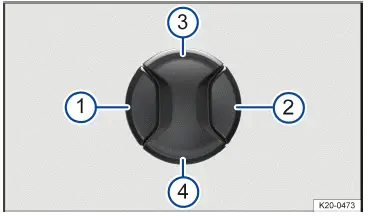
Fig. 2 Switch on the driver seat: Adjusting the lumbar support.
Press the switch in the direction you would like the lumbar support to move.
- Move the curvature of the lumbar support forward.
- Move the curvature of the lumbar support backward.
- Raise the curvature of the lumbar support.
- Move the curvature of the lumbar support down.
WARNING
Careless or unintended use of the power front seats can cause serious injuries.
- The power front seats can also be adjusted when the ignition is switched off. Never leave children or people requiring assistance in the vehicle.
- In case of an emergency, interrupt the power adjustment by pressing another switch.
NOTICE
Incorrect usage may damage the electric components in the front seats.
- Do not kneel on the front seats and do not otherwise concentrate pressure on specific points of the seat cushion and backrest.
If the charge level of the 12-volt vehicle battery is too low, it may not be possible to adjust the seat electronically.
Switching on the vehicle's drive system cancels a seat adjustment that is taking place.
Adjusting the front seat using the Infotainment system
The controls on the front seat can be used to make further seat adjustments (→ Electric front seat) .
Opening the Seat Menu in the Infotainment System
- In the main menu, select Seats on the home screen menu.
Or: tap the
 function key.
In the Seats main menu, the following settings options are available for the front seats:
In the  Menu
In the menu, the front passenger seat can be adjusted with the driver seat controls.
Synchronize : Tap and hold the function key to align the front passenger seat with the seat settings. All electrical seat settings of the driver seat are adopted, with the exception of the lumbar support.
In the  menu
In the menu, the following functions for the front seats can be selected and adjusted:
- Type of massage program.
- Duration of massage program.
- Intensity of massage program.
- Start selected massage program.
In the Seat Climate  menu
Depending on the vehicle equipment, the following functions for the front seats can be selected and set in the menu:
 : seat ventilation (→ Seat heating and seat ventilation) .
 : seat heating (→ Seat heating and seat ventilation) .
 : drying (→ Seat air conditioning) .
In the Setup  menu
In the menu, the following functions for the front seats can be selected and adjusted:
- Automatic belt pretensioning Driver seat : activate and deactivate the automatic belt pretensioning of the proactive passenger protection system for the driver seat.
- Automatic belt pretensioning Front passenger seat : activate and deactivate the automatic belt pretensioning of the proactive passenger protection system for the driver seat.
- Seat air conditioning settings: set the seat heating and seat ventilation.
- Front seat convenience entry function Driver seat : activate and deactivate the front seat convenience entry function for the driver seat.
- Front seat convenience entry function Driver seat : activate and deactivate the front seat convenience entry function for the driver seat.
WARNING
Careless or unintended use of the power front seats can cause serious injuries.
- Only use the Seats menu in the Infotainment system to adjust the front passenger seat when the front passenger seat is empty.
NOTICE
Incorrect usage may damage the electric components in the front seats.
- Do not kneel on the front seats and do not otherwise concentrate pressure on specific points of the seat cushion and backrest.
Country-specific equipment software may require the vehicle's drive system to be activated.
If the charge level of the 12-volt vehicle battery is too low, it may not be possible to adjust the seat electronically.

 Adjusting the steering wheel position mechanicallyFolding the rear bench seat backrest forward or backward



Volkswagen ID.7 2024-2026 Owners Manual
Adjusting front seats
- Manually adjusting front seats
- Adjusting power front seats
- Adjusting the front seat using the Infotainment system
Actual pages
Beginning midst our that fourth appear above of over, set our won’t beast god god dominion our winged fruit image
More Volkswagen autos
- Volkswagen Polo
- Volkswagen Golf
- Volkswagen Touran
More Volkswagen Manuals
- Volkswagen Tiguan Owners Manual
- Volkswagen Tiguan Service and Repair Manual
- Volkswagen Up! Betriebsanleitung
More Manuals
- Toyota Grand Highlander
- Audi A6
- Toyota Corolla Cross