Driving with Side Assist
Switching on and off
You can view the switched on condition of Side Assist in the Infotainment system. You can also switch Side Assist on and off there.
- Open the Assistance systems menu.
- Switch Side Assist on or off in the corresponding submenu.
When it is switched on, the yellow indicator light  in the housing of the outside mirror comes on once briefly.
If there is a system malfunction, Side Assist may switch off automatically.
Deactivation due to trailer mode
If you use the trailer hitch installed at the factory and have made the required electrical connection, Side Assist will switch off automatically. Once a trailer is connected to the vehicle electrical system and the driver starts to drive, a message will appear in the instrument cluster display stating that Side Assist is deactivated. Once you have disconnected the electrical connection, Side Assist will be automatically switched on again.
For trailer hitches that were not installed at the factory, you must switch Side Assist off and on again manually.
Displays in the outside mirror
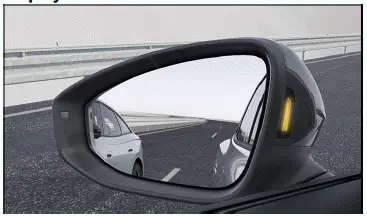
Fig. 1 In the housing of the outside mirrors: Side Assist indicators.
 Blinking: a vehicle in the blind spot has been detected and the turn signal is also activated towards the detected vehicle.
 Lights up: the vehicle you are driving is being overtaken or you are overtaking another vehicle with a difference in speed of up to approx. 15 km/h.
There is no indicator if the passing speed is clearly faster.
The faster another vehicle approaches, the sooner the display in the outside mirror housing will turn on.
Lane change system "Side Assist Plus"
In vehicles with a Lane Keeping System (Lane Assist), a corrective steering intervention warns you when a possible critical situation is detected when changing lanes (information level, warning level), if Lane Assist is switched on and is ready to take control. The steering intervention also occurs if you activate the turn signal for the respective side. If you oversteer the steering intervention, an additional warning is provided by a steering wheel vibration. Steering wheel vibration must also be activated in the Assistance systems menu in the Infotainment system.
Brightness
The brightness of the visual display adapts it self automatically to the ambient brightness.
You can set the default brightness of the display in the Assistance systems menu in the Infotainment system. Side Assist is not active while adjusting the settings.
Some settings can be saved in the driver personalization user profiles and change automatically when profiles are switched.
Troubleshooting
 Side Assist malfunction
Malfunction or fault. The yellow indicator light in the instrument cluster display lights up. In addition, the yellow central warning light  comes on.
- Deactivate the vehicle's drive system and activate it again.
- If the problem persists, contact an authorized Volkswagen dealer or authorized Volkswagen Service Facility.
Volkswagen recommends contacting an authorized Volkswagen dealer or authorized Volkswagen Service Facility.
Malfunctioning sensor view, malfunction message, system switches off automatically
- Clean the radar sensors and remove stickers or attachments from the radar sensors or the bumper (→ Vehicle care exterior) , (→ Accessories and replacement parts) .
- Check if there is any noticeable damage (→ Accessories and replacement parts) .
- If the problem persists, contact an authorized Volkswagen dealer or authorized Volkswagen Service Facility.
Volkswagen recommends contacting an authorized Volkswagen dealer or authorized Volkswagen Service Facility
The system is functioning differently than expected
- The radar sensors could be dirty. Clean the radar sensors (→ Vehicle care exterior) .
- The radar sensors could be covered by water.
- The view of the radar sensors is limited due to weather conditions, such as snow, or due to dirt, soap residue or coatings. Clean the radar sensors (→ Vehicle care exterior) .
- The system limitations are not adhered to (→ Lane Change System (Side Assist)) .
- The vehicle could be damaged in the radar sensor area, for example from parking barriers. Check if there is any noticeable damage (→ Accessories and replacement parts) .
- The view of the radar sensors is limited by attachments, bicycle rack systems or stickers. Clear the area around the field of view of the radar sensor (→ Accessories and replacement parts) .
- Painting work was carried out on or structural modifications were made to the area around the radar sensors, to the rear of the vehicle or to the suspension (→ Repairs and technical modifications) .
- The side mirrors have been covered with after-market tinting films (→ Repairs and technical modifications) .
- If the problem persists, contact an authorized Volkswagen dealer or authorized Volkswagen Service Facility.
Volkswagen recommends contacting an authorized Volkswagen dealer or authorized Volkswagen Service Facility.

 Side Assist system limitationsParking



Volkswagen ID.7 2024-2026 Owners Manual
Actual pages
Beginning midst our that fourth appear above of over, set our won’t beast god god dominion our winged fruit image
More Volkswagen autos
- Volkswagen Polo
- Volkswagen Golf
- Volkswagen Touran
More Volkswagen Manuals
- Volkswagen Tiguan Owners Manual
- Volkswagen Tiguan Service and Repair Manual
- Volkswagen Up! Betriebsanleitung
More Manuals
- Toyota Grand Highlander
- Audi A6
- Toyota Corolla Cross