Rear view

In this manual: Rear view
About this Owner's Manual — 1Explanations — 1Explanation of symbols — 1View from the front — 1Rear view — 1Driver door — 1Driver side — 1Center console — 1Passenger's side — 1Symbols in the instrument cluster — 1Warning and information texts — 1Introduction to the instrument cluster — 1Operating the Volkswagen Digital Cockpit — 1Volkswagen Digital Cockpit information displays — 1Correct seating position — 1Emergency equipment — 1Information Call, Roadside Assistance Call and Emergency Call Service — 1Vehicle key functions — 1Interior monitoring and towing protection — 1Opening and closing the trunk lid — 1Opening and closing the windows — 1Adjusting the steering wheel position mechanically — 1Adjusting front seats — 1Folding the rear bench seat backrest forward or backward — 1Adjusting the head restraints — 1Switching the turn signals on and off — 1Switching the lights on and off — 1Switching the high beam headlights on and off — 1Operating the windshield wiper lever — 1Interior rearview mirror — 1Sun visors — 1Overview of the Climatronic — 1Overview of Seat Heating and Seat Ventilation — 1Windshield defroster — 1Operating the stationary air conditioning — 1Functions of the electric drivetrain — 1Steering information — 1Information on the pedals — 1Information on the brakes — 1Switching the ignition on and off — 1Driving mode selector — 1Information about energy recuperation — 1Selecting the driving mode — 1General driver information — 1Eco tips — 1Eco assist — 1Warning levels and braking support — 1Operating Travel Assist — 1Using assisted lane changing — 1Driving with Emergency Assist — 1Side Assist system limitations — 1Driving with Side Assist — 1Parking — 1Switching Park Distance Control (PDC) on and off — 1Switching the Rear View Camera system on and off — 1Volkswagen App for Park Assist with Remote Control — 1Cup Holder in the Rear Center Armrest — 1Sockets in the vehicle — 1Requirements for an Over-the-Air Update — 1Downloading and installing an Over-the-Air Update — 1System function of V2X — 1Traffic hazard alert — 1USB port — 1Bluetooth interface — 1Setting up the Internet connection — 1Symbols and settings for App-Connect — 1Setting Up Volkswagen ID — 1Ordering Services and Activation in the Vehicle — 1Setting, Changing and Resetting the S-PIN — 1Managing Users — 1Status display — 1Impact on online vehicle functions — 1Customizable vehicle settings — 1Viewing and enabling functions — 1Safety instructions — 1Brands, licenses, copyright — 1Overview of Infotainment system — 1Cleaning the screen — 1Playing a Media File — 1Functions and symbols of the navigation system — 1Coupling, connecting and managing — 1Introduction to the Voice Assistant — 1Stowing luggage and cargo — 1Hitching a trailer — 1Attaching a rear carrier system or bicycle rack to the ball mount — 1Mounting a roof rack — 1Loading the roof rack — 1Warning signs for the high-voltage system — 1Charging cable for charging stations with alternating current (AC) — 1Charging cable for mains sockets — 1Placement — 1Fuses in the hood space — 1Ground jump-start point — 1Instructions for towing — 1Engine coolant specifications — 1Brake fluid specifications — 1Checking the Brake Fluid — 1Checking the 12 V vehicle battery acid level — 1Charging, replacing, disconnecting, or connecting the 12 V vehicle battery — 1Handling tires — 1Preparing Your Vehicle — 1Maintenance procedures and digital maintenance schedule — 1Vehicle care information — 1Accessories and replacement parts — 1Sensors and Cameras — 1Repairs and technical modifications — 1Airbag system repairs and situations that can affect the system function — 1Mobile phone usage in the vehicle — 1Paint and vehicle body warranty — 1Data Storage and Data Protection Information — 1Event Data Recorder (EDR) — 1Labels and signs — 1Fluids in the air conditioning system — 1Product recycling — 1Manufacturer addresses — 1
10steps
~60min
3/5difficulty
Done 0 of 10
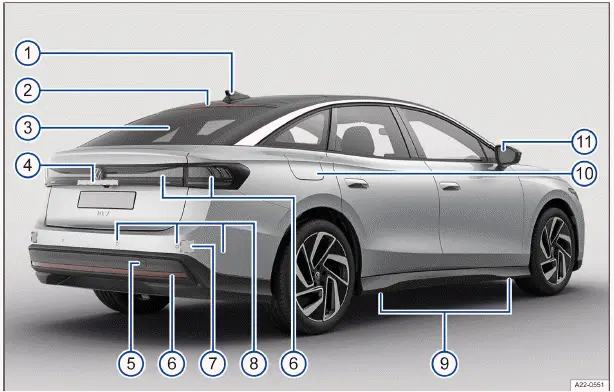
Fig. 1 Rear vehicle overview.

  1. Roof antenna (→ Radio reception and antenna)
  2. High-mounted brake light
  3. Rear window:
  • With rear window defroster (→ Rear window defroster)
  • With window antenna (→ Radio reception and antenna)
  1. Area
  • Button to open the trunk lid
  • Camera for parking systems , (→ Vehicle care exterior)
  • License plate light (→ Exterior lighting)
  1. Behind a cover: mount for towing eye
  2. Taillights and reflectors (→ Exterior lighting)
  3. Behind the bumper: radar sensor for assistance systems , (→ Vehicle care exterior)
  4. Sensors for assistance systems , (→ Vehicle care exterior)
  5. Mounting points for the vehicle jack
  6. Charging socket flap (→ Charging processes)
  7. Outside mirrors (→ Exterior rearview mirrors)
  • with exit warning system indicator (→ Exit warning system)
  • with Lane Change System (Side Assist) display (→ Lane Change System (Side Assist))
  • With camera for Area View (→ Area View) , (→ Vehicle care exterior)

next pagenext pageView from the frontDriver doornext pagenext page

Volkswagen ID.7 2024-2026 Owners Manual

Actual pages

Beginning midst our that fourth appear above of over, set our won’t beast god god dominion our winged fruit image

More Volkswagen autos

  • Volkswagen Polo
  • Volkswagen Golf
  • Volkswagen Touran

More Volkswagen Manuals

  • Volkswagen Tiguan Owners Manual
  • Volkswagen Tiguan Service and Repair Manual
  • Volkswagen Up! Betriebsanleitung

More Manuals

  • Toyota Grand Highlander
  • Audi A6
  • Toyota Corolla Cross
© 2020-2026 Copyright www.vwid7.org



