System function of V2X
Introduction
V2X technology, hereafter referred to as V2X, enables communication between multiple nearby vehicles as well as between vehicles and nearby traffic infrastructure, hereafter referred to as "participants".
System function of V2X
The communication between the participants takes place in accordance with cross-manufacturer V2X technology and Wi-Fi standards.
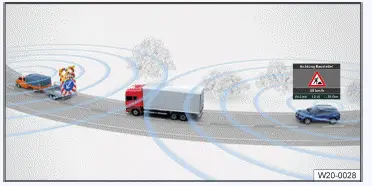
Fig. 1 Communication among participants (general example).
When V2X technology is switched on, data is constantly being transferred between the participants, irrespective of whether the vehicle is in online or offline mode.
Transferring data
If V2X technology is activated, the following data is sent and received:
- Vehicle data, e.g. speed.
- Positioning data.
- Incident data, e.g. accidents in the form of a traffic hazard alert.
Continually changing, temporary IDs attached to the V2X technology data minimize the risk that data sent out can be traced back to you or misused.
To update V2X technology certificates and consequently to ensure that V2X technology remains activated, activate online mode in the vehicle at least once a month.
You can find further information on data processing in the Infotainment system  .
Activating V2X technology
V2X technology is available depending on the country. If you can activate V2X technology via the following path, the vehicle is equipped with V2X technology.
- Tap
 Privacy settings.
When V2X technology is switched on, data is constantly being transferred between the participants, irrespective of whether the vehicle is in online or offline mode. If the vehicle is in Offline mode but V2X is nevertheless activated, the following symbol will be displayed in the Infotainment system:  or
 Offline mode is active, V2X technology is sending data.
If you are in Online mode, there is no special display for V2X, regardless of whether or not V2X has been activated. To check whether V2X is sending data in Online mode, check whether V2X has been activated under  Privacy settings.
- V2X limitations
- Activating and deactivating V2X
V2X limitations
Data transfer
The V2X system in your vehicle only communicates with those participants who are equipped with functioning and compatible V2X technology.
Participants with deactivated, faulty or incompatible V2X are not included.
Range
Depending on the weather conditions and area surrounding the vehicle, V2X technology participants can communicate in an immediate area of up to around 800 m (244 ft). Not all of the functions based on V2X use the full range possible.
WARNING
V2X technology is not a replacement for the driver's attention and works only within the system limitations. V2X technology cannot detect all hazardous situations and may warn with a delay or not at all. If you rely solely on V2X technology, there is a risk of accidents and serious injuries or even death.
- Always drive attentively and think ahead and be ready to intervene at any moment.
- Observe the system limitations (→ V2X technology) .
- Always adapt your driving style to the current visibility, weather, road, and traffic conditions.
Functional limitations
The function of V2X may be restricted in the following cases:
- The environmental conditions prevent data from passing through to the participant.
- Trailer mode prevents data from passing through to the participant.
- Vehicle superstructures prevent data from passing through to the participant.
- The event is not detected by participants as such.
Activating and deactivating V2X
When you log in as a user in the vehicle for the first time, check whether the V2X technology setting is as you want it and deactivate V2X technology manually if necessary.
Activating V2X technology
- Tap
 Privacy settings.
- Activate V2X technology.
WARNING
With V2X technology, limit values for electromagnetic radiation outside the vehicle could be exceeded. Higher limit values for electromagnetic radiation could pose a risk to the health of persons with active medical implants, e.g.
pacemakers.
V2X antennae are located on the roof of the vehicle and, if necessary, in the mirror triangle of the windshield.
- When outside the vehicle, keep a distance of 20 cm( approx. 8 in) from the activated V2X technology antenna.
- Deactivate V2X technology if you suspect it has affected an active medical implant, e.g. pacemaker, or another medical device.
Manually deactivating V2X technology
- Tap
 Privacy settings.
- Deactivate V2X technology.
Automatic deactivation of V2X
V2X can be automatically deactivated in certain cases (→ V2X technology) .
Once the reason for the automatic deactivation has been resolved, V2X technology is reactivated if necessary.
- To check the activation status of V2X, tap
 Privacy settings.
Troubleshooting
V2X deactivates automatically
- V2X is not permitted in the country in which you are currently driving.
- The vehicle was offline for too long, meaning that certificates were not updated.
Adjust the privacy settings so that an online connection can be established and certificates can be updated.
- System error.
Contact suitably qualified professionals for assistance. Volkswagen recommends contacting an authorized Volkswagen dealer or authorized Volkswagen Service Facility.
No V2X data is being displayed
- The function of V2X is restricted.
- There are no participants sending data in the surrounding area.
- There are participants sending data in the surrounding area but they are not relevant to your vehicle.
- The V2X technology antennae are blocked by attachments or covers.
Keep the areas around the V2X antennae clear.
- Data exchange between the participants is limited or not possible due to weather conditions.
- The driver has already responded to the hazard ahead.

 Downloading and installing an Over-the-Air UpdateTraffic hazard alert



Volkswagen ID.7 2024-2026 Owners Manual
System function of V2X
- V2X limitations
- Activating and deactivating V2X
Actual pages
Beginning midst our that fourth appear above of over, set our won’t beast god god dominion our winged fruit image
More Volkswagen autos
- Volkswagen Polo
- Volkswagen Golf
- Volkswagen Touran
More Volkswagen Manuals
- Volkswagen Tiguan Owners Manual
- Volkswagen Tiguan Service and Repair Manual
- Volkswagen Up! Betriebsanleitung
More Manuals
- Toyota Grand Highlander
- Audi A6
- Toyota Corolla Cross