Eco tips
The correct driving style can help to reduce consumption, pollution, and wear on the electric drivetrain, brakes, and tires. The following tips will help you conserve the environment and your money.
Using Energy Recuperation
Energy recuperation enables energy from the rolling vehicle to also be used to charge the high-voltage battery (→ Energy recuperation) .
Have maintenance performed regularly
Regular maintenance is required for fuel-efficient driving and increases the service life of the vehicle.
Removing unnecessary weight
Emptying out the luggage compartment before a journey, for example, removing empty crates or unneeded child restraints, can reduce energy consumption.
To keep the vehicle air resistance as low as possible, remove accessories such as ski, bicycle, and roof racks after use.
Saving power
Electrical equipment, such as the air conditioning system and window heating, requires energy from the high-voltage battery.
If you want to increase your vehicle's fuel range:
- Set a higher interior temperature in summer and a lower interior temperature in winter. When outside temperatures are high, air out the vehicle before driving.
- If you are using an external power supply, use the stationary air conditioning.
- Switch off comfort consumers that are not required.
An authorized Volkswagen dealer or authorized Volkswagen Service Facility can provide you with more information about correct maintenance and replacement parts that are particularly energy efficient, such as new tires.
- Driving a loaded vehicle
- Driving with an open trunk lid
- Driving through water on roads
- Operating the vehicle in different countries and continents
- Limits of the sensor system
- Operating the speed limiter
- System Limitations of the Predictive Control
- Driving with predictive control
Driving a loaded vehicle
Heed the following for good vehicle handling when the vehicle is loaded:
- Stow all cargo securely .
- Accelerate with extra care and caution.
- Avoid sudden braking and driving maneuvers.
- Brake earlier than usual.
- If necessary, read and heed the information about roof racks (→ Roof rack) .
- If necessary, note the information about driving with a trailer .
WARNING
Sliding loads can considerably impair the driving stability and safety of your vehicle, and increase the braking distance when you brake hard or perform emergency braking. This can cause accidents and serious or fatal injuries.
- Correctly secure the load to prevent it from sliding.
- Use suitable tie-downs or securing straps on heavy objects.
- Engage the rear seat backrests and, if necessary, the adjustable rear seats securely.
NOTICE
Spilled fluids can come in contact with the connectors of the orange high-voltage cables. This can cause damage to the electrical system and high-voltage battery.
- Do not transport large amounts of fluids in the vehicle interior.
Driving with an open trunk lid
Driving with an open trunk lid can be especially dangerous. Secure all objects and the open trunk lid correctly and take sufficient precautions.
Driving with an open trunk lid increases the air resistance of the vehicle and, consequently, the energy consumption of the electric drivetrain. This reduces the potential vehicle range significantly. Volkswagen recommends that you do not drive with the trunk lid open.
WARNING
If driving with the trunk lid unlocked or open, loose objects can fall out of the vehicle and injure other road users.
This can cause accidents and serious or fatal injuries.
- Always drive with the trunk lid closed.
- Store all objects in the luggage compartment securely.
- Always drive carefully and anticipate upcoming traffic situations.
- Avoid abrupt or sudden driving and braking maneuvers because the open trunk lid can move in an uncontrolled manner.
- If there is a roof rack with cargo on the trunk lid, always remove it before driving with an open trunk lid.
WARNING
Objects protruding from the luggage compartment change the vehicle length and may possibly endanger other road users. This can cause accidents and serious or fatal injuries.
- Follow the legal regulations.
- Mark objects sticking out of the luggage compartment so they will be visible to others on the road.
- Never use the trunk lid to secure or wedge objects.
NOTICE
Opening the trunk lid changes the height and possibly the length of the vehicle. This can cause damage to the vehicle if driving carelessly.
- Be aware of the changed outer dimensions, such as when driving through underpasses.
Driving through water on roads
Note the following to reduce the risk of vehicle damage when driving through water, for example on flooded roads:
- The water must not be any higher than the bottom of the vehicle body→
 .
- Do not driver faster than walking speeds.
- Never stop the vehicle, drive in reverse, or deactivate the vehicle's drive system in water.
- Oncoming vehicles create waves that can raise the water level for your vehicle enough that it is not safe to drive through.
WARNING
When driving through water, mud, slush, etc., the braking effect may be delayed due to damp or icy brake rotors and brake pads in the winter, and this can extend the braking distance. This could cause a loss of vehicle control, accidents and serious or fatal injuries.
- Perform careful braking maneuvers to dry and remove ice from the brakes.
- Do not endanger road users or disregard legal regulations during braking maneuvers.
- Avoid abrupt and sudden braking maneuvers directly after driving through water.
NOTICE
Driving through water can greatly damage or corrode parts of the vehicle, e.g. electronics.
- Never drive through salty water.
- Using fresh water, immediately rinse any parts of the vehicle that may have come into contact with salty water.
- Protect electronic components against contact with water.
Operating the vehicle in different countries and continents
Approval regulations
The vehicle was manufactured by the factory for a specific country and meets those requirements and approval regulations that were valid at the time of vehicle manufacture.
If the vehicle will be used temporarily or for a brief period in another country, then read and observe the following information.
Safety standards and regulations
Some countries have special safety standards and regulations that differ from the vehicle configuration. Volkswagen recommends obtaining information about legal regulations from an authorized Volkswagen dealer or authorized Volkswagen Service Facility before driving in other countries.
Selling in other countries
If the vehicle is sold in another country or will be used for an extended period in another country, then the applicable legal regulations in that country must be observed.
Certain equipment may need to be installed or removed and functions may need to be deactivated. The scope and types of service may also be affected. This particularly applies if the vehicle is being operated for an extended period in a different climate region.
Functions of the Infotainment system
Due to the many different frequency bands around the world, the Infotainment system installed at the factory may not function in other countries.
Charging in other countries
Due to the various different legal regulations, you may only be able to charge with limited charging current at power outlets in other countries. The charging cable limits the charging current depending on the infrastructure used. If there are different settings, the lower value is used for charging (→ Charging cable) .
Due to the different technical standards, you may not be able to charge at charging stations in another country or only if you use a suitable charging cable. For more information contact an authorized Volkswagen dealer or authorized Volkswagen Service Facility.
Volkswagen is not responsible for damage to the vehicle caused by insufficient maintenance or a lack of available original parts.
Volkswagen is not responsible if the vehicle does not meet all of the applicable legal requirements in other countries and continents.
Operating the vehicle in different countries and continents
Limits of the sensor system
Introduction
Depending on the vehicle equipment, the vehicle has driver assistance systems that increase driving convenience.
These driver assistance systems use some sensors and cameras (hereafter referred to as the "sensor system") that are only partially visible to you.
The sensors and cameras visually detect the vehicle's surroundings ultrasonically or by using radar waves.
Installed sensor systems
Depending on the vehicle equipment, the following sensor systems may be installed:
- Radar sensor in the front of the vehicle.
- Radar sensors in the rear of the vehicle.
- Camera behind the windshield.
- Ultrasonic sensors in the front of the vehicle.
- Ultrasonic sensors in the rear of the vehicle.
You can find information on the relevant installation location in the vehicle overviews
WARNING
The driver assistance systems are not a replacement for the driver's attention and work only within their system limitations. The driver assistance systems cannot detect all driving situations and may not provide warnings or react, or may provide warnings or react with a delay, or may provide warnings or react in a way that is not desired. If you are careless, there is a risk of accidents, serious injuries and death.
- Always stay attentive and do not rely solely on the system. The driver is always responsible for control of the vehicle.
- Be aware of the limits of the sensor system and the system limitations of the individual systems.
- Always adapt your speed and distance to vehicles driving ahead based on the visual, weather, road, and traffic conditions.
- Be prepared to override or interrupt automatic interventions at all times.
- Pay attention to indicators in the instrument cluster display and respond to the displays accordingly when the traffic situation allows.
- Do not use driver assistance systems if you suspect a problem or damage.
Limits of the sensor system
Limits of the radar sensor
Driver assistance systems that use radar sensors may not respond, may offer a delayed response or may respond in an unexpected way in the following situations:
- When driving in poor weather conditions, such as heavy rain, snow or heavy spray.
- When driving through construction zones, tunnels or toll stations.
- When driving on winding roads, for example, mountain roads
- In front of bumps or dips in the road
- When driving off-road
- When driving in parking ramps
- When driving on roads with embedded metal objects, such as railroad tracks
- When driving on gravel roads
- In complex driving situations, such as traffic islands.
- Following a violent impact affecting components within the range of the radar sensors, e.g. following a rear-end collision.
- If the radar sensors are obscured, dirty, misaligned or damaged.
Limits of the camera behind the windshield
Driver assistance systems that use the camera behind the windshield may not respond, may offer a delayed response or may respond in an unexpected way in the following situations:
- In front of bumps or dips in the road
- When driving in construction zones
- When driving off-road
- When driving in poor weather conditions, such as heavy rain, snow, fog or heavy spray and poor road conditions.
- In low-lying sun, darkness or if there is glare from oncoming vehicles.
- If the camera is not available due to long exposure to direct sunlight or high ambient temperatures.
- If the camera field of view is covered, dirty or damaged.
- If the camera is misaligned.
Delayed reaction
If the sensor system is exposed to environmental conditions that limit its function, the driver assistance systems may only be able to detect this with a delay. Therefore, the display that indicates that functions are impaired may be delayed when you first start driving or while driving.
Limits in certain driving situations

Fig. 1 Driving around curves.
The sensor system always measures straight ahead. Therefore, on tight curves, vehicles may be detected by mistake or vehicles driving ahead may not be detected.

Fig. 2 Narrow vehicle.
Vehicles that are driving close to your vehicle but outside the sensor range, such as motorcycles, cannot be detected.

Fig. 3 Changing lanes.
Vehicles that change to your lane close in front of your vehicle cannot be detected. This also applies to vehicles with attachments exceeding the vehicle dimensions.
Specific system limitations
In addition to the limits of the sensor system, every driver assistance system has additional system limitations linked to their function. Please also note these:
- Predictive speed limiter (→ Speed limiter with predictive control) .
- Eco assist (→ Eco assist) .
- Adaptive Cruise Control (ACC) (→ Adaptive Cruise Control (ACC)) .
- Predictive cruise control (→ Predictive cruise control) .
- Autonomous Emergency Braking (Front Assist) (→ Autonomous Emergency Braking (Front Assist)) .
- Lane Assist (→ Lane Keeping System (Lane Assist)) .
- Comfort drive Travel Assist (→ Comfort drive Travel Assist) .
- Emergency Assist (→ Emergency Assist) .
- Lane Change System (Side Assist) (→ Lane Change System (Side Assist)) .
Troubleshooting
 No or restricted sensor range to the front
Parts of the sensor systems in the front of the vehicle have limited availability or are not available. The yellow symbol and a message are displayed for a few seconds.
- The sensor areas are dirty or the sensor system's view is limited due to weather conditions, such as snow, or from detergent residue or coatings. Clean the sensor areas in the front of the vehicle and clean the windshield (→ Vehicle care) .
- The sensor areas are impaired by attachments, decorative frames on license plate holders, or labels. Keep the areas around the sensor system clear (→ Accessories and replacement parts) .
- The sensor system is misaligned or damaged, for example as a result of damage to the front of the vehicle or the windshield. Check if there is noticeable damage (→ Accessories and replacement parts) .
- Painting work was carried out on or structural modifications were made to the front of the vehicle or the windshield (→ Repairs and technical modifications) .
- Malfunction or fault. Deactivate the vehicle's drive system and activate it again.
- If the problem persists, contact an authorized Volkswagen dealer or authorized Volkswagen Service Facility.
Volkswagen recommends contacting an authorized Volkswagen dealer or authorized Volkswagen Service Facility.
If the sensor range is restricted, driver assistance systems may not be available or only to a limited extent.
Refer to the other indicator lights of the driver assistance systems (→ Symbols in the instrument cluster) .
Additional information may be displayed in the vehicle status, depending on the malfunction (→ Vehicle settings menu) .
Operating the speed limiter
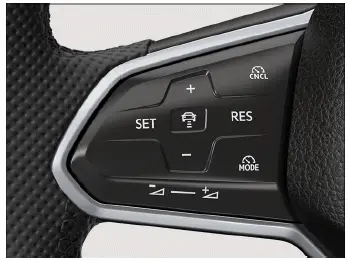
Fig. 1 Left side of the multi-function steering wheel.
Switching on
- Press the
 button on the left-hand side of the multi-function steering wheel repeatedly until the speed limiter is selected.
- Press the
 button on the right-hand side of the multi-function steering wheel or wait for a short time.
The speed limiter is switched on. At this stage, the limiter will not yet start regulating your speed.
Starting the regulation function
- Press the
 button while driving.
Your current speed will be saved as the top speed.
Setting the speed
You can adjust the saved speed as follows:
+ 1 km/h: Press the  button gently.
- 1 km/h: Press the  button gently.
+ 10 km/h: Press the  button firmly or swipe it from the bottom to the top. Pressing for the first time changes to the next-largest tens digit (km/h) or fives digit (mph).
- 10 km/h: Press the  button firmly or swipe it from the top to the bottom. Pressing for the first time changes to the next-smallest tens digit (km/h) or fives digit (mph).
To change the stored speed continuously, press and hold the respective button.
Canceling the regulation function
- Press the
 button briefly.
The vehicle speed remains stored in the system.
Resuming the regulation function
- Press the
 button.
Troubleshooting
 Speed limiter not available
Malfunction or fault. The yellow indicator light turns on.
- Deactivate the vehicle's drive system and activate it again.
- If the problem persists, switch off the speed limiter and seek assistance from suitably qualified professionals.
Volkswagen recommends contacting an authorized Volkswagen dealer or authorized Volkswagen Service Facility.
The regulation function is canceled automatically
- ESC is switched off.
- The brakes are overheated. Let the brakes cool down and check the function again.
- If the problem persists, switch off the speed limiter and seek assistance from suitably qualified professionals.
Volkswagen recommends contacting an authorized Volkswagen dealer or authorized Volkswagen Service Facility.
For safety reasons the speed limiter will only switch off completely once you release the accelerator pedal or switch off the system manually.
System Limitations of the Predictive Control
Introduction
The speed limiter with predictive control automatically adapts one of your saved maximum speeds to the known speed limits.
The speed limiter with predictive control is an extension of the speed limiter and uses Dynamic Road Sign Display and the navigation data from the Infotainment system.
The speed limiter with predictive control is not available in all countries and may not be available depending on your vehicle equipment.
WARNING
The predictive speed limiter is not a replacement for the driver's attention and works only within the system limitations. The predictive speed limiter cannot detect all enforced maximum speed limits and may not react, or may react with a delay, or may react in a way that is not desired. If you are careless, there is a risk of accidents, serious injuries and death.
- Always stay attentive and do not rely solely on the system. The driver is always responsible for the stored speed of the vehicle.
- Observe the system limitations (→ Speed limiter with predictive control) .
- Always adapt your speed to the visibility, weather, road and traffic conditions.
- Keep the navigation data up to date.
- Always observe the maximum permissible speed.
- Note that the speeds regulated by the system do not necessarily conform to your driving style.
Please also observe the safety information for the speed limiter.
The system will also use navigation data if the vehicle does not have a navigation system. Keep the navigation data up to date (→ Navigation) . Please contact suitably qualified professionals if you have any questions.
Volkswagen recommends contacting an authorized Volkswagen dealer or authorized Volkswagen Service Facility.
System Limitations of the Predictive Control
As well as the system limitations of the Dynamic Road Sign Display, the speed limiter with predictive control has the following further system limitations:
- The speed limiter with predictive control only recognizes traffic signs which display a speed limit.
- Road signs that display a speed limit indirectly, such as city limit signs, are only detected on the basis of the navigation data.
- If a speed limit is announced on the basis of the navigation data but not detected by the Dynamic Road Sign Display, the announced speed is reset to the speed last saved.
- The speed limiter with predictive control is not available with detected speed limits below approximately 30 km/h. In this case, a corresponding message will appear in the instrument cluster display.
Entering and Exiting the Highway
- Depending on the country, when you enter a highway, the recommended speed or the maximum permitted speed will automatically be saved as the speed.
- When you exit a highway, Adaptive Cruise Control ACC with predictive cruise control will be deactivated.
Functional limitations
In the following situations, the predictive speed limiter may not change the stored speed, may change it with a delay, or may change it in a way that is not desired:
- Dynamic Road Sign Display is malfunctioning.
- The navigation data are out of date.
- You are driving without route guidance.
- You deviate from the route calculated by the navigation system.
- The position of the vehicle cannot be determined correctly due to inaccurate GPS data.
Activating predictive control
- Open the Assistance systems menu in the Infotainment system.
- Select the speed limiter.
- Switch on response to permissible speed.
- Switch on the speed limiter and start control (→ Speed limiter)
Driving with predictive control
Displays
 The system has detected a speed limit for the route.
 The system has saved the detected speed and is controlling the vehicle accordingly.
To cancel speed adjustment
If you do not wish to adopt the speed shown in the notification, you can cancel the speed adjustment:
- Press the
 button.
Or: release and press the accelerator pedal again twice.
The most recently saved speed is used again.
- Press the
 button.
The current speed is assumed.
- Press the
 button.
The regulation function is paused.
Prepone the speed adjustment
As soon as a higher speed than the currently saved speed is shown in the instrument cluster display, you can prepone the speed adjustment:
- Press the
 button or swipe the button from the bottom to the top.
Or: release and press the accelerator pedal again twice.
Adjusting the speed shown
+ 1 km/h: Press the  button gently.
- 1 km/h: Press the  button gently.
+ 10 km/h: Press the  button firmly or swipe it from the bottom to the top. Pressing for the first time changes to the next-largest tens digit (km/h) or fives digit (mph).
- 10 km/h: Press the  button firmly or swipe it from the top to the bottom. Pressing for the first time changes to the next-smallest tens digit (km/h) or fives digit (mph).
If you adjust the speed shown in the notification too far, the predictive speed control will be canceled.
If a speed limit is detected, the predictive control will adjust the saved speed, even if the speed limiter is not in control.
If the current speed is significantly higher than the speed limit detected by the Dynamic Road Sign Display, a warning will be shown in the instrument cluster display.
Troubleshooting
A notification shows that the predictive speed limiter is currently unavailable or is not available in your country
- If the message is displayed for a long time and the predictive speed limiter is available in your country, seek assistance from suitably qualified professionals. Volkswagen recommends contacting an authorized Volkswagen dealer or authorized Volkswagen Service Facility.
Additional information may be displayed in the vehicle status, depending on the malfunction (→ Volkswagen Digital Cockpit (Pro)) .

 General driver informationEco assist



Volkswagen ID.7 2024-2026 Owners Manual
Eco tips
- Driving a loaded vehicle
- Driving with an open trunk lid
- Driving through water on roads
- Operating the vehicle in different countries and continents
- Limits of the sensor system
- Operating the speed limiter
- System Limitations of the Predictive Control
- Driving with predictive control
Actual pages
Beginning midst our that fourth appear above of over, set our won’t beast god god dominion our winged fruit image
More Volkswagen autos
- Volkswagen Polo
- Volkswagen Golf
- Volkswagen Touran
More Volkswagen Manuals
- Volkswagen Tiguan Owners Manual
- Volkswagen Tiguan Service and Repair Manual
- Volkswagen Up! Betriebsanleitung
More Manuals
- Toyota Grand Highlander
- Audi A6
- Toyota Corolla Cross