Switching Park Distance Control (PDC) on and off
Introduction
Park Distance Control assists the driver when parking and warns if there are obstacles.
System function
Using ultrasonic sensors, Park Distance Control detects the distance between the vehicle and an obstacle.
The Park Distance Control warns you of a collision via colored segments on the screen of the Infotainment system and via warning chimes → fig. 1 , →  .
If the driver does not respond to an approaching obstacle, automatic braking support may kick in (→ Automatic braking support)
WARNING
The Park Distance Control is not a replacement for the driver's attention and works only within the system limitations. Park Distance Control might not be able to detect some obstacles and may not react, may react late, or may react in a way that is undesired. If you do not take care, there is a risk of accidents and serious injuries.
- Always stay attentive and do not rely solely on the system. The driver is always responsible for control of the vehicle.
- React quickly to the Park Distance Control visual warnings and chimes.
- Apply the brakes using the brake pedal before encountering an obstacle.
NOTICE
The system will only provide visual and audible warnings for obstacles within the vehicle's path. The collision area has been reached, at the latest, when the second to last segment is displayed in the Park Distance Control screen or a continuous warning tone sounds. There is a risk of damage to the vehicle.
- Always brake the vehicle in good time before encountering an obstacle.
NOTICE
Depending on the vehicle equipment, distances to obstacles in the side areas are also displayed. Any obstacles that enter these areas from the outside are not displayed. The vehicle may be damaged in this instance.
- In order to fully scan and display the side areas, move the vehicle a few meters forwards or backwards.
Screen display
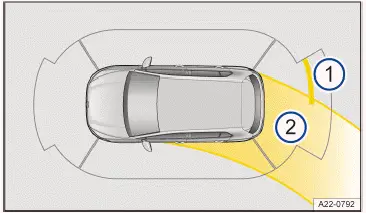
Fig. 1 Infotainment system: Display of Park Distance Control (general example).
- Obstacle detection.
- Steering lock.
 Red section of the image: Nearby obstacle. The vehicle is at risk. Brake!
 Yellow section of the image: Obstacle in the path of the vehicle. The vehicle is at risk. Steer around the obstacle.
 Grey section of the image: Obstacle outside of the vehicle's path or a malfunction in the sensor area.
 Maneuver braking deactivated or malfunctioning.
 Mute the warning chimes.
Park Distance Control settings
- Tap the
 function key in the Infotainment system.
- Tap
 Settings .
- Tap Park
 Distance Control settings .
- Select a setting, e.g. automatic activation when driving forward or maneuver braking.
Driving with a trailer
If a trailer electrical system is connected, the rear and side sensors of the Park Distance Control are not switched on:
- You are not warned about obstacles.
- The maneuver braking is also deactivated automatically.
You can save some PDC settings, like the volume of the warning chimes, in the driver personalization user profiles. The settings will automatically change when the account is switched.
Switching Park Distance Control (PDC) on and off
Switching on
- Select the reverse gear.
Or: Tap the function
 key in the Infotainment system. Then tap the
 or
 function key.
Or: The vehicle will roll backward.
Switching off
- Disengage reverse gear and then tap the home button
 or the
 function key in the upper section of the Infotainment system.
Or: switch on the electronic parking brake.
Park Distance Control also switches off when forward travel becomes faster.
Automatic activation when driving forwards
Park Distance Control activates automatically in the event of an obstacle in the front area, e.g. in dense traffic or when driving into a garage.
The function can be deactivated in the Park Distance Control settings in the Infotainment system.
- To close the Park Distance Control screen, tap the home button
 or the
 function key in the Infotainment system.
No automatic braking intervention takes place (→ Automatic braking support) .
Automatic activation is available again under following conditions:
- The vehicle has been accelerated to more than approx. 15 km/h and then the speed has fallen below this again.
Or: the ignition has been switched off and on again.
If an obstacle is detected in front of the vehicle, the Park Distance Control display appears in the Infotainment system. If the vehicle continues to approach the obstacle, a warning chime also sounds.

 ParkingSwitching the Rear View Camera system on and off



Volkswagen ID.7 2024-2026 Owners Manual
Actual pages
Beginning midst our that fourth appear above of over, set our won’t beast god god dominion our winged fruit image
More Volkswagen autos
- Volkswagen Polo
- Volkswagen Golf
- Volkswagen Touran
More Volkswagen Manuals
- Volkswagen Tiguan Owners Manual
- Volkswagen Tiguan Service and Repair Manual
- Volkswagen Up! Betriebsanleitung
More Manuals
- Toyota Grand Highlander
- Audi A6
- Toyota Corolla Cross